
You run a retail store and a wholesale store with the same products. Names, descriptions and photos should be the same on both, but the wholesale prices are lower, and each store has its own stock. With Import Export by RockStarLab PRO, you keep the product data in the retail store, push the changes to the wholesale store, and recalculate the wholesale prices there in one step.
PRO: WooCommerce product sync, the Content Updater and custom functions. Free: the Content Sync connection between the stores. Use PRO on both stores.
How it works
- You edit products in the retail store and push them to the wholesale store.
- The push copies the product data, prices included. The stock and the reviews of the wholesale store stay as they are.
- On the wholesale store, the Content Updater sets the regular price of the pushed products to 70% of the retail price.
Our wholesale prices are 30% below retail. Use your own rule in the function below.
Before you start
- Connect the stores in Import Export → Content Sync (see how Content Sync works).
- Back up the wholesale store, or ask your AI agent to start the backup. The push and the price update both change products.
Step 1: Create the wholesale price function
On the wholesale store, open Import Export → Functions and click New Function. Name it, paste the code and test it with a retail price:
// Wholesale price: 70% of the retail price, rounded to cents.
if ($value === '' || $value === null) {
    return $value;
}
return number_format(round((float) $value * 0.7, 2), 2, '.', '');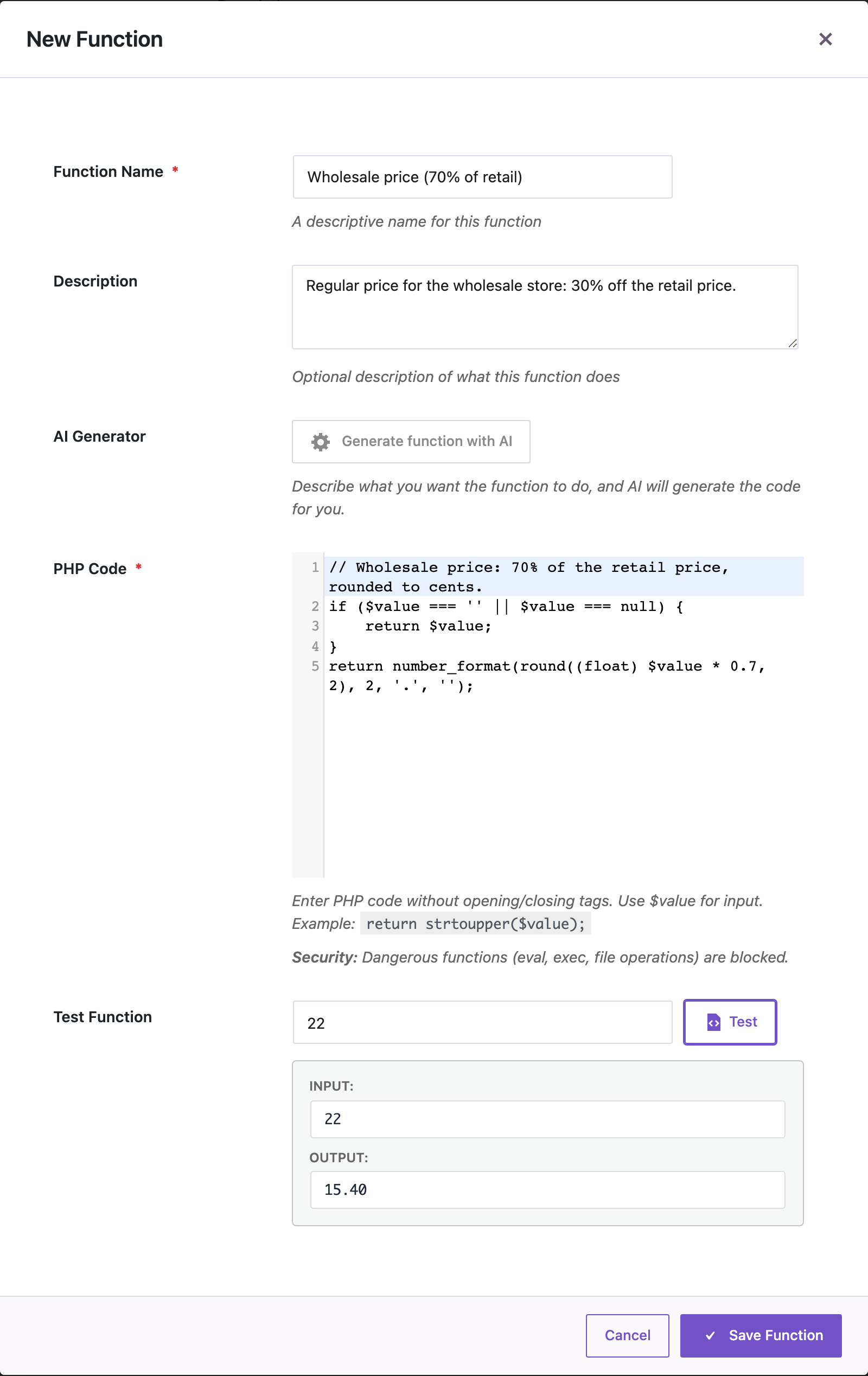
For a retail price of 22, the function returns 15.40. Click Save Function. You create it once.
Step 2: Push the changes from the retail store
In our retail store, we raised the price of the Polo from $20 to $22, rewrote the description of the Sunglasses and added a new product, the Pour-Over Kettle at $48. In Products, select the products, click Sync Content, choose the wholesale store and push (see how to sync WooCommerce products).
The push updated 2 products and created 1. On the wholesale store, the prices were now the retail prices: $22, $90 and $48. The stock of the Polo stayed at 120, the wholesale stock, while the retail store has 20.
Step 3: Recalculate the wholesale prices
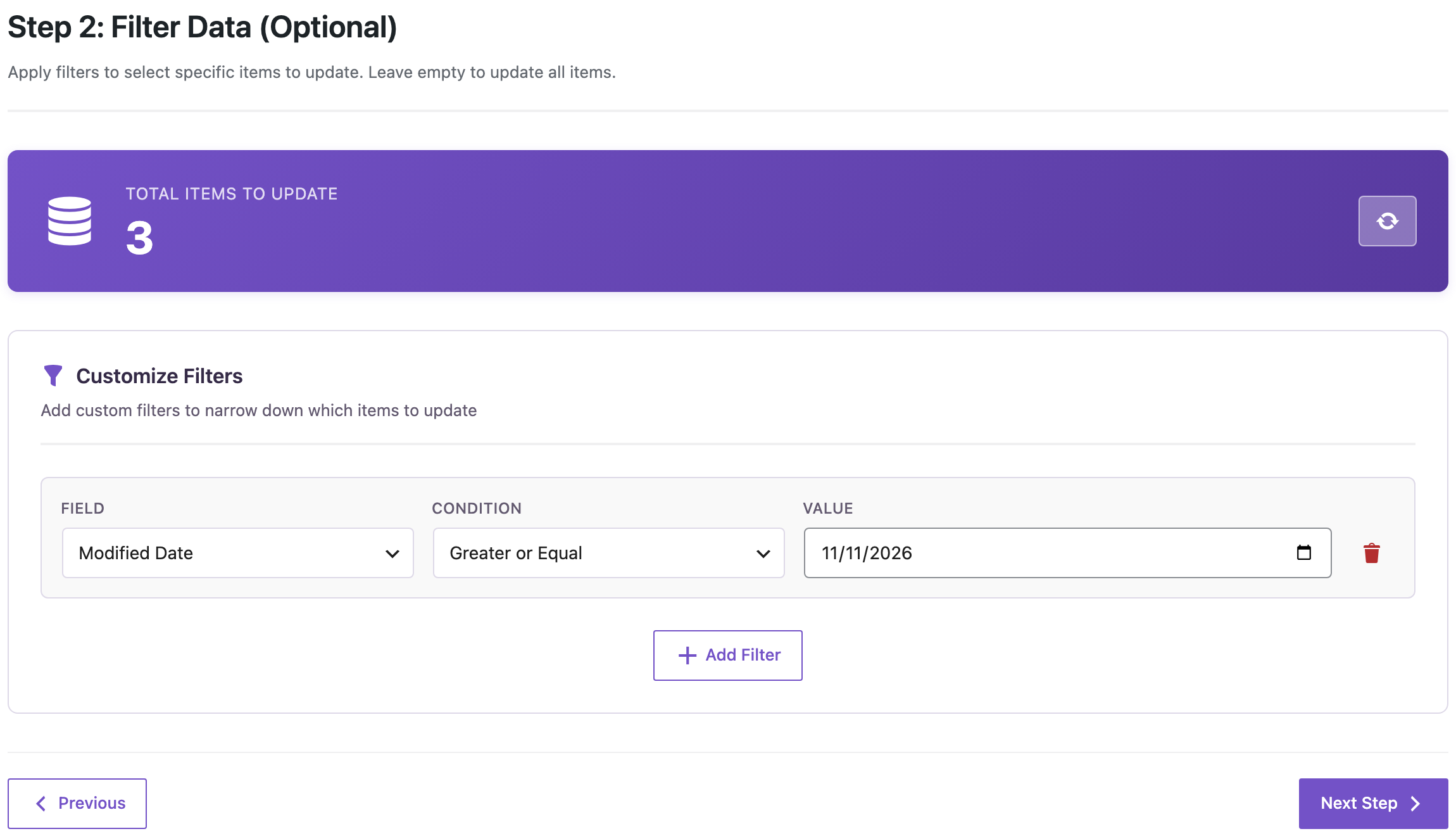
On the wholesale store, open Import Export → Content Updater and choose WooCommerce Products. Add a filter: Modified Date, Greater or Equal, the date of the push. Our filter found the 3 pushed products:
In Select Fields to Update, click Regular Price. In Field Transformations, click Assign Transformations for it, find the wholesale function and click Add. Test Pipeline shows the result for a test value:
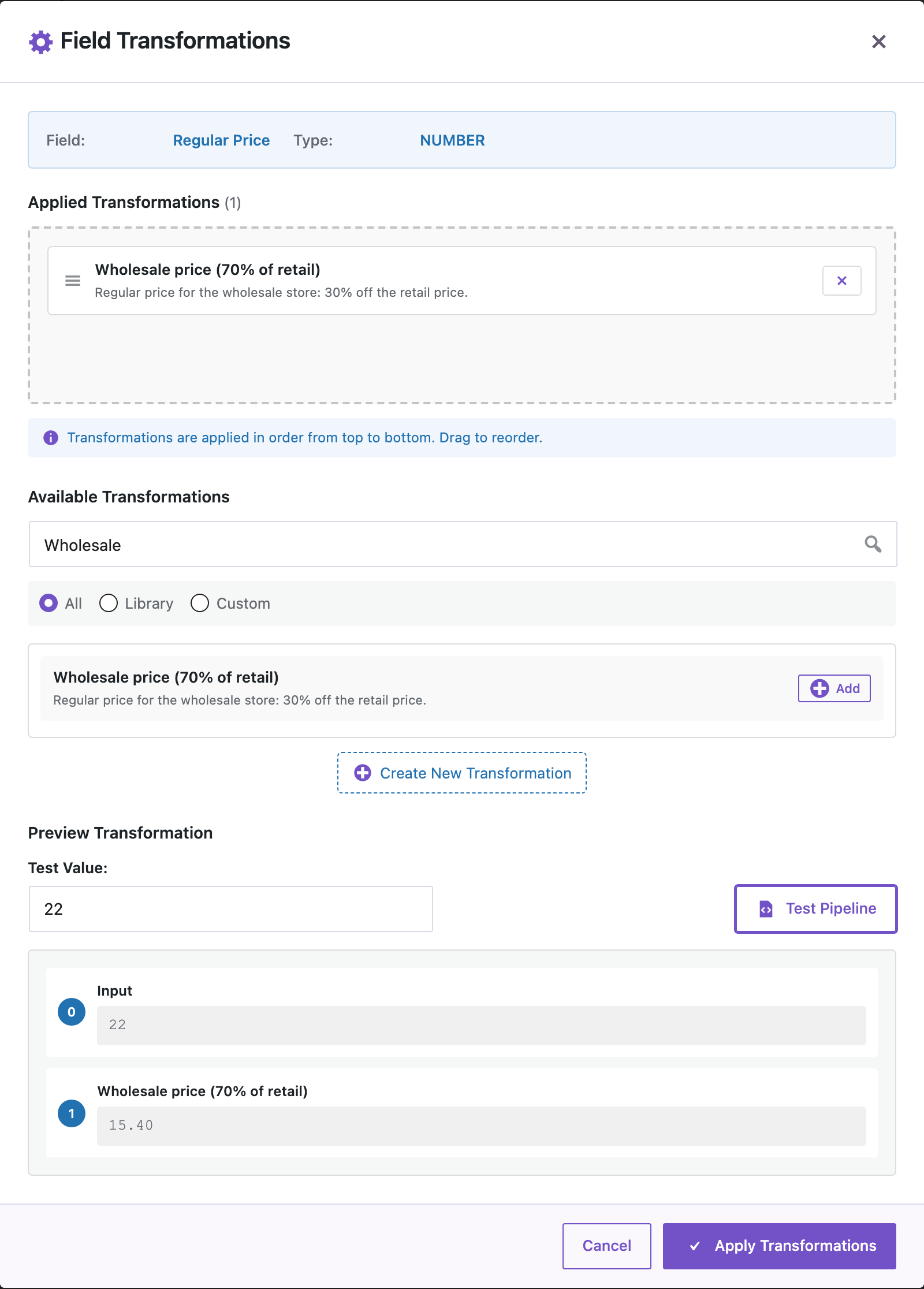
Click Apply Transformations, go to the last step and click Start Update:
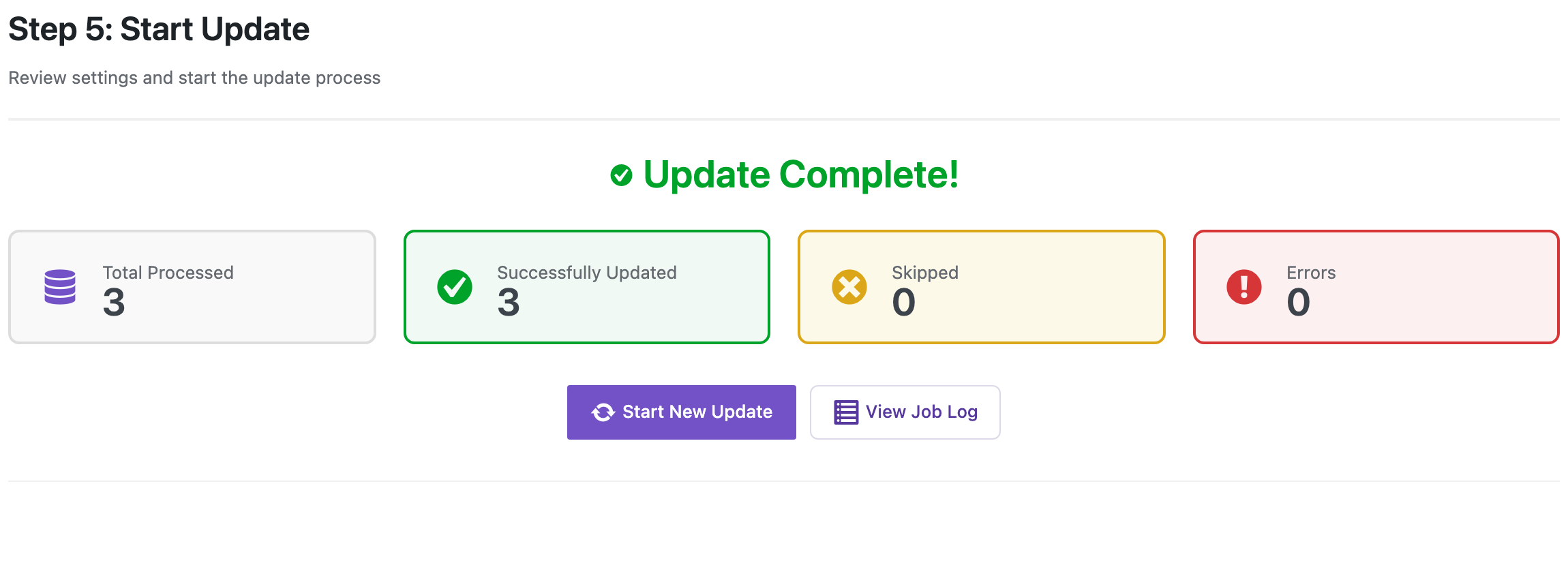
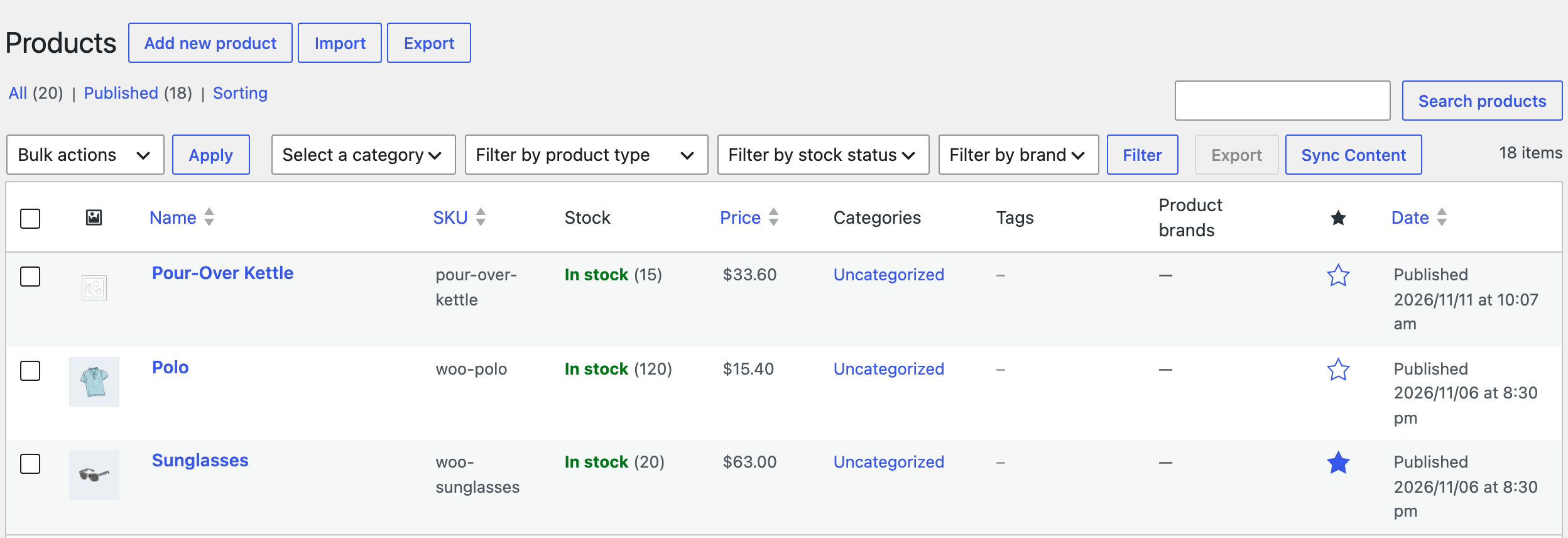
The wholesale store now shows the wholesale prices, $15.40, $63.00 and $33.60, with its own stock:
Tips
- Run the update once after each push. The update changes the modified date of the products, so the same filter finds them again, and a second run would take another 30% off.
- Filter by the date of the push. A product that you edited on the wholesale store on the same day also matches the filter. Check the count before you start the update.
- Sale prices. If your products have sale prices, the Sale Price field is in the same list; assign the same function to it.
- Variable products. See syncing variable products between stores.
- Prices from a file. If your wholesale prices come from a price list, update them from a CSV instead.
With an AI agent
An AI agent connected to the wholesale store through the WordPress MCP Adapter (see connecting Claude Code to WordPress) can check the result:
Show the products changed today with their regular price and stock.In our run, the agent called rsl-ie-pro/update-preview with the Modified Date filter. It returned the 3 products: Pour-Over Kettle 33.60 (stock 15), Sunglasses 63.00 (stock 20) and Polo 15.40 (stock 120). The preview reads the products without changing them.
FAQ
Does a push overwrite the wholesale stock?
No. When the wholesale store manages the stock of a product, its stock quantity and stock status stay as they are. A new product gets the stock of the retail store; change it after the first push.
Does a push overwrite the wholesale prices?
Yes. The prices come with the product, which is why you run the Content Updater after each push.
Does the product rating change?
No. A push does not overwrite the average rating, the review count or the sales count of a wholesale product.
Is this in the free plugin?
No. WooCommerce product sync, the Content Updater and functions are PRO features.
Related Guides
- How to Sync WooCommerce Products Between Two Sites
- Bulk Update WordPress Content with Content Updater
- Sync WooCommerce Variable Products Between Two Stores
Get the free plugin on WordPress.org.

Comments 0
Have a question or a tip to share? Leave it below.