
Import Export by RockStarLab 2.1.46 is a fix release for the free plugin, together with PRO 2.1.11. The most important change is in Content Sync: a post pushed as a new post no longer replaces a different post on the other site that happens to have the same slug. Content Sync also keeps the Yoast SEO and Rank Math primary category, a Content Migration import goes on when one media file is missing on the source site, and the WooCommerce Orders export (PRO) lists checkout fields as columns. We recommend updating if you use Content Sync.
Content Sync: “Create New Post” always creates a new post
In the Map Posts for Sync window you choose, for each post, whether to update a post on the other site or to create a new one. In 2.1.46, Create New Post always adds a new post, even if the other site already has a post with the same slug, for example last year’s “Christmas Menu” and this year’s. The existing post is left as it is, and the new one gets its own slug. If you push the same post again with Create New Post, the copy made from it the first time is updated, so no second copy appears. To update a particular post on the other site, choose it in the list or use Auto-match by Title, as before.
Content Sync keeps the primary category
Yoast SEO and Rank Math let you mark one category of a post as primary; it is used in breadcrumbs and permalinks. Categories have different IDs on different sites. In 2.1.46, a pushed or pulled post gets the primary category that matches on the receiving site, the same category that is assigned to the post there. Other SEO data, such as the SEO title and meta description, is copied as before; see what Content Sync copies.
Content Migration goes on when a media file is missing
When a Content Migration import downloads media from the source site and one file is gone there (deleted from the server but still listed in the Media Library), the import now counts that file as failed and imports the rest of the package: posts, pages, comments and the other media. The summary says how many media files could not be downloaded and points to the Jobs Log for details. If the source site can’t be reached at all, the import still stops, so you can fix the connection and run it again.
Checkout fields in the Orders export (PRO 2.1.11)
Plugins that add fields to the WooCommerce checkout, such as a delivery date or a gift message, save them with the order. When you export WooCommerce Orders, these fields now appear under Custom Fields on the field selection step, and each one becomes its own column:
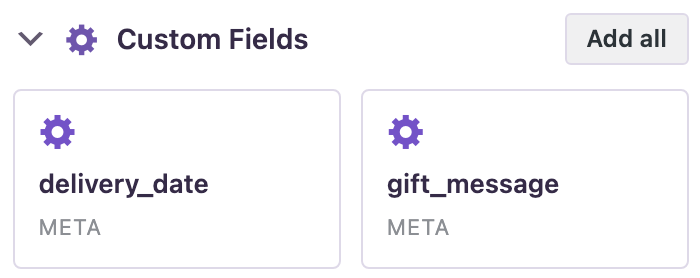
In our test store, four orders had a delivery date and two of them a gift message; the export preview filled both columns for those orders and left them empty for the rest. Hidden fields whose names start with an underscore are not listed. This needs PRO 2.1.11 with the free plugin 2.1.46.
How to update
Update from Dashboard → Updates or the Plugins screen, or with wp plugin update import-export-by-rockstarlab. PRO updates the same way while its license is active. Your jobs, schedules, templates, connections and settings stay as they are. On a busy site, make a backup first.
With an AI agent
An AI agent connected through the WordPress MCP Adapter (see connecting Claude Code to WordPress) can read checkout fields too. On 2.1.46 with PRO 2.1.11, we asked for the delivery dates and gift messages of recent orders. The agent called rsl-ie-pro/export-preview with the export type woo_order and the fields order_number, delivery_date and gift_message. It returned eight orders: four with delivery dates from 9 to 14 November, two of them with gift messages (“Happy birthday, Anna!” and “Enjoy the coffee!”), and empty values for the others.
FAQ
Do I need to update both sites for the Content Sync fixes?
Yes, update the site that receives the posts. The fixes work on the receiving side, so for a push update the live site, for a pull the site you pull into. Updating both keeps them on the same version.
Will the update change posts I already synced?
No. Existing posts are not changed by the update. The fixes apply to the next push or pull.
Which order fields are listed under Custom Fields?
Fields that have a value in at least one order. Hidden fields whose names start with an underscore are left out.
Which PRO version do I need?
PRO 2.1.11 for checkout fields in the Orders export. The other changes are in the free plugin.
Related Guides
- XML Feeds with Header Elements Now Import (What’s New in 2.1.47)
- ACF Fields for Custom Post Types and Excel-Ready Totals (What’s New in 2.1.45)
- How Content Sync Works: API Keys, Push, Pull and What Gets Copied
- How Auto-Match by Title Works and When to Map Posts Manually
- How to Export All WooCommerce Orders into CSV or Excel
Get the free plugin on WordPress.org.

Comments 0
Have a question or a tip to share? Leave it below.