
Import Export by RockStarLab 2.1.45 is a fix release for the free plugin. ACF fields now show up when you import into a custom post type, prices and totals in XLSX exports are numbers that Excel can add up, and importing the same file twice no longer duplicates drafts without a slug. Custom post type import is part of PRO; the fix is in the free plugin, which PRO builds on. PRO stays at 2.1.10.
ACF fields when importing a custom post type
When you import into Custom Post Types, you choose the post type on the mapping step. In 2.1.45 the ACF fields of that post type appear in the ACF Fields group right after you choose it, and Auto Map matches columns to them.
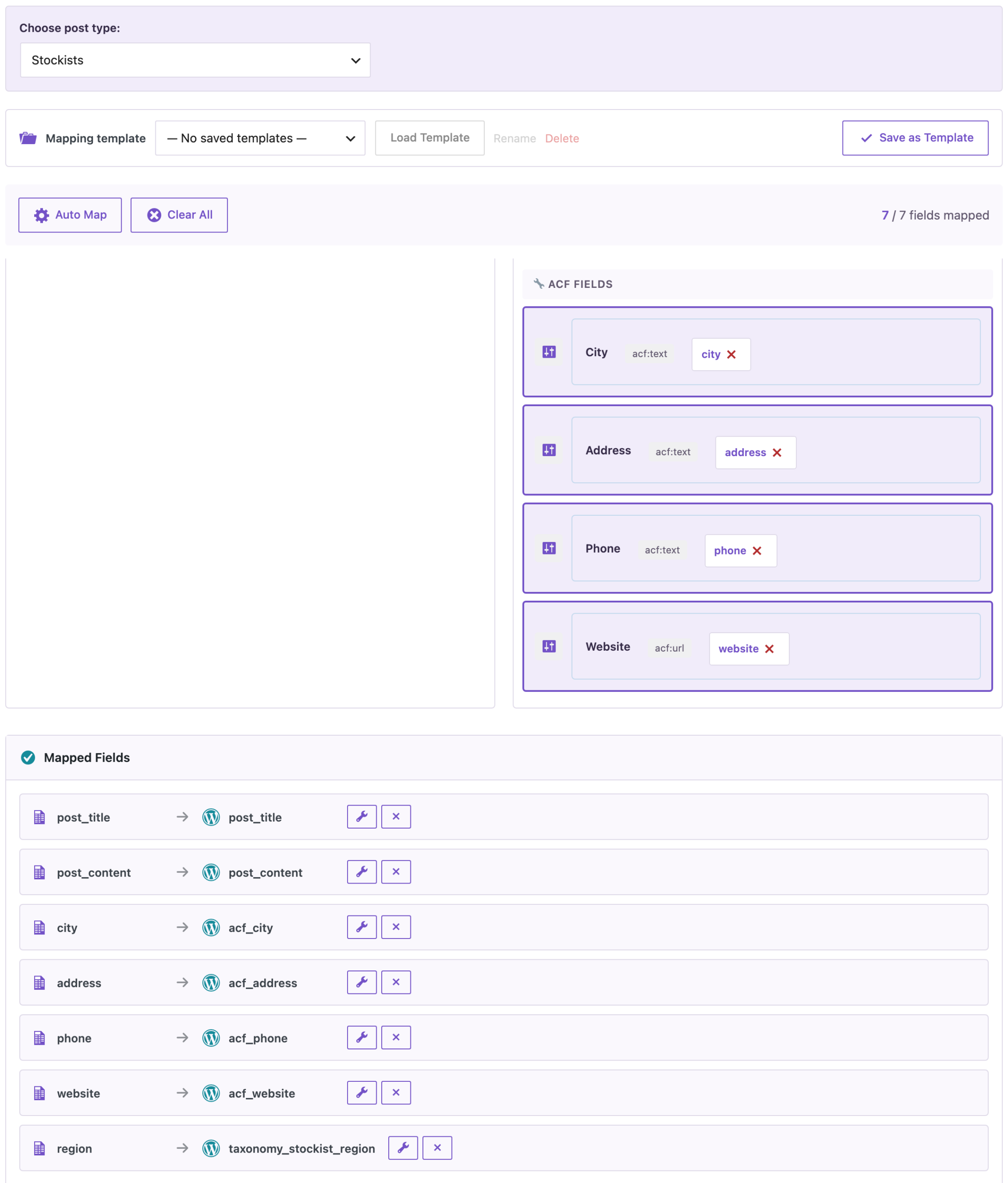
In our test, a CSV of six coffee stockists went into a “Stockists” post type with four ACF fields (City, Address, Phone, Website) and a Region taxonomy. All 7 columns were mapped, the import created 6 stockists, and ACF reads every value back.
Prices and totals in XLSX are numbers
XLSX exports already wrote whole numbers and prices like 49.99 as numbers. In 2.1.45, amounts with a trailing zero, such as 13.80, 40.00 or 0.00, are numbers too, shown with two decimals. A SUM in Excel, Google Sheets or LibreOffice now adds every row:

The file above is an export of WooCommerce orders for October with the tax and order totals; the Total row was added in the spreadsheet. If you import such a file back, the plugin reads 13.80, not 13.8. ODS exports keep these values as text, because the ODS format writer doesn’t keep number formats.
No duplicate drafts on a repeated import
Drafts that were never published often have no slug yet. When an import checks for existing posts by slug, such a draft now matches the post with the same title and date, so it’s updated instead of added again. This applies to importing the same file twice and to restoring a Content Migration package on the site it came from.
How to update
Update from Dashboard → Updates or the Plugins screen, or with wp plugin update import-export-by-rockstarlab. Your jobs, schedules, templates and settings stay as they are. On a busy site, make a backup first.
With an AI agent
An AI agent connected through the WordPress MCP Adapter (see connecting Claude Code to WordPress) can check an import like the one above. On 2.1.45, after the stockist import, the agent called rsl-ie-pro/export-preview for the post type stockist with the fields acf_city and acf_website. It returned all six stockists with their cities, from Leeds to Aberdeen, and the websites, with one empty website where the file had none.
FAQ
Do I need to change my saved import templates?
No. Saved templates are not changed by the update.
Will my spreadsheet formulas still work with older exports?
Older exports keep their text cells. Export again with 2.1.45 to get numbers everywhere.
Does this change CSV exports?
No. CSV has no cell types; values are written as before.
Does PRO change?
No. PRO stays at 2.1.10 and works with 2.1.45.
Related Guides
- Safer Content Sync and Checkout Fields in Order Exports (What’s New in 2.1.46)
- Accurate Stock Filters for Products and Variations (What’s New in 2.1.44)
- How to Import ACF Fields into WordPress: Repeater, Flexible Content and Images
- How to Export All WooCommerce Orders into CSV or Excel
Get the free plugin on WordPress.org.

Comments 0
Have a question or a tip to share? Leave it below.