
Import Export by RockStarLab 2.1.47 is a small fix release for the free plugin. XML feeds that start with information about the feed itself, such as an update date or the sender’s name, before the list of records, are now read correctly. PRO stays at 2.1.11.
XML feeds with header elements
Many feeds from distributors and partner networks look like this: a date or a source name first, then the list of records.
<feed>
  <updated>2026-11-10T08:00:00Z</updated>
  <stockists>
    <stockist id="S-101"><name>Café Lumen</name>…</stockist>
    <stockist id="S-102"><name>The Book Nook</name>…</stockist>
    …
  </stockists>
</feed>
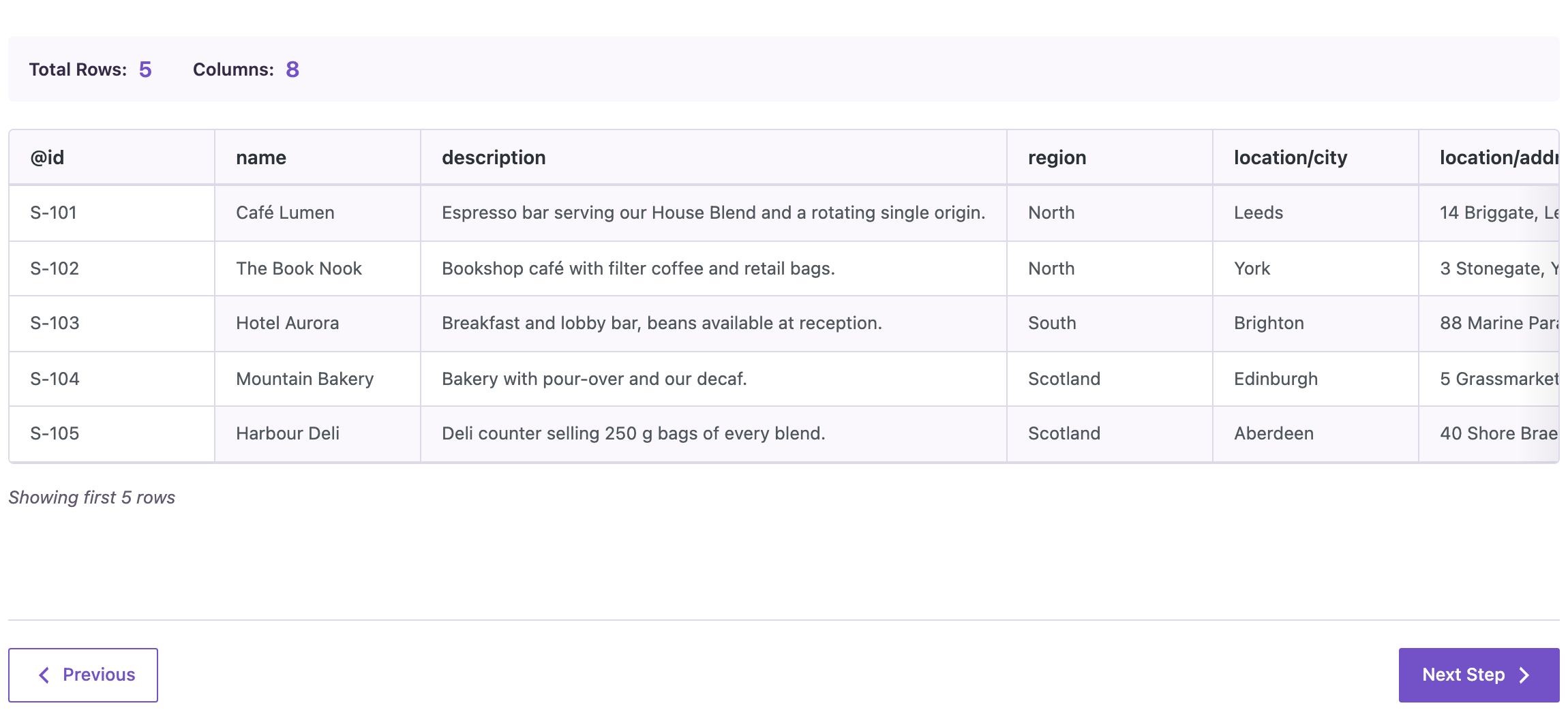
The plugin finds the record element by itself, the one that repeats. Until 2.1.47 it looked only inside the first element under the root, here <updated>, so the preview of such a file showed 0 rows. Now it checks every element under the root and picks the list. On 2.1.46 this file showed 0 rows; on 2.1.47 the preview showed all 5 stockists, with nested elements as columns such as location/city:
Feeds without header elements, RSS feeds with <channel><item> and the plugin’s own XML exports are read as before. For a full example of importing such a feed, see importing products from an XML supplier feed.
How to update
Update from Dashboard → Updates or the Plugins screen, or with wp plugin update import-export-by-rockstarlab. Your jobs, schedules, templates and settings stay as they are. If a scheduled import from an XML feed found 0 rows before, run it again after the update.
With an AI agent
An AI agent connected through the WordPress MCP Adapter (see connecting Claude Code to WordPress) can upload a feed and check how it will be read before importing. On 2.1.47, the agent uploaded a feed with <updated> and <source> before three stockists, using rsl-ie/upload-create, rsl-ie/upload-chunk and rsl-ie/upload-complete. The file was ready with 3 rows and the columns @id, name and location/city, from Café Lumen in Leeds to Hotel Aurora in Brighton.
FAQ
Do I need to change my import settings?
No. The record element is still found automatically.
Does this change CSV, Excel or JSON imports?
No. Only XML files are affected.
Does PRO change?
No. PRO stays at 2.1.11 and works with 2.1.47.
Related Guides
- Bulk Comment Moderation from a Spreadsheet (What’s New in 2.1.48)
- Safer Content Sync and Checkout Fields in Order Exports (What’s New in 2.1.46)
- How to Import WooCommerce Products from an XML Supplier Feed
- Save and Reuse Field Mapping Templates for Recurring WordPress Imports
Get the free plugin on WordPress.org.

Comments 0
Have a question or a tip to share? Leave it below.