
Most “best CSV importer” lists are written from feature pages. We installed the free version of five popular WordPress import plugins on the same local site and ran two tests. The first imports 10,000 posts with featured images and ACF fields. The second moves posts with ACF image, gallery, repeater, post object and user fields from one site to another. Below is what each plugin did, with screenshots of the plugin screens.
Disclosure: we develop Import Export by RockStarLab, one of the five plugins. To keep the comparison fair, every plugin got the same files, the same database snapshot and the same machine. The paid versions of the other plugins add several features that are missing here. We point those out where they matter.
Short answer
- Import Export by RockStarLab was the only free plugin that imported everything in both tests. That covers images, all ACF field types, the category hierarchy, and image, gallery, repeater, post and user fields during a migration. It imported 10,000 posts with images in 27 min 41 s.
- WP All Import (free) was by far the fastest: 2 min 20 s for 10,000 posts. It imported no images, and its free ACF add-on imported only 3 of our 5 fields. Images, select fields and true/false fields need the Pro editions.
- Really Simple CSV Importer finished in 21 min 33 s, faster than us on a local site with no time limit. It does the whole import in one PHP request. With a 120-second limit, like many hosts set, it stopped after 1,238 of 10,000 posts.
- WP Import Export Lite was close to us in speed at 29 min 34 s. It saved ACF values as plain custom fields. In the migration test it copied the old site’s IDs into the fields, so image, gallery, post and user fields pointed to the wrong things.
- WP Ultimate CSV Importer (free) imported the posts and images but took 2 h 37 min. Its ACF section is a Pro feature, and its free export does not include custom fields.
The plugins and versions we tested
| Plugin | Version | Notes |
|---|---|---|
| Import Export by RockStarLab | 2.1.14 | Free version from WordPress.org |
| WP All Import | 4.1.4 | Free version, plus the free “ACF Import Add-On” 1.0.9 and the free WP All Export 1.6.0 for the migration test |
| WP Import Export Lite | 3.9.35 | Free version |
| WP Ultimate CSV Importer | 9.3 | Free version, plus its free exporter add-on 3.1 for the migration test |
| Really Simple CSV Importer | 1.3.1 | Free, import only |
How we tested
Everything ran on a local site in LocalWP. Nothing was hosted, so network speed and shared hosting load did not affect the results:
- Apple M1, 16 GB RAM, macOS 26.6
- WordPress 7.1.4, PHP 8.2, memory_limit 256M, no PHP time limit (LocalWP default)
- ACF PRO 6.8.10
- Before each run the site was restored from the same database and uploads snapshot, and only ACF plus the plugin under test were active
- Featured images were downloaded over HTTP from a second local site, the way an importer downloads them from your old site or a CDN
We measured the time from clicking the plugin’s start button until the plugin showed its finished state. A script checked for that state every 20 seconds, so each time can be up to 20 seconds long. After every run a script counted what actually landed in the database: posts, featured image attachments, parent and child categories, tags, ACF values and ACF field references.
Test 1: the 10,000-row CSV
The file is a 12.9 MB CSV with 10,000 rows and these columns:
post_title, post_content, post_excerpt, post_status, post_date, categories, tags, featured_image, subtitle, price, color, featured, event_date
categoriesholds a parent and child pair such asFood > Recipes, andtagsholds two tags.featured_imageis the URL of a unique 1000 x 667 JPEG (about 33 KB). That makes 10,000 images to download, store and resize.- The last five columns are ACF fields in one field group: subtitle (text), price (number), color (select), featured (true/false) and event_date (date picker, written as
20260603).
Each plugin was set up to import every column it could. Really Simple CSV Importer has no mapping screen, so it got the same data with the column names it expects (post_category, post_tags, post_thumbnail).
Test 2: moving complex ACF fields to another site
The second test is a migration. The source site has 20 posts, and each one has six ACF fields:
- an image field
- a gallery with three images
- a repeater with two rows, each with a title and a two-image gallery
- a post object field that points to another post in the set
- a user field
- a WYSIWYG field with two images inside the text
Across all posts the fields use 29 different images. Each plugin exported the posts with its own exporter, and we imported the file into a clean second site with its own matching plugin. The users exist on both sites with the same logins but different IDs, which is normal when two sites were set up separately.
For each field we compared the files by checksum (md5), the related post by title and the user by login. A field only counts as correct if it holds the same image, post or person as on the source site.
Test 1 results: 10,000 posts with images and ACF fields

| Plugin (free) | Time | Posts | Featured images | Child categories | ACF values | Linked to ACF fields | Peak memory per request |
|---|---|---|---|---|---|---|---|
| Import Export by RockStarLab | 27 min 41 s | 10,000 | 10,000 | Yes | 5 of 5 | Yes | 20 MB |
| WP Import Export Lite | 29 min 34 s | 10,000 | 9,999 | Yes | 5 of 5 | No | 29 MB |
| Really Simple CSV Importer | 21 min 33 s | 10,000 | 10,000 | No | 5 of 5 | No | 24 MB |
| WP Ultimate CSV Importer | 2 h 37 min 36 s | 10,000 | 10,000 | Yes | 5 of 5 | No | 38 MB |
| WP All Import + ACF add-on | 2 min 20 s | 10,000 | 0 | Yes | 3 of 5 | Yes | 16 MB |
What “linked to ACF fields” means
ACF stores each value twice: the value itself (subtitle) and a hidden reference to the field definition (_subtitle = field_...). That reference tells ACF which field type and settings the value belongs to. Three plugins saved the values as plain custom fields without the reference.
We checked what that changes. get_field() still returns the values, but raw. The date picker returns 20260603 instead of the field’s display format. The true/false field returns the string 1 instead of true. For simple text fields the difference is small. For image, gallery and relationship fields it matters more, because their return format (image array, post object) depends on the field settings.
Import Export by RockStarLab
Auto Map matched all 13 CSV columns, including the five ACF fields, because the column names matched the field names. The import ran in batches of 50 rows, and no request took longer than 27 seconds. It created the parent and child categories, downloaded all 10,000 images and generated their thumbnails, and saved every ACF value with its field reference. Peak memory stayed at 20 MB per request.

Where it was slower: Really Simple CSV Importer finished about 6 minutes sooner on this local site, and WP All Import was much faster on posts without images. If you import text-only rows on a host with no time limit, those two are quicker.
WP All Import (free) with the ACF Import Add-On
WP All Import imported 10,000 posts in 2 min 20 s, the fastest result in the test. Categories, child categories and tags were all correct. The speed comes partly from what it skipped:
- The Images section of the free edition shows “Upgrade to the Pro edition of WP All Import to Import Images”. No featured images were imported.
- The free ACF add-on imported the text, number and date fields with correct field references. The select and true/false fields show “Upgrade to the Pro edition of the ACF Import Add-On”.
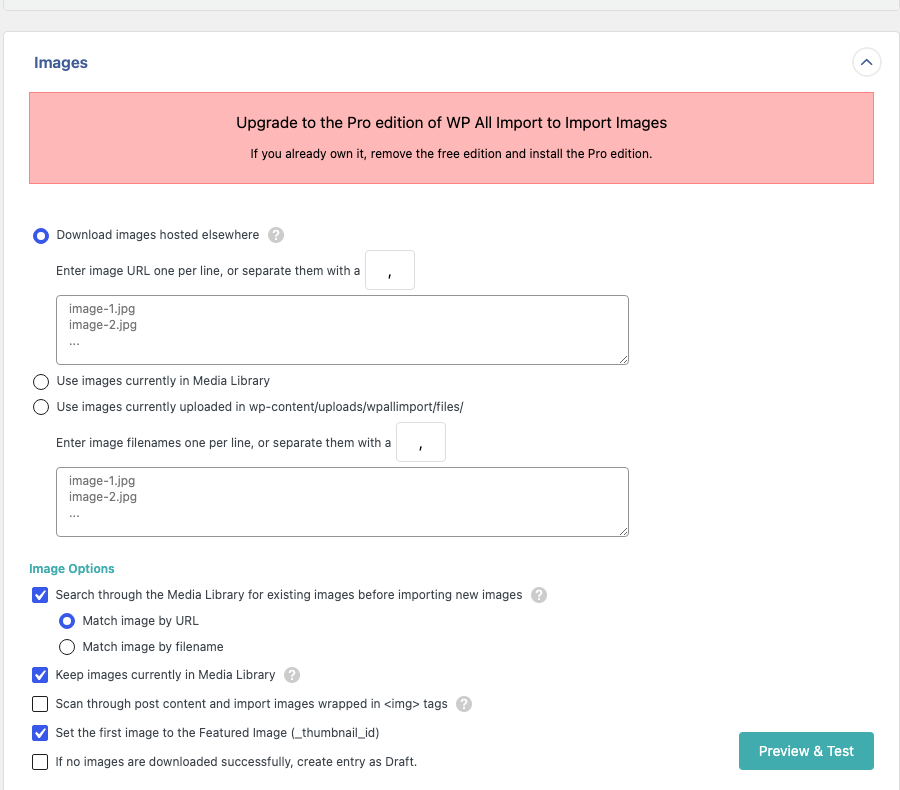
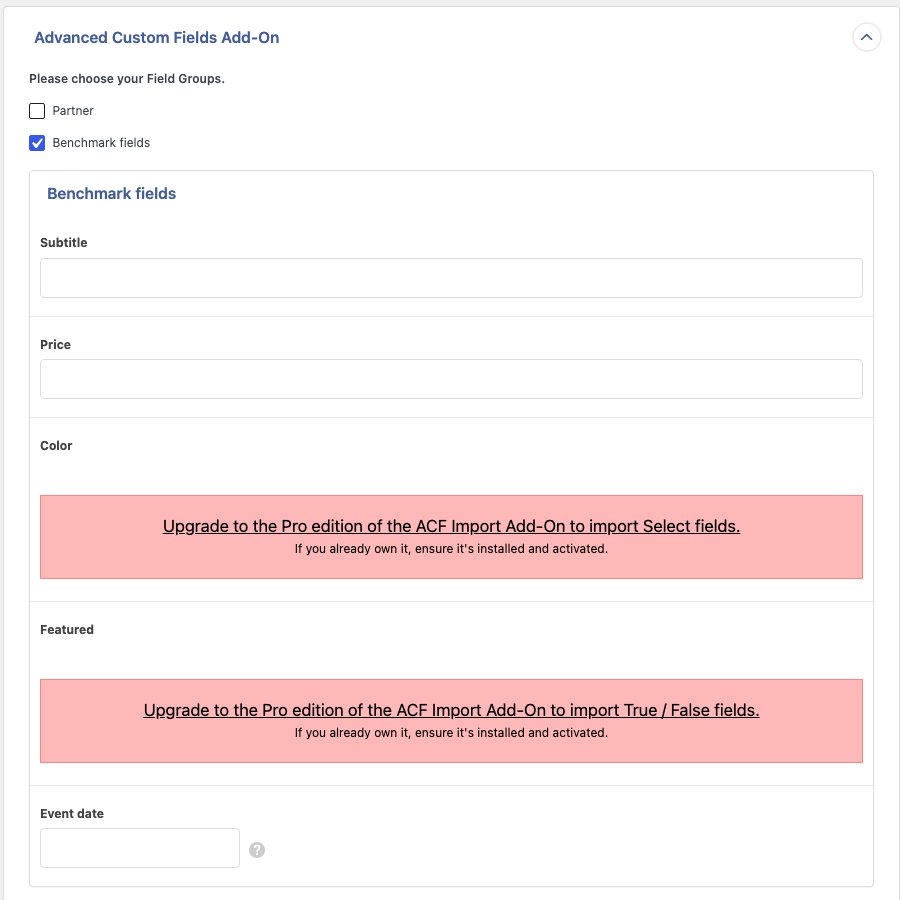
WP All Import Pro is a strong tool, and with the paid editions both of these limits go away. In the free edition, a CSV with image URLs imports without the images.
WP Ultimate CSV Importer (free)
All 10,000 posts, images, categories and tags were imported, but the run took 2 h 37 min. The request log shows why it takes long: the import ran as 2,000 background requests of 5 rows each, and each request took about 3.5 seconds.
- The “Advanced Custom Fields (ACF)” section of the mapping screen has a PRO badge. We mapped the five values through “Create WP Custom Fields” instead, so they were saved without ACF field references.
- When we first uploaded the 12.9 MB file, it was not accepted. The plugin asks for a PHP memory limit of at least 400 MB for files over 5 MB. We raised the limit to 512 MB for its upload request only, so the import could run.

WP Import Export Lite
WP Import Export Lite finished in 29 min 34 s, about two minutes behind us. It imported 9,999 of 10,000 featured images. The mapping step has sections for title, content, images, custom fields, taxonomies and other options, but no ACF section in the Lite version. The ACF values were mapped as custom fields, so they work as raw values without the field reference.

Really Simple CSV Importer
Really Simple CSV Importer is a small importer with no mapping screen. You upload a CSV whose column names follow its format, and it imports the whole file in a single page load. Locally that page load took 1,292 seconds (21.5 minutes). The images and ACF values were imported, but the Parent > Child categories were not built as a hierarchy.
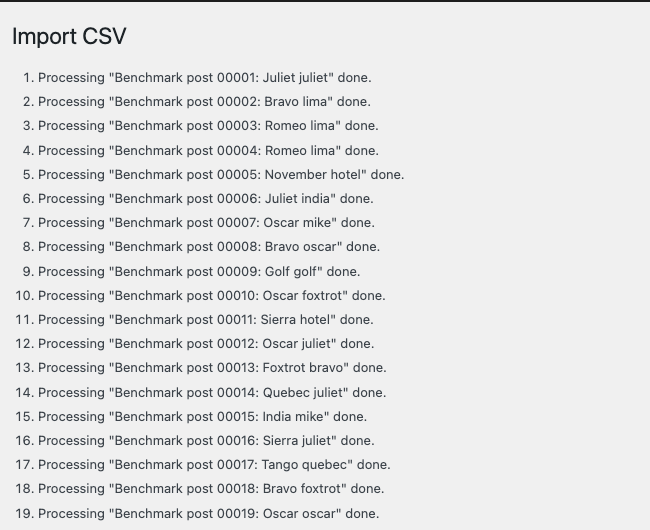
The single request is the catch. LocalWP has no PHP time limit, but most hosts allow 30 to 300 seconds per request. We repeated the import with a 120-second limit. The request stopped after 1,238 of the 10,000 posts, and the page showed no error message. The other four plugins split the work into short requests, so a host time limit does not stop them.
Test 2 results: moving image, gallery, repeater, post and user fields
| Plugin (free), own export and import | Image | Gallery | Repeater with gallery | Post object | User | Images in WYSIWYG |
|---|---|---|---|---|---|---|
| Import Export by RockStarLab | 20 of 20 | 20 of 20 | 20 of 20 | 20 of 20 | 20 of 20 | Downloaded (20 of 20) |
| WP Import Export Lite | 0 of 20 | 0 of 20 | 0 of 20 | 0 of 20 | 0 of 20 | Still linked to the old site |
| WP Ultimate CSV Importer | The free export does not include custom fields or ACF fields, so there was nothing to import | |||||
| WP All Export + WP All Import | “Migrate Posts” exports no custom fields. The ACF section of WP All Export free asks for the ACF Export Package | |||||
| Really Simple CSV Importer | No exporter. With a CSV of raw field values it saved the old IDs, like WP Import Export Lite: 0 of 20 in every field | |||||
Our plugin downloaded each of the 29 images once, even though most of them appear in several posts. Galleries in different posts point to the same Media Library items instead of creating copies.
Why IDs break when you move ACF fields
ACF does not store an image in an image field. It stores the attachment ID, such as 1015, and a gallery stores a list of IDs. A post object field stores a post ID and a user field stores a user ID. On a different site, ID 1015 is either empty or belongs to something else. A correct migration has to export something portable and turn it back into local IDs on the new site:
- the image file URL instead of the attachment ID
- the post slug instead of the post ID
- the user login instead of the user ID
Import Export by RockStarLab exports ACF values in that form. On import it downloads the files once, finds the posts and users, and writes the new IDs. When a field points to a post further down in the same file, the plugin fills it in after the last row is imported.
WP Import Export Lite’s “Export With Settings For Import” is its own migration feature. It exported the raw meta values (cmpx_image = 1015, cmpx_gallery = a:3:{...}) and imported them unchanged. The screenshot shows the same post on the new site after each import.

On the right, after WP Import Export Lite:
- The image and gallery fields are empty, because those IDs do not exist on the new site.
- One repeater gallery shows an unrelated image that happened to have the same ID.
- The related post field is empty, because the old post ID belongs to an attachment on the new site.
- The user field shows a different person.
The WYSIWYG images still display, but only because they load from the old site’s address. If the old site goes offline, they break.
WP Ultimate CSV Importer and WP All Export: no ACF in the free export
The free exporter of WP Ultimate CSV Importer produced a CSV with the standard post columns only: title, content, excerpt, date, slug, author, status, featured image, categories and tags. Choosing extra columns is a Pro feature. WP All Export (free) has a “Migrate Posts” button that bundles the posts with an import template for WP All Import, but the bundle contains no custom fields. Its field picker has an ACF section that shows “Upgrade to the ACF Export Package to Export Advanced Custom Fields”. You can still add the raw custom fields one by one, but those are the same old IDs as above.

Which plugin should you use?
- A CSV with image URLs and ACF fields, on normal hosting: Import Export by RockStarLab was the only free plugin that imported everything, and it runs in short batches.
- Moving ACF content with images, galleries, repeaters or relationships to another site: Import Export by RockStarLab, or the paid editions of the other plugins. In our test, none of the other free versions moved these fields correctly.
- Text-only posts and as much speed as possible: WP All Import free is very fast. Check that you do not need images or select and true/false ACF fields.
- A quick one-off import on a server with no time limit: Really Simple CSV Importer is small and fast, as long as you do not need category hierarchy or a mapping screen.
- Exports with saved settings and plain custom fields: WP Import Export Lite is close to our speed and has a convenient export-with-settings feature. It suits fields that store plain text or numbers rather than IDs.
We have also written separate guides for people who are switching from WP All Import and WP All Export, WP Ultimate CSV Importer and WP Import Export Lite.
Before you run a large import, make a backup
An import of thousands of posts changes your database and Media Library in one go, so make a backup first. With UpdraftPlus, click Backup Now and wait until it finishes. If you work with an AI agent through the WordPress Abilities API, the agent can start the backup with rsl-ie/updraftplus-backup-start and check it with rsl-ie/updraftplus-backup-status. The full steps, including how to restore, are in How to Create a WordPress Website Backup and Restore It.
How to import a CSV with images and ACF fields in Import Export by RockStarLab
- Go to Import Export by RockStarLab > Import and choose the content type, for example Blog Posts.
- Upload the CSV. Large files are uploaded in chunks, so the PHP upload limit does not apply (see Maximum Upload File Size Exceeded).
- On the mapping step click Auto Map. Columns named like your fields (
post_title,featured_image,categories, or an ACF field name) are matched automatically. Drag any remaining columns onto their fields. - On the options step, keep Automatically Import Media Files checked so image URLs are downloaded into the Media Library. The default batch size of 50 suits most hosts.
- Click Start Import. You can close the tab, and the import keeps running in the background.
The formats for categories and tags are in Import Posts with Categories and Tags from CSV, featured images are covered in Import Posts from Excel with Featured Images by URL, and ACF fields in How to Import Posts, Pages and Custom Post Types with ACF PRO Fields.
For much larger files, see How to Import a Large CSV (100,000 Rows) into WordPress Without Crashing Your Site, which covers batch size, memory and what to do when an import stops partway.
Limits of this test
- This was one local machine. On shared hosting all times will be longer, and the differences between plugins may change.
- We tested free versions only. WP All Import Pro, the ACF Import Add-On Pro, WP Ultimate CSV Importer Pro and the paid ACF export packages add the features that were missing here.
- Each test ran once per plugin, so small differences (such as the two minutes between us and WP Import Export Lite) are within normal run-to-run variation.
- Plugins change. The versions are listed at the top, and results for later versions may differ.
FAQ
Which free WordPress plugin imports a CSV with featured images?
In our test, Import Export by RockStarLab, WP Import Export Lite, WP Ultimate CSV Importer and Really Simple CSV Importer imported the images from URLs. WP All Import free did not: images need WP All Import Pro.
Can I import ACF fields from a CSV for free?
Yes. Import Export by RockStarLab maps ACF fields on its free mapping screen, including repeaters, galleries and relationships. WP All Import’s free ACF add-on handles some field types, such as text, number and date. The other plugins can write the values as plain custom fields.
Why are my ACF images empty after migrating to a new site?
The image field stores an attachment ID, and that ID refers to a different item, or none, on the new site. Use an export that writes image URLs, and an importer that downloads them and saves the new IDs.
Why does my import stop partway through on shared hosting?
Most likely the PHP time limit. An importer that processes the whole file in one request is stopped when the limit is reached. Batch-based importers continue in the next request.
How long does it take to import 10,000 posts with images?
On our test machine it took 27 to 30 minutes with Import Export by RockStarLab and WP Import Export Lite, and 2 h 37 min with WP Ultimate CSV Importer. Most of that time goes into downloading the images and generating thumbnails.

Comments 0
Have a question or a tip to share? Leave it below.