
If you are looking for a free alternative to Ultimate CSV Importer, Import Export by RockStarLab is a practical option for WordPress users who need to import, export, sync, and manage website data without starting with an expensive annual license.
Ultimate CSV Importer is a well-known WordPress import/export plugin with many advanced features. However, its PRO pricing starts from around $199, which may be too much if you only need occasional imports, exports, content migration, media transfer, or CSV/Excel workflows.
Import Export by RockStarLab gives you a free starting point for common WordPress import and export tasks, with optional PRO features available when you need more advanced workflows.
Why Look for an Ultimate CSV Importer Alternative?
Many WordPress site owners, agencies, developers, and content managers need import/export tools only from time to time.
For example, you may need to:
- Import blog posts from a CSV or Excel file.
- Export WordPress posts for a content audit.
- Move pages between websites.
- Sync selected content from staging to production.
- Export or import media files.
- Update existing records without creating duplicates.
- Work with ACF fields or custom fields.
If you do not need every enterprise-level feature immediately, starting with a free WordPress import export plugin can be a better fit.
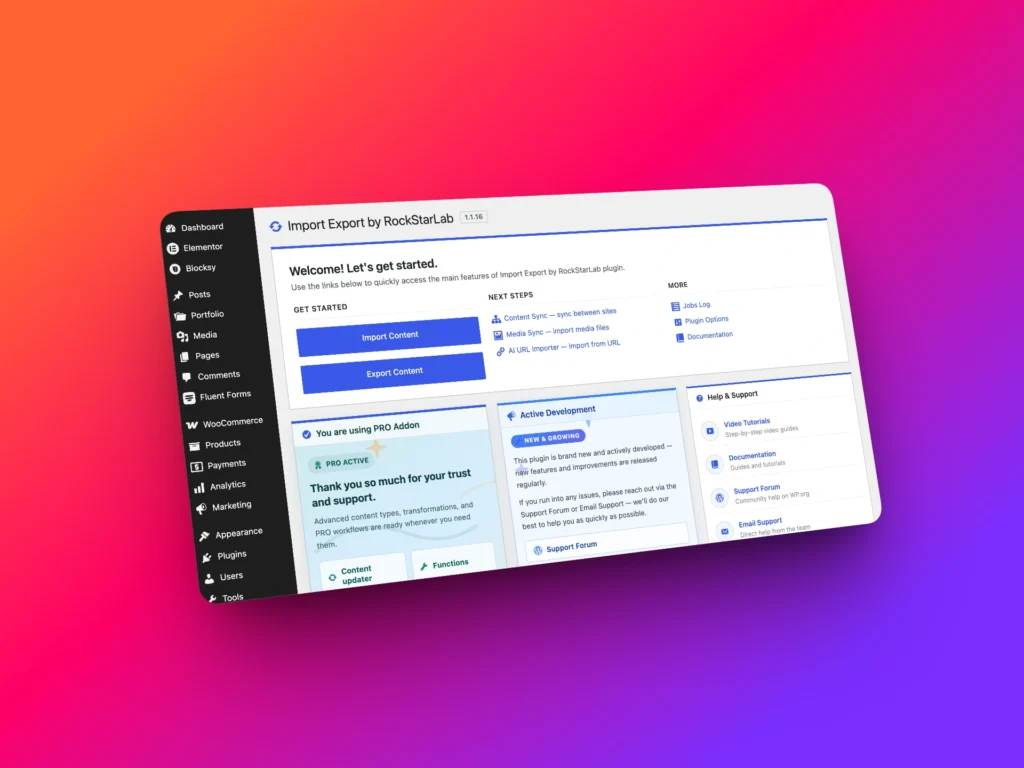
Import Export by RockStarLab: Free First, PRO When Needed
Import Export by RockStarLab is built around a simple idea: start with the free plugin, then upgrade only when your workflow needs advanced functionality.
The free version is useful for everyday WordPress data tasks, including importing and exporting standard content, working with multiple file formats, syncing content, and handling media workflows.
The PRO version adds advanced workflows such as custom post types, WooCommerce data, users, comments, taxonomy terms, Content Updater, transformation functions, and more.
For new users, PRO can also be activated for a free first month, so you can test professional features before committing.
Free Alternative to Ultimate CSV Importer: Feature Comparison
The table below compares common workflows users often look for when evaluating Ultimate CSV Importer alternatives.
| Feature / Workflow | Ultimate CSV Importer PRO | Import Export by RockStarLab |
|---|---|---|
| Import WordPress posts and pages | Available | Available in free version |
| Export WordPress posts and pages | Available | Available in free version |
| CSV import/export | Available | Available |
| Excel XLSX import/export | Available | Available |
| JSON, XML, and ODS export formats | Depends on workflow/version | Available for export workflows |
| Import custom post types | Available in PRO | Available in PRO |
| ACF and custom fields | Available | Supported, with advanced workflows in PRO |
| WooCommerce products, orders, coupons, attributes | Available in PRO / add-ons | Available in PRO |
| Update existing records without duplicates | Available in PRO | Available with matching/import options and PRO workflows |
| Scheduled import/export jobs | Available in PRO | Available with Jobs Log and Schedules workflows |
| Advanced export filters | Available in PRO | Available in export workflows |
| Bulk content updates | Available in PRO workflows | Available through Content Updater in PRO |
| Transformation functions | Advanced rules / logic available in PRO | Available in PRO with custom functions and AI function generation |
| Content sync between websites | Not the main workflow | Available for posts and pages |
| Selected media export | Depends on workflow/version | Available in PRO |
| Starting price | From around $199 | Free plugin available, optional PRO upgrade |
What You Can Do with the Free Version
The free version of Import Export by RockStarLab is designed to cover many common WordPress import/export workflows.
You can use it to import and export standard WordPress content, work with spreadsheet-friendly files, move data between websites, and manage practical site maintenance tasks without paying upfront.
Free workflows include:
- Import posts and pages.
- Export posts and pages.
- Import CSV, XML, XLSX, and ODS files.
- Export CSV, JSON, XML, XLSX, and ODS files.
- Use ZIP support for supported import files.
- Export all site URLs.
- Sync posts and pages between connected WordPress websites.
- Use Media Folder Sync for files uploaded outside the Media Library.
- Use AI URL Importer when an AI provider is configured.
- Review Jobs Log and Schedules.
When You May Need PRO
Some workflows are more advanced and are available in the PRO version of Import Export by RockStarLab.
PRO is useful when you work with complex WordPress data, WooCommerce stores, custom fields, advanced bulk updates, or transformation logic.
PRO workflows include:
- Import and export custom post types.
- Import and export media files.
- Export selected media files from the WordPress Media Library.
- Import and export users.
- Import and export comments.
- Import and export taxonomy terms.
- Import and export WooCommerce products, orders, coupons, and attributes.
- Work with MySQL database table workflows.
- Use Content Updater to bulk update existing WordPress data.
- Use transformation functions during import, export, and content updates.
- Generate transformation functions with AI.
- Handle advanced metadata, custom fields, ACF fields, and ACF Repeater fields.
Pricing Difference: Why It Matters
Ultimate CSV Importer PRO pricing starts from around $199. For some teams, that may be acceptable. But for many users, it is a large upfront cost, especially if they only need import/export tools occasionally.
Import Export by RockStarLab lets you start with the free plugin. If you need PRO features, you can activate PRO for your first month and test the advanced workflows before deciding whether to continue.
This is especially helpful for one-time migrations, temporary cleanup projects, staging-to-production tasks, or short-term WooCommerce data work.
Unique Workflows Beyond Basic CSV Import
Import Export by RockStarLab is not only a CSV importer. It also includes workflows that can reduce manual work in real WordPress projects.
Content Sync Between Websites
If you work with staging and production websites, Content Sync lets you move selected posts or pages between connected sites without traditional import/export files.
This is useful when you prepare content on staging, show it to a client, and then push approved content to production.
Media Sync and Selected Media Export
Media workflows are also important during migration and site maintenance.
You can sync files uploaded by FTP with the WordPress Media Library, export the full Media Library, import media into another website, or export only selected media files in PRO.
Content Updater
Content Updater allows PRO users to bulk update existing WordPress data using transformation functions.
For example, you can clean imported content, update titles, normalize custom fields, change SEO fields, or prepare WooCommerce data without editing each item manually.
Transformation Functions
Transformation functions let you modify field values during import, export, or bulk update workflows.
You can clean prices, format dates, generate slugs, remove HTML, validate email fields, map values, and create custom logic for your data.
Which Plugin Should You Choose?
If you need a mature import/export plugin with a wide feature set and you are ready to pay for a PRO license, Ultimate CSV Importer may be one option to evaluate.
If you want a free starting point, flexible import/export formats, practical WordPress content workflows, and optional PRO features only when you need them, Import Export by RockStarLab is a strong alternative.
It is especially useful if you want to avoid a large upfront license cost and prefer to test advanced workflows before paying.
Best Use Cases for Import Export by RockStarLab
| Use Case | How Import Export by RockStarLab Helps |
|---|---|
| Blog migration | Import and export posts, categories, tags, content, and images |
| Content audit | Export posts, pages, URLs, and media data to spreadsheet formats |
| Staging to production | Sync selected posts or pages between connected WordPress websites |
| Media migration | Export, import, sync, or selectively move Media Library files |
| WooCommerce workflows | Use PRO to work with products, orders, coupons, and attributes |
| Bulk data cleanup | Use PRO Content Updater and transformation functions |
| Custom field migration | Work with custom fields, metadata, ACF fields, and ACF Repeater fields |
Conclusion
If you are searching for a free alternative to Ultimate CSV Importer, Import Export by RockStarLab is worth trying.
It gives you a free WordPress import/export plugin for common workflows and optional PRO tools for advanced content, media, WooCommerce, custom field, and bulk update tasks.
Instead of paying a high upfront price before you know whether a plugin fits your workflow, you can start free, test the plugin on your own website, and upgrade only when you need advanced features.
Download Import Export by RockStarLab from WordPress.org
Learn more about the WordPress import export plugin
FAQ
Is Import Export by RockStarLab a free alternative to Ultimate CSV Importer?
Yes. Import Export by RockStarLab offers a free plugin for common WordPress import/export workflows, with optional PRO features for more advanced tasks.
Can I import WordPress posts from CSV for free?
Yes. Import Export by RockStarLab supports importing standard WordPress posts and pages from supported file formats, including CSV and Excel workflows.
Does Import Export by RockStarLab support WooCommerce?
WooCommerce product, order, coupon, and attribute workflows are available in the PRO version.
Can I update existing records without duplicates?
Yes. Import workflows include matching options to detect existing records, and PRO workflows provide additional tools for advanced updates and bulk content changes.
Does the plugin support ACF fields?
Yes. Import Export by RockStarLab supports custom fields and ACF workflows, including advanced ACF and ACF Repeater field workflows in PRO.