
The posts are imported, but the custom fields are empty: no event date, no price, nothing in the ACF box. Usually the import didn’t fail. The fields were never mapped, or they were saved under a name or in a format your site doesn’t use. In the example, event details for a coffee roastery are imported into existing posts with Import Export by RockStarLab, and each reason custom fields and ACF data go missing gets its own section.
Free: custom fields and ACF fields on posts and pages. PRO: the same for custom post types, users and WooCommerce products.
Short Answer
- Check the Mapped Fields list before importing. Every column you need must be there.
- For ACF, create the field group on the new site first, so the fields appear in the mapping.
- For a plain custom field, add it with + Add in the Custom Fields group and drag the column onto it.
- Run the import and read the values back in the editor or with an export.
The file and the fields
Our site has an ACF field group “Event details” with Event date (date picker), Venue (select), Seats (number) and Sold out (true/false). The file comes from a spreadsheet, with the values typed the way people type them:
Title,Event date,Venue,Seats,Sold out,Internal notes
Latte Art Workshop,16/05/2026,Training Lab,8,yes,Ask Maria for the keys
Roastery Open Day,06/06/2026,Main Roastery,120,no,Order extra cups
Cold Brew Masterclass,2026-07-04,training-lab,10,1,
The three events already existed as posts, so on the options step we matched them by Title with Update.
Cause 1: the column isn’t mapped
Auto Map matched the four ACF fields by their labels. “Internal notes” is a plain custom field that no post had yet, so it had nowhere to go and stayed in the column list:
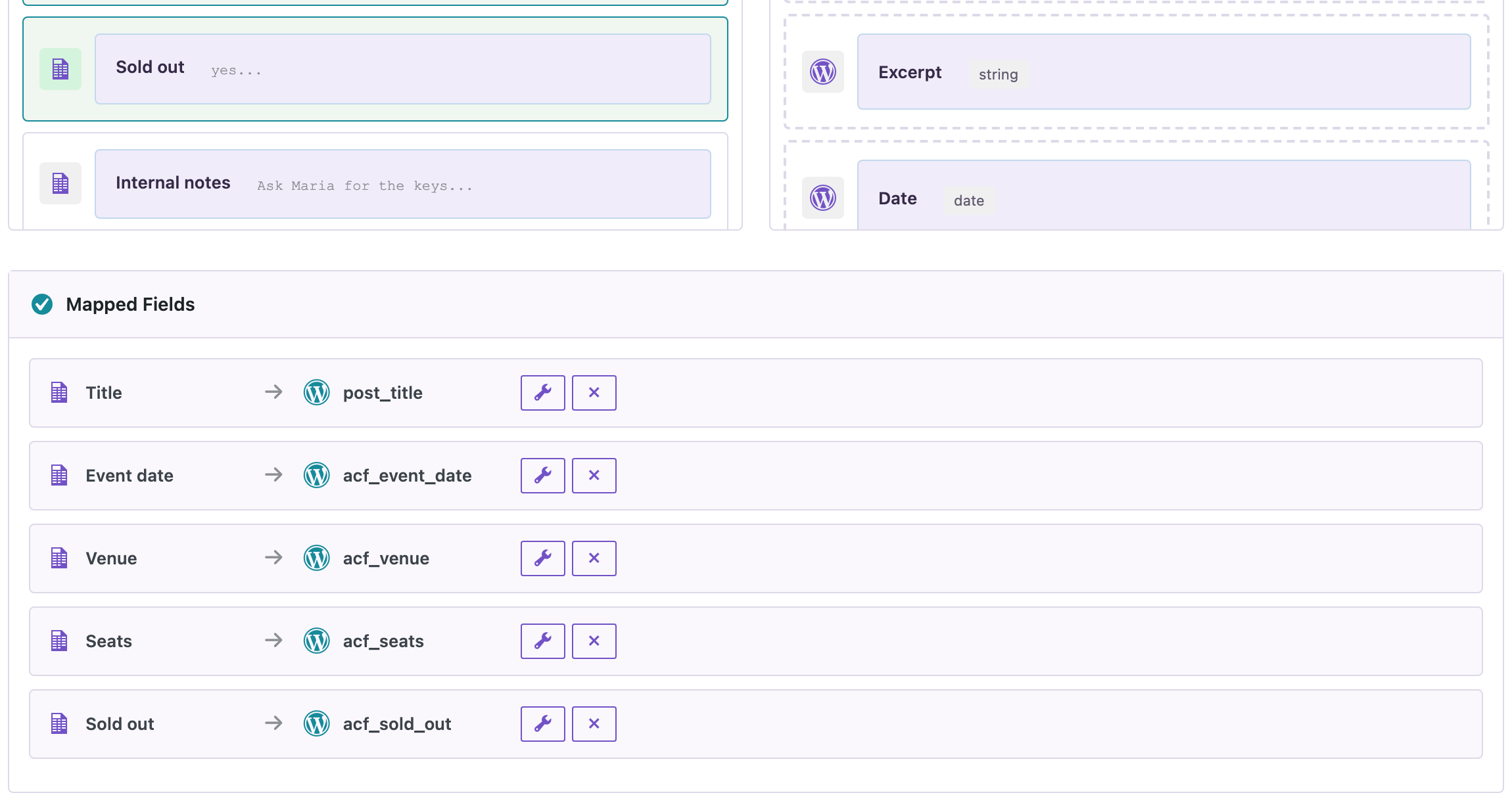
An unmapped column is simply skipped, so the import finishes without errors and the field is empty. Scroll through the Mapped Fields list before you start.
Cause 2: the custom field doesn’t exist yet
The Custom Fields group lists keys that posts already use. For a new one, click + Add in that group, type the meta key (internal_notes), and drag the column onto it:
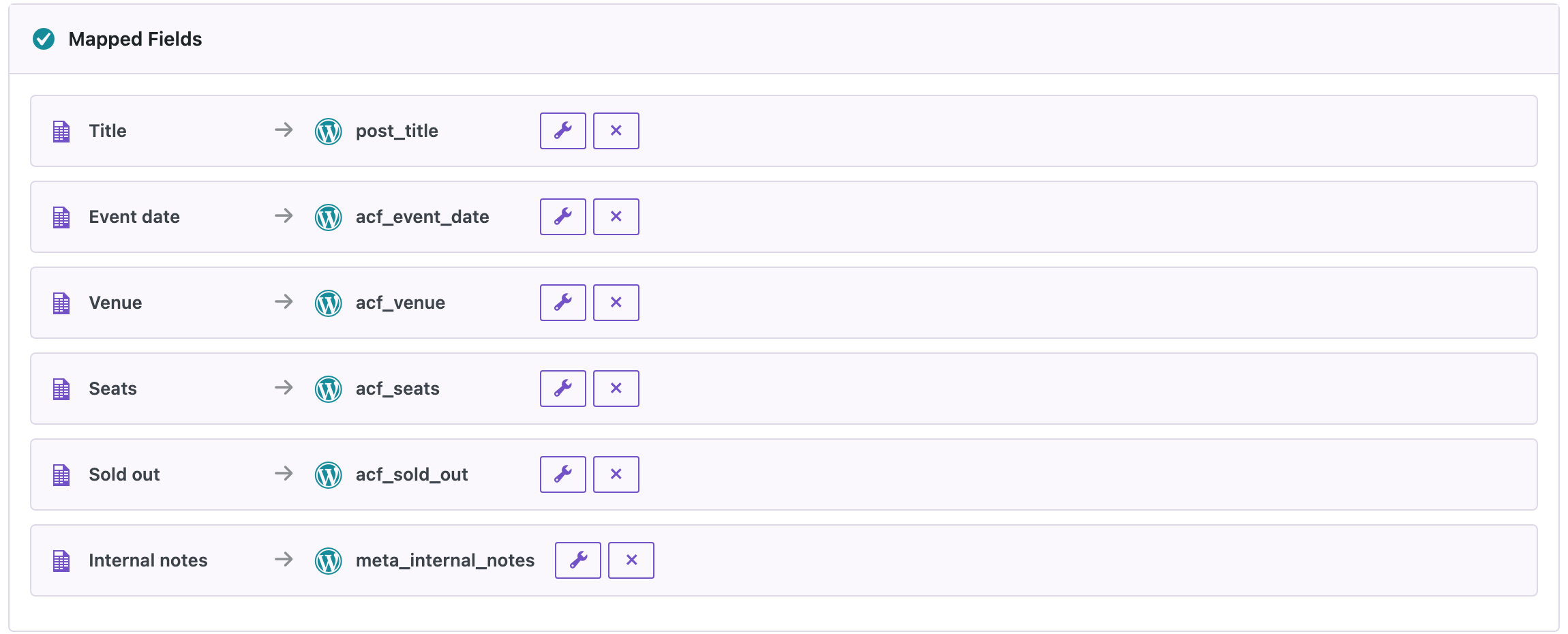
After this import, two events had their notes; the third had none in the file. The key is saved exactly as you type it, so use the key your theme or plugin reads, not a label.
Cause 3: the ACF field group isn’t on the new site
ACF fields show up in the mapping only when their field group exists on the site you import into. When you move a site, import or sync the field groups first (ACF’s own Tools screen exports them as JSON), then the content. Without the group, the values would be plain custom fields that the ACF box doesn’t show.
Cause 4: the value is in a format ACF doesn’t store
ACF stores a date picker as 20260516, a select as its value (training-lab) and true/false as 1 or 0. Values in other formats are a classic reason the editor shows empty fields. In our file the dates were written two ways, the venue once as a label and once as a value, and “Sold out” as yes, no and 1. After the import, all three posts had:
- Event date
20260516,20260606and20260704, both from 16/05/2026 and from 2026-07-04; - Venue
training-labandmain-roastery, whether the file had the label or the value; - Sold out
1for “yes” and “1”,0for “no”; - ACF’s reference keys (
_event_dateand so on), soget_field()returned 16/05/2026, Training Lab and true.
The plugin converted the values to ACF’s formats for these field types. If a value still doesn’t show, compare it with what ACF saves when you fill the field by hand.
Cause 5: the import ran but didn’t touch these posts
If the matching field doesn’t find the existing posts, new posts are created next to them and your old ones stay empty. Check the result counters: Updated should match the number of posts you meant to change. Matching by ID is the safest; see updating posts without duplicates.
Before you import
Updating custom fields overwrites the values that are there. Back up the site, and export the current values first so you can compare or roll back.
With an AI agent
An AI agent connected through the WordPress MCP Adapter (see connecting Claude Code to WordPress) can read the fields back after the import:
Show the event date, venue, seats, sold-out flag and internal notes of the Latte Art Workshop post.In our run, the agent called rsl-ie/export-preview with the fields acf_event_date, acf_venue, acf_seats, acf_sold_out and meta_internal_notes. It returned 20260516, training-lab, 8, 1 and “Ask Maria for the keys”.
FAQ
Why are my ACF fields not in the mapping list?
The field group doesn’t exist on this site, or its location rules don’t include this post type. Create or import the group first.
Which date format should my file use for an ACF date picker?
The display format of the field (such as 16/05/2026) or ISO dates (2026-05-16) both worked in our test; ACF stores them as 20260516.
Can I use the label of a select option?
Yes. In our test “Training Lab” was saved as the option’s value, training-lab.
Does it work with repeater and flexible content fields?
Yes; see the ACF import guide linked below for those layouts.
Why does the import say it succeeded when the fields are empty?
Unmapped columns are skipped without an error. Check the Mapped Fields list.
Related Guides
- Import ACF Fields: Repeater, Flexible Content and Images
- How to Export WordPress Post Meta (Custom Fields) to CSV or Excel
- Featured Images Missing After WordPress Import: Causes and Fixes
- Bulk Update WordPress Posts from CSV Without Duplicates
Get the free plugin on WordPress.org.

Comments 0
Have a question or a tip to share? Leave it below.