
Custom fields hold the data that makes a post more than text: an event’s date and venue, a recipe’s cooking time, a listing’s price. WordPress shows them one post at a time in the editor, and its built-in export tool gives you an XML file instead of a table. Import Export by RockStarLab exports post meta to CSV or Excel with one column per custom field, and can filter posts by a custom field’s value. The example is a coffee roastery’s events, with their dates, venues, prices and seats.
Free: everything in this guide works in the free plugin. ACF fields have their own group and are covered in the ACF guide.
Short Answer
- Go to Import Export by RockStarLab → Export and choose Posts (or Pages, or a custom post type).
- To export only some posts, add a Custom Field (Meta) filter with the field name, a condition and a value.
- Open the Custom Fields group in the field list and add the fields you need. Each becomes a column.
- Choose CSV or XLSX and start the export.
The posts
Each event on our blog is a post in the Roastery Events category with four custom fields: event_date, event_venue, ticket_price and seats. The training team wanted a list of the events in the Training Lab.
Filter by a custom field
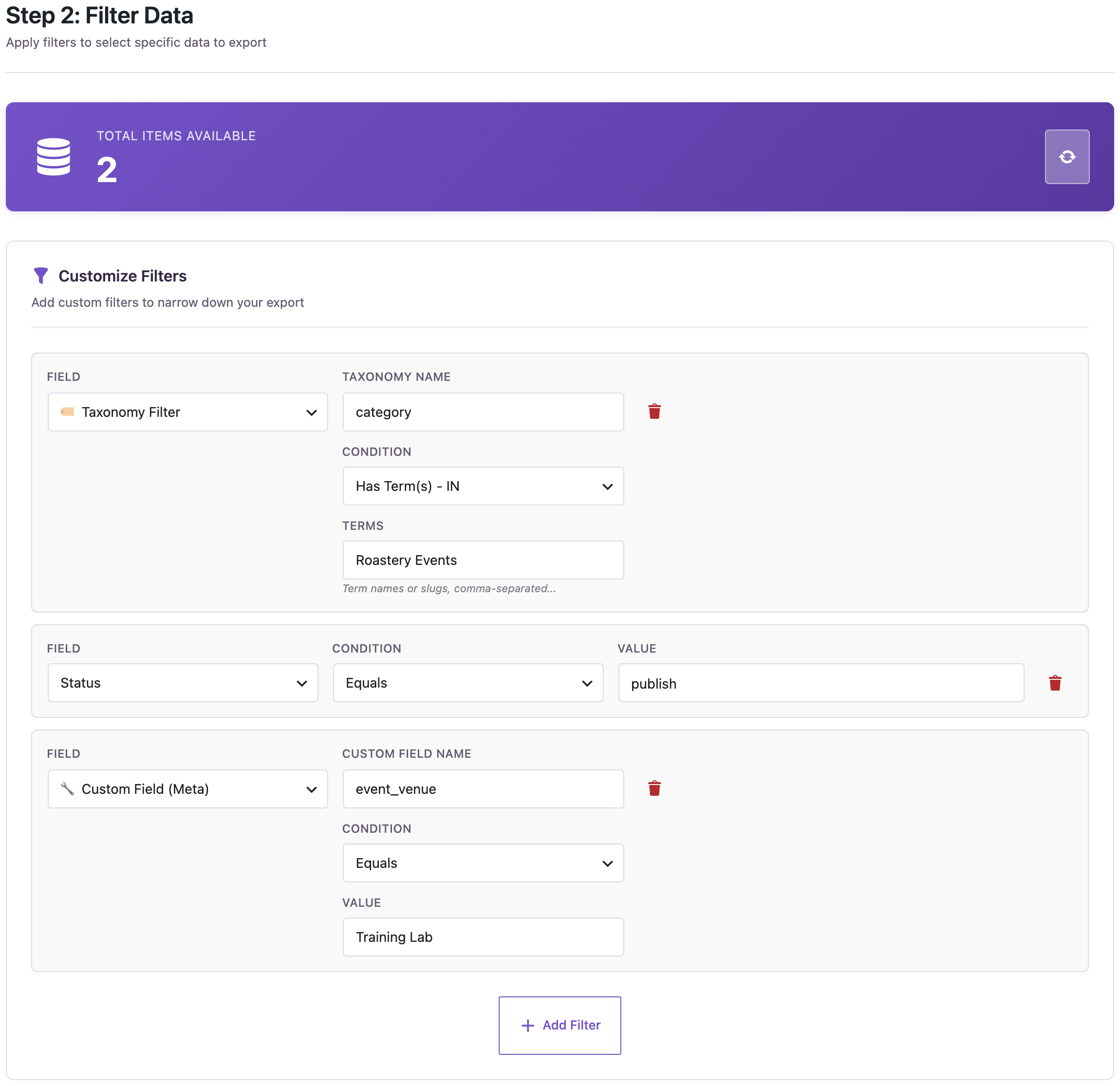
- Taxonomy Filter: category Roastery Events.
- Status equals
publish. - Custom Field (Meta): name
event_venue, condition Equals, valueTraining Lab.
The counter dropped from 4 events to 2. The field name is the meta key as WordPress stores it, without spaces. Besides Equals, the conditions include Contains, Greater Than, Less Than, In and Is Empty, so you can also find posts where a field was never filled in.
Add the custom fields as columns
The plugin reads the meta keys your posts use and lists them in the Custom Fields group. Each key you add becomes its own column:
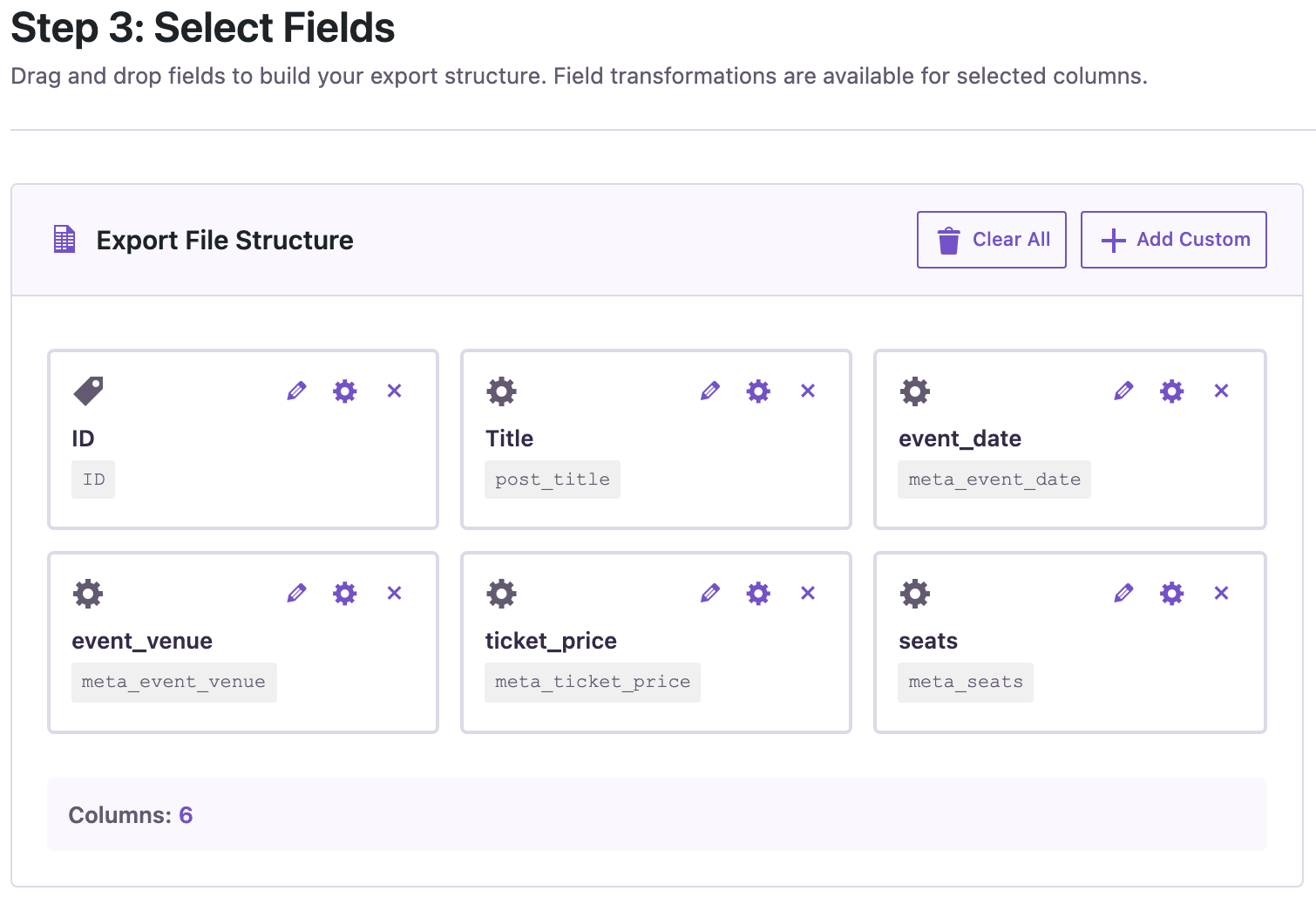
The file headers are the field keys with a meta_ prefix. That prefix lets you import the file back later and have each column go into the right custom field. From WP-CLI or an AI agent, the post_meta field puts all of a post’s custom fields into one cell as JSON, which is useful for a backup but harder to read in a spreadsheet.
The result
ID,post_title,meta_event_date,meta_event_venue,meta_ticket_price,meta_seats
2035,"Cold Brew Masterclass",2026-05-16,"Training Lab",25,10
2034,"Latte Art Workshop",2026-04-04,"Training Lab",35,8
Open the CSV in Excel or Google Sheets, or choose XLSX on the format step to skip the import dialog. If Excel shows strange characters or puts everything in one column, see fixing CSV files in Excel.
Friendlier column names
A report for people who don’t know WordPress reads better with headers like “Date” and “Venue”. You can set your own column names. From the command line (see the WP-CLI guide):
wp rsl-ie export --type=post --status=publish \
  --fields=post_title,meta_event_date,meta_event_venue,meta_ticket_price \
  --options='{"meta_query":[{"key":"event_venue","value":"Training Lab"}],"column_headers":{"post_title":"Event","meta_event_date":"Date","meta_event_venue":"Venue","meta_ticket_price":"Price"}}' \
  --format=csv --output=training-lab-events.csv --user=admin
In our run the file started with Event,Date,Venue,Price. A file with renamed headers is meant for reading. To import it back, keep the meta_ names or map the columns by hand.
Before you import changes back
A common next step is to fix values in the spreadsheet and import them back. Back up the site first and match rows by ID so the import updates the posts instead of creating new ones (see updating posts without duplicates).
With an AI agent
An AI agent connected through the WordPress MCP Adapter (see connecting Claude Code to WordPress) can filter by a number in a custom field:
Which events have fewer than 20 seats? Give me a CSV with the event, date, venue and seats.In our run, the agent called rsl-ie/export-count with a meta_query on seats less than 20 as a number (count: 2), then rsl-ie/export-start with the four fields and readable column names. rsl-ie/file-get returned small-events.csv with the Latte Art Workshop and the Cold Brew Masterclass.
FAQ
Why don’t I see my custom field in the list?
The Custom Fields group lists keys that posts of that type actually use. Fill the field on at least one post. Keys that start with an underscore are left out of the list, because WordPress and plugins use them internally.
Can I export custom fields of pages or custom post types?
Yes. Choose that content type on the first step; its custom fields appear in the same group.
How do I export ACF fields?
ACF fields have their own ACF Fields group with readable values; see the ACF guide linked above.
Can I filter by a number, like price above 20?
Yes. Use Greater Than or Less Than in the Custom Field (Meta) filter.
Does the export change my posts?
No. An export only reads them.
Related Guides
- Export WordPress Posts by Category, Tag or Author to CSV
- Export WordPress Posts with Featured Image URL and Categories to Excel
- Import ACF Fields: Repeater, Flexible Content and Images
- Bulk Update WordPress Posts from CSV Without Duplicates
Get the free plugin on WordPress.org.

Comments 0
Have a question or a tip to share? Leave it below.