
Two blogs that should be one: a company bought another, a side project grew into the main topic, or you’re tired of maintaining two installs. Merging means moving the second site’s posts, categories, authors and images into the main site without overwriting what’s already there and without links that still point to the old domain. In the example, a coffee roastery’s “Brew Lab” blog is merged into its main site with Import Export by RockStarLab.
Free: everything in this guide works in the free plugin for posts and pages. PRO: the same for custom post types, WooCommerce products and users with their roles.
Short Answer
- On the second site, export the posts with Slug, Date, Status, Author Email, Author Name, Categories, Featured Image URL and Content.
- On the main site, import the file with Check for Existing Items by Field = Slug and If Match Found = Skip, so no existing post is overwritten.
- Turn on Automatically Import Media Files and add a Replace links rule from the old domain to the new one.
- Check which posts were skipped, then redirect the old site’s URLs.
What happens to each part
| Part | What the import does |
|---|---|
| Posts | Created with their slug, date and status. |
| Posts with a slug that already exists | Skipped with If Match Found = Skip. The main site’s post stays as it is. |
| Categories | Matched by slug. A category with the same slug on both sites becomes one category; new ones are created. |
| Authors | Matched by email. Authors who don’t exist on the main site are created with the Author role. |
| Featured images and images in the content | Downloaded into the main site’s media library, and the image addresses are updated. |
| Links to the old site | Rewritten with Replace links. |
Our two sites
- Main site (www.example-roastery.com): a Roastery Journal category (slug
journal) with “Spring Cupping Guide” and “Roastery Open Day”. - Brew Lab (brewlab.example.com): four posts. Two are in Brew Guides, by Maya Chen, with a featured image, an image in the content and a link from one guide to the other. One is in a category called Journal, with the same slug
journal. One is also called “Spring Cupping Guide”, with the same slug as the main site’s post.
Export from the second site
In Export on the Brew Lab site, we chose Posts, filtered by the two categories and added these columns:

Categories are exported with their names and slugs. Author Email is what the main site uses to find or create each author.
Import into the main site
In Import on the main site, choose Posts, upload the file and click Auto Map; all nine columns are matched by name. Then set the options:
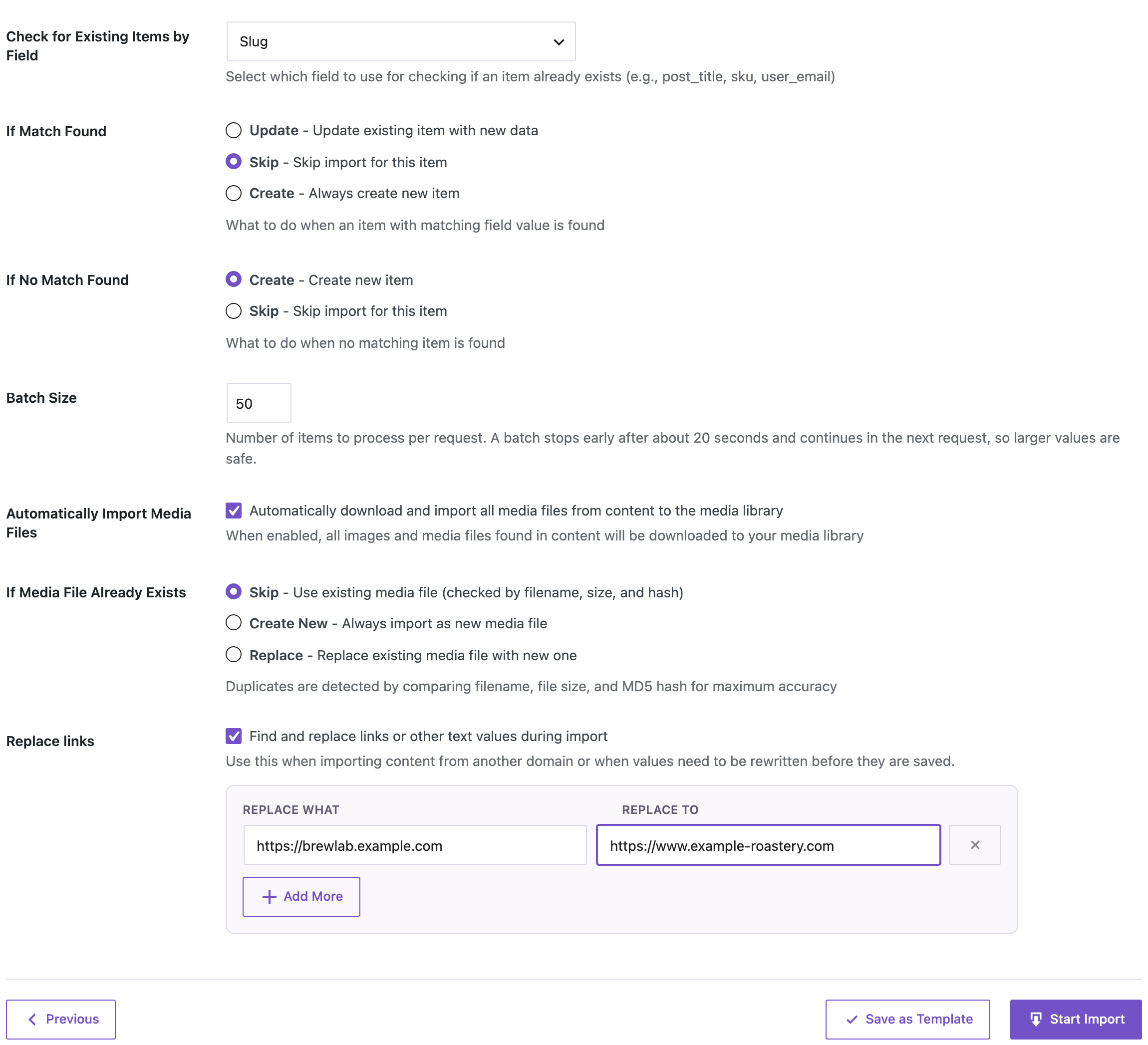
- Check for Existing Items by Field: Slug and If Match Found: Skip. If the main site already has a post with the same slug, it is left alone.
- Automatically Import Media Files downloads images from the old site.
- Replace links: Replace What = the old domain, Replace To = the main site’s domain.

Three posts were created, and one was skipped: Brew Lab’s “Spring Cupping Guide”, because the main site already had a post with that slug. The main site’s version wasn’t changed.

On the main site after the import:
- “Our New Grinder” is in Roastery Journal. The Brew Lab’s “Journal” category had the same slug, so it joined the existing category, which kept its name.
- The Brew Guides category was created, with both guides in it.
- Maya Chen was created as an author from her email and has both guides. The admin’s post went to the main site’s admin, who has the same email.
- The AeroPress guide has its featured image, and the V60 guide’s image is now in the main site’s media library, with its address updated in the content.
- The link from the AeroPress guide to the V60 guide now points to the main site. Both sites use the same permalink structure, so the address works.
Posts that were skipped
A skipped post means both sites had a post with the same slug. Decide for each one:
- Keep only the main site’s post. Nothing to do; redirect the old URL to it.
- Keep both. Change the slug in the file, for example to
spring-cupping-guide-brew-lab, and import only that row again. With no matching slug, it’s created as a new post. - Replace the main site’s post. Import that row with If Match Found = Update. This overwrites the main site’s version, so do it only on purpose.
After the merge
- Redirects. Send each old Brew Lab URL to its new address with a 301 redirect, so links and search rankings follow. See building a 301 redirect map from a URL export.
- Pages. Repeat the export and import with Pages if the second site has pages you want to keep.
- Roles. New authors get the Author role. Change roles in Users if someone needs more.
Before you import
Back up the main site before you merge. Import a few posts first and check categories, authors, images and links before importing the rest.
With an AI agent
An AI agent connected through the WordPress MCP Adapter (see connecting Claude Code to WordPress) can check that no post still links to the old site:
How many posts on this site still contain brewlab.example.com in their content?In our run, the agent called rsl-ie/export-count with a filter “content contains” the old domain and got 0. With the new address of the V60 guide, the same check found the one post that links to it.
FAQ
Will the merge overwrite posts on my main site?
Not with If Match Found set to Skip. Posts with a slug that already exists are skipped and counted in the result.
What happens to categories with the same name?
Categories are matched by slug. If both sites use the same slug, the posts go into the main site’s category, and its name stays.
Do authors need accounts on the main site first?
No. Authors are matched by email, and missing ones are created with the Author role.
Are images copied?
Yes, with Automatically Import Media Files on: featured images from the Featured Image URL column and images in the content are downloaded to the main site.
What about links between posts of the old site?
Add a Replace links rule from the old domain to the new one. With the same permalink structure on both sites, the rewritten links work.
Can I merge more than two sites?
Yes. Export each site and import the files one after another into the main site with the same options.
Related Guides
- Move WordPress Posts to a New Site and Keep Dates, Authors and Slugs
- Build a 301 Redirect Map from a WordPress URL Export
- Bulk Update WordPress Posts from CSV Without Duplicates
- Bulk Import Images from URLs into the Media Library
Get the free plugin on WordPress.org.

Comments 0
Have a question or a tip to share? Leave it below.