
A product without a photo looks broken in the shop and is rejected by Google Merchant Center. A product without a description gives buyers and search engines nothing to go on. In a catalog of a few hundred products, these gaps are hard to spot on the Products screen. With Import Export by RockStarLab PRO, you either export just the products with a specific gap, or export the whole catalog with check columns and see every gap in one sheet. The example checks a small merch shop.
PRO: WooCommerce product export is part of PRO. Free: the same checks for posts and pages, for example with Featured Image URL and Word Count.
Short Answer
- No featured image: filter Custom Field (Meta)
_thumbnail_idIs Empty. - No description: filter Description Is Empty.
- No short description: filter Short Description Is Empty.
- All gaps at once: export all published products with Featured Image URL, Gallery Images, Word Count and Short Description, and mark the empty cells in the spreadsheet.
Add Status Equals publish to every export to check only products customers can see.
Products without a featured image
WooCommerce stores the product image’s ID in a custom field called _thumbnail_id. A product without an image doesn’t have it, so a custom field filter finds them:
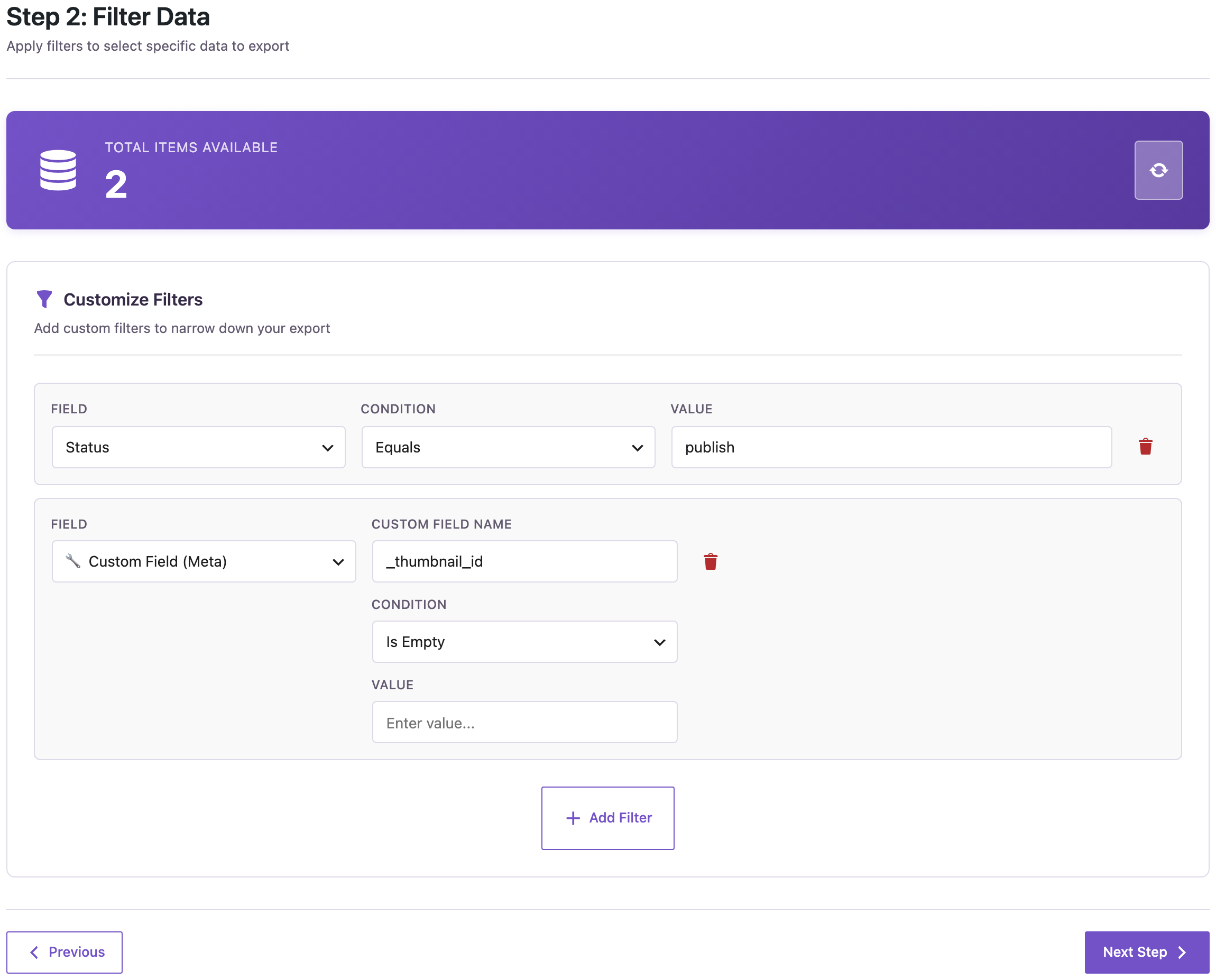
Two of our 17 published products had no image: Belt and Polo. Export Product Name, SKU and Permalink, and you have a to-do list for the photographer.
Products without a description
The filters Description Is Empty and Short Description Is Empty work the same way. In our shop, the first found Cap, the second Belt and Sunglasses. Filters combine with AND, so run them as separate exports, or use the whole-catalog check below.
Check the whole catalog at once
For a full content audit, export all published products with these columns:
- Featured Image URL: empty when there’s no image.
- Gallery Images: the extra photos, separated by commas.
- Word Count: the number of words in the description; 0 when it’s empty.
- Short Description: the text next to the price.
Then add a Check column that names the gaps, for example with =IF(C2="","no image","") and similar formulas for the other columns, and sort by it:
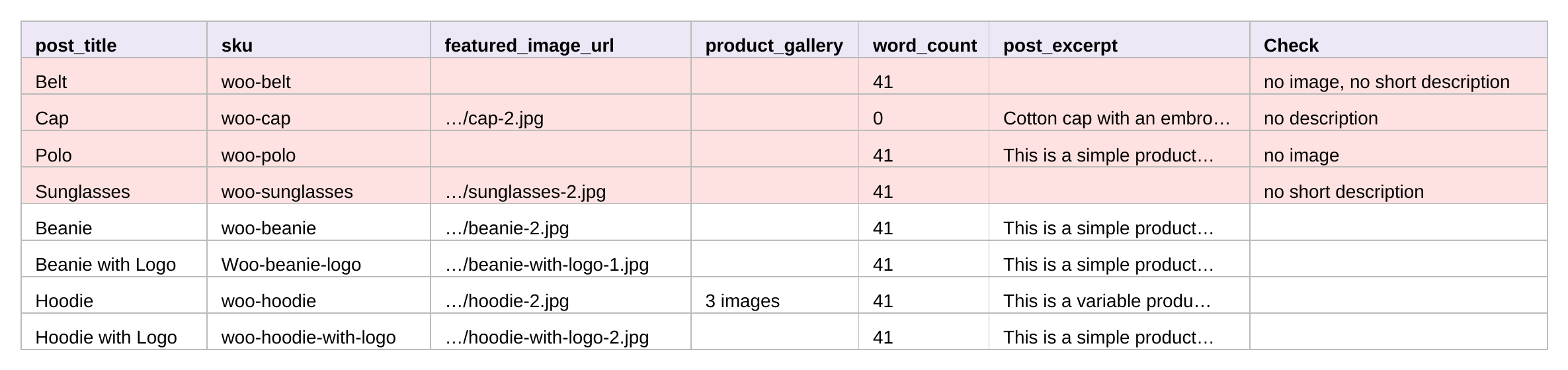
Four products need work: Belt has no image and no short description, Cap no description, Polo no image and Sunglasses no short description. Word Count also shows thin descriptions that aren’t empty: a product with 15 words probably needs more than one with 300.
Fix the gaps in bulk
Write the missing short descriptions in the same spreadsheet and import it back by SKU; the steps are the same as in updating products by SKU. For missing photos, get the images into the Media Library first; see importing images from URLs. Back up the site before an import that changes products.
With an AI agent
An AI agent connected through the WordPress MCP Adapter (see connecting Claude Code to WordPress) can run all three checks in a row:
Which published products have no image, no description or no short description?In our run, the agent called rsl-ie-pro/export-preview three times: with the custom field filter _thumbnail_id is_empty it got Belt and Polo, with post_content is_empty Cap, and with post_excerpt is_empty Belt and Sunglasses. The same four products as in the spreadsheet.
FAQ
Does this find products that only lack gallery images?
Use the Gallery Images column in the whole-catalog export; an empty cell means no gallery.
Are variations checked?
These filters check the products. To review variation images, export with One row per variation and look at the Featured Image URL column: a variation without its own image shows the product’s image.
What if a description contains only a shortcode or an image?
Word Count doesn’t count shortcodes or HTML, so such a product shows 0 or very few words. Open it to check.
Can I check posts and pages the same way?
Yes, with the free plugin: export Featured Image URL and Word Count for posts or pages.
Related Guides
- How to Export WooCommerce Products for Google Merchant Center
- Find Thin Content in WordPress: Export Word Counts for a Content Audit
- Export WooCommerce Product Variations with SKU, Price and Stock
- Bulk Import Images from URLs into the WordPress Media Library
Get the free plugin on WordPress.org.

Comments 0
Have a question or a tip to share? Leave it below.