
In WooCommerce, the prices, SKUs and stock of a T-shirt in three colors live in its variations, not in the product itself. A normal product export gives you one row for the T-shirt and leaves the details in a block of JSON. For a price check, a supplier list or a stock count you want the opposite: one row per variation. With Import Export by RockStarLab PRO, one checkbox does that. The example exports the variations of a small merch shop.
PRO: WooCommerce product export is part of PRO. Free: posts, pages and media.
Short Answer
- In Export, choose Products and add the filter Product Type Equals
variable. - Add Parent SKU, SKU, Product Name, Regular Price, Sale Price, Stock Quantity and Stock Status.
- On the format step, tick Variations: One row per variation and export to XLSX or CSV.
Choose the products and fields
Our shop has two variable products, a V-Neck T-Shirt in three colors and a Hoodie with four color and logo options. The filter Product Type Equals variable selects them; without it, simple products are exported too, one row each.
The fields that matter for variations:
- Parent SKU: the SKU of the product the variation belongs to, so you can group or sort the rows.
- SKU, Regular Price, Sale Price, Stock Quantity and Stock Status: the variation’s own values.
- Product Name: for a variation, the product name with its options, for example “Hoodie – Blue, Yes”.
One row per variation
On the format step, tick One row per variation:
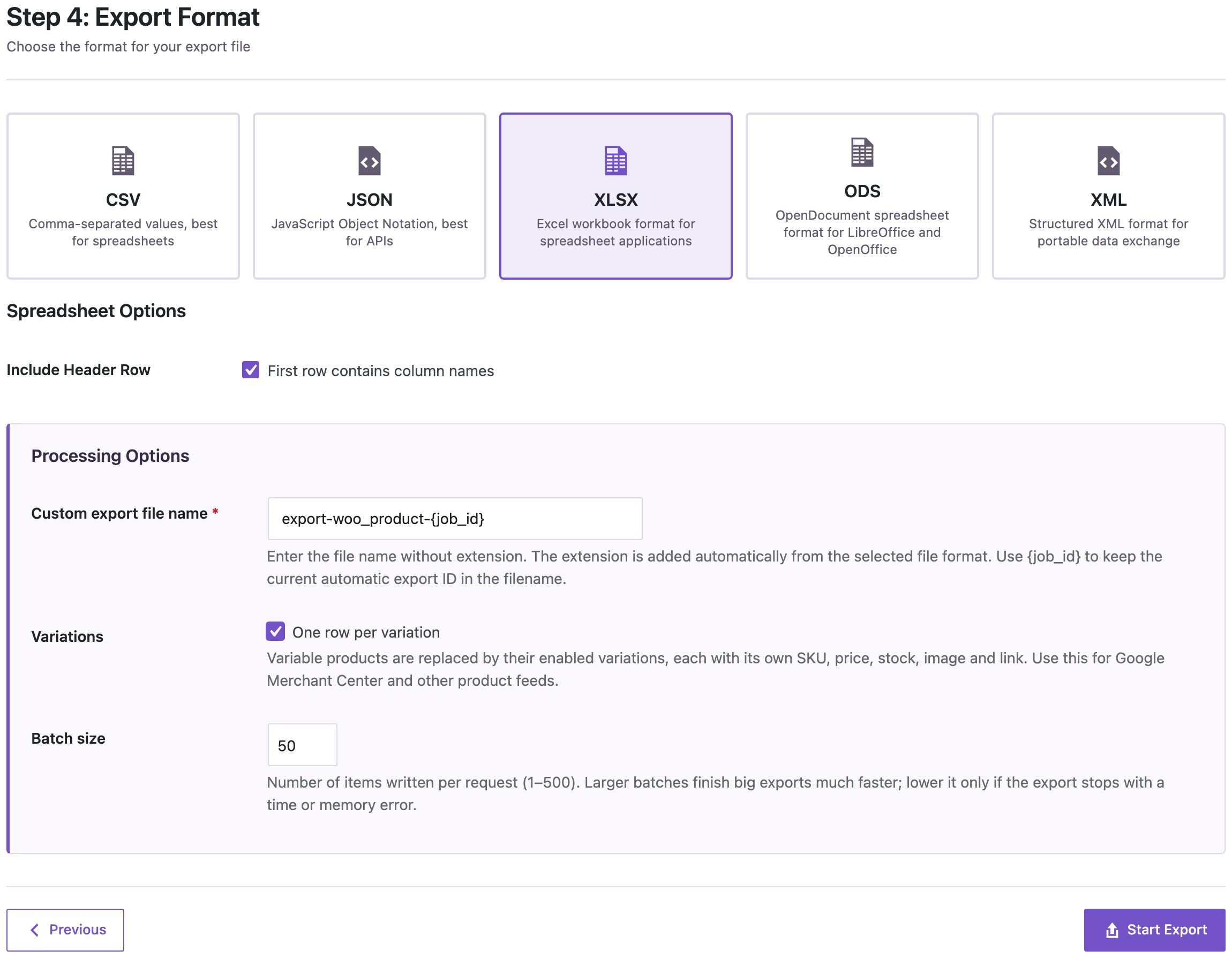
Each variable product is replaced by its variations. Fields a variation doesn’t have of its own, such as the description, come from the product.
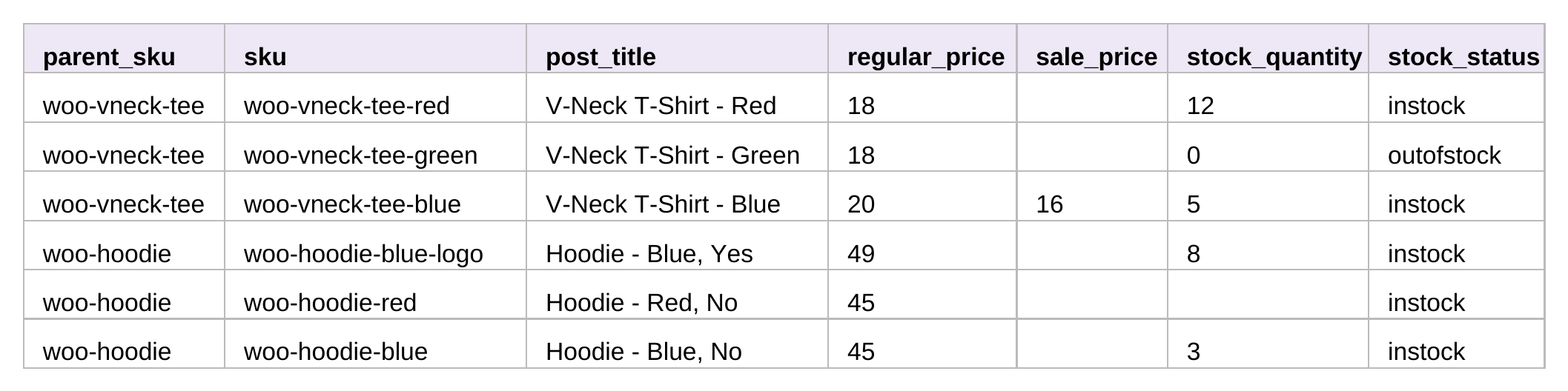
What the file showed about our shop:
- The Green V-Neck is out of stock at 0.
- The Blue V-Neck is on sale: 16 instead of 20.
- “Hoodie – Red, No” has no stock quantity: that variation doesn’t track stock, and its stock status is set by hand.
- Only six rows for seven variations: “Hoodie – Green, No” is disabled in WooCommerce, and disabled variations aren’t exported.
Uses for the file
- Price check: sort by Parent SKU and compare prices within a product. A variation with a missing or different price stands out.
- Supplier list: send the SKUs and quantities of what you need to reorder. For a list of low-stock items only, see exporting low-stock products.
- Stock count: print the list, count the shelf and compare.
- Product feeds: the same option produces one item per variation for Google Merchant Center; see the Merchant Center guide.
Changing prices or stock in bulk
An export only reads your shop. To change prices or quantities in bulk, edit the file and import it back by SKU; see updating prices and stock by SKU. Back up the site before an import that changes prices, and try a few rows first.
With an AI agent
An AI agent connected through the WordPress MCP Adapter (see connecting Claude Code to WordPress) can answer questions about variations directly:
List the SKU, price, sale price and stock of every variation.In our run, the agent called rsl-ie-pro/export-preview with the product export, the filter Product Type equals variable and the option variation_rows. It returned the same six variations as the file, from woo-vneck-tee-red at 18 with 12 in stock to woo-hoodie-blue at 45 with 3 in stock.
FAQ
Are disabled variations included?
No. Only enabled variations are exported as rows.
Can I export simple and variable products together?
Yes. Leave out the Product Type filter: simple products get one row, variable products one row per variation.
Where are the variation’s options, like color and size?
In the Product Name, for example “V-Neck T-Shirt – Blue”. The Product Attributes column holds the attribute settings of the product.
Can I import this file to create variable products on another shop?
For creating variable products, use the layout in importing variable products from CSV.
Related Guides
- Export Low-Stock and Out-of-Stock WooCommerce Products to Excel
- How to Update WooCommerce Prices and Stock by SKU Using CSV
- How to Import WooCommerce Variable Products from CSV
- How to Export WooCommerce Products for Google Merchant Center
Get the free plugin on WordPress.org.

Comments 0
Have a question or a tip to share? Leave it below.