
A post is more than its title and text. Event dates, prices, notes for editors and the SEO title and meta description from Yoast SEO are all stored as custom fields (post meta). When you push a post from staging to live with Import Export by RockStarLab Content Sync, those fields travel with it. Below is what arrived on the live site in our test and what happened to the Yoast SEO data. One behavior matters before you push: the live copy ends up with the same fields as staging, so a field that exists only on live is removed.
Free: Content Sync for posts and pages, with all their custom fields. PRO: the same for custom post types and WooCommerce products.
Short Answer
- All custom fields of the post are copied, including hidden ones whose names start with an underscore.
- Yoast SEO data is copied too: SEO title, meta description, focus keyphrase, the noindex setting and the social title. A canonical URL that points to staging is changed to the live domain.
- On an update, the live post gets exactly the fields the staging post has. A field you deleted on staging is deleted on live, and a field added only on live is removed.
The test post
On a coffee roastery’s staging site, the post “Tasting Bar Espresso Flight” had these custom fields:
event_date(2026-12-05),ticket_price(12.50) andtasting_notes(cherry, cocoa);- a hidden field
_internal_note(check stock); - Yoast SEO: SEO title “Espresso Flight at Our Tasting Bar %%sep%% %%sitename%%”, a meta description, the focus keyphrase “espresso flight”, the post hidden from search results (noindex), a canonical URL on the staging domain and a Facebook title “Espresso Flight Weekend”.
Yoast SEO was active on both sites.
Push the post
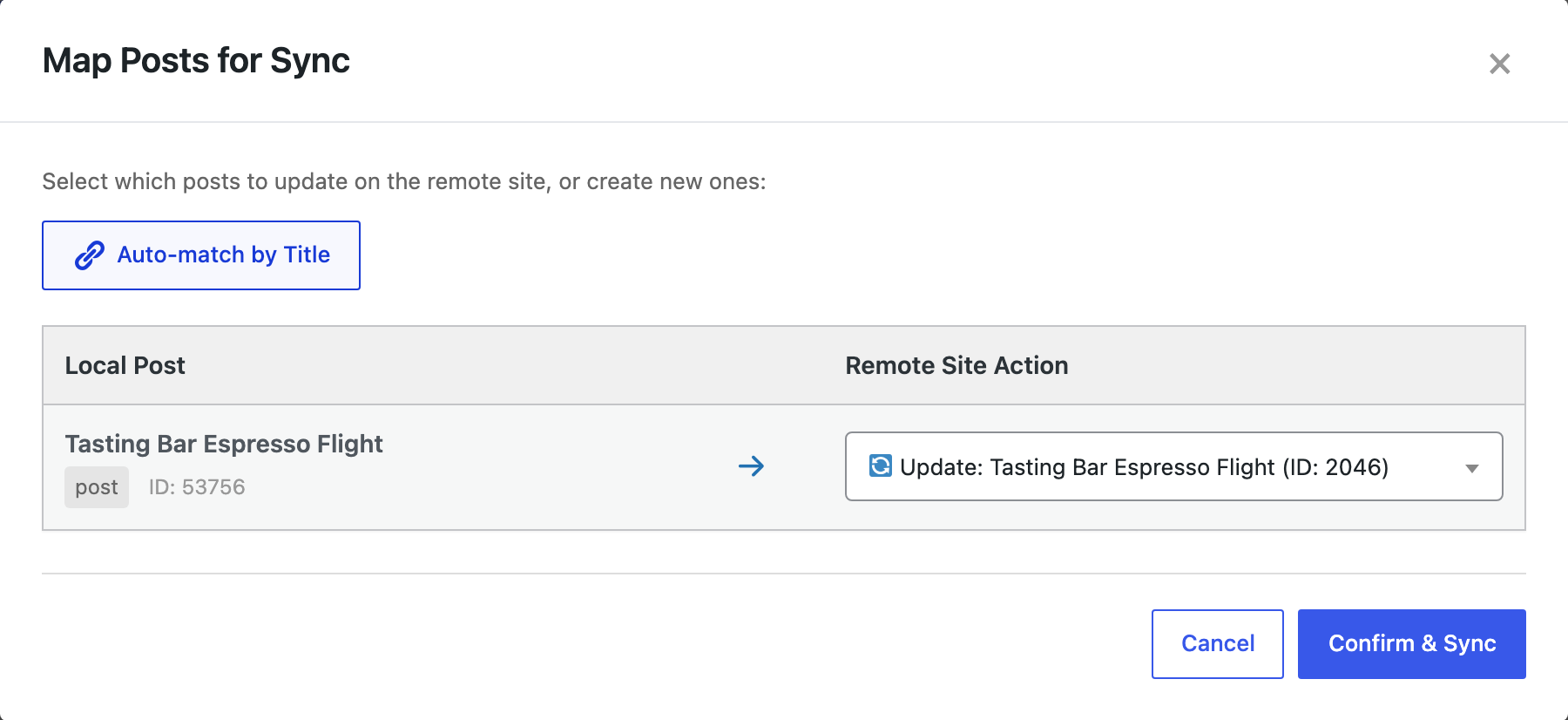
In Posts on staging, we selected the post, clicked Sync Content above the list, picked the live site and clicked Push to Site. The first push created the post on live. For later pushes, Auto-match by Title finds the live copy and sets it to Update:
After the first push, the live post had every field from staging with the same values, including _internal_note. The Yoast fields were copied as they were. The SEO title kept its variables, so on live it showed the live site’s name. The canonical URL was changed from the staging domain to the live domain.
What an update does to the fields
Then we changed things on both sides. On staging we set event_date to 2026-12-12 and deleted ticket_price. On live an editor added a field live_only_badge (Staff pick) to the same post. We pushed the post again as an update:
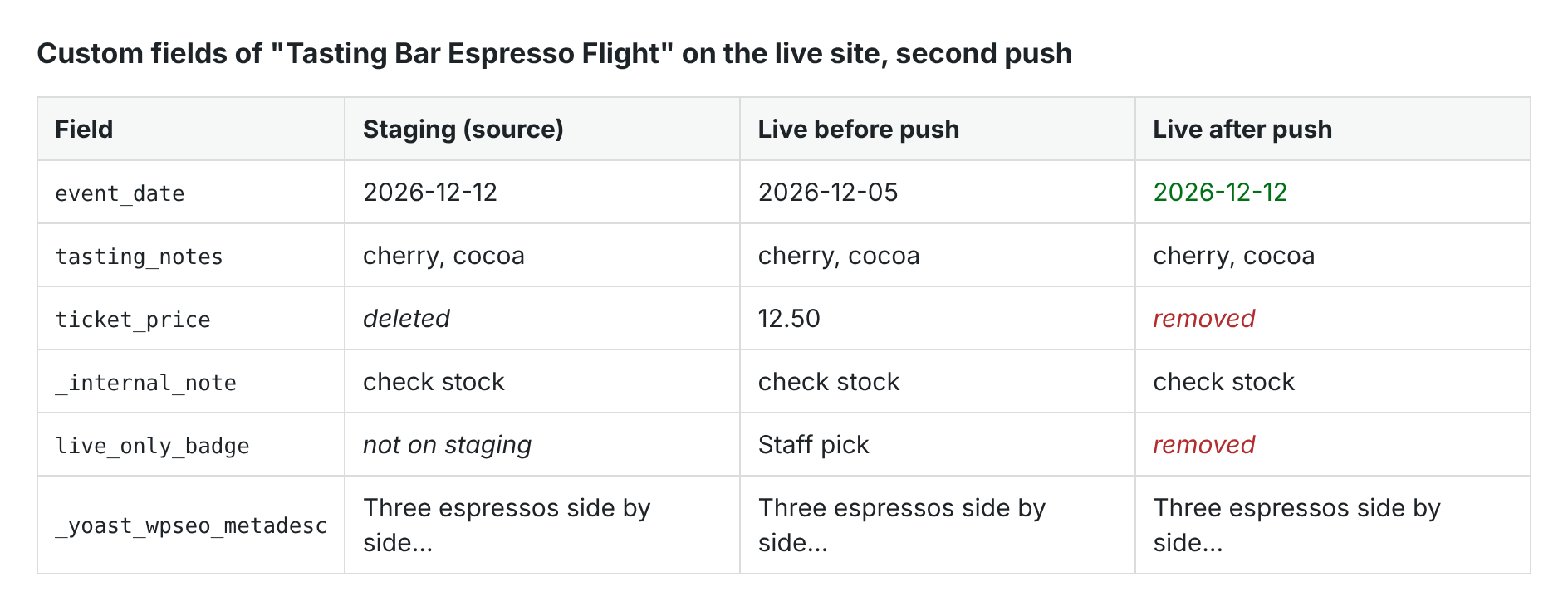
The new date arrived, ticket_price was deleted on live as it was on staging, and live_only_badge was removed because the staging post doesn’t have it. After an update, the live post has the same set of fields as the staging post.
So if editors add fields on the live site, add the same fields on staging before you push, or keep that information outside the post (for example in a taxonomy or an option).
Yoast SEO on the live site
We opened the post in the live editor and the Yoast SEO Search appearance panel showed the SEO title and meta description from staging:

On the front end of the live post, the page title was “Espresso Flight at Our Tasting Bar” followed by the live site’s name, the meta description and og:title “Espresso Flight Weekend” were in the page head, and the robots tag said noindex, as set on staging. Check the noindex setting before you push: a post marked “don’t show in search results” on staging stays hidden on live.
The featured image went with the post as well; see syncing featured images and media. To change meta descriptions for many posts at once on one site, use a CSV file instead.
Before you push
An update replaces the fields of the live post. Push one post first and check it, and back up the live site before you push many.
With an AI agent
An AI agent connected to the staging site through the WordPress MCP Adapter (see connecting Claude Code to WordPress) can push the update for you:
Push the post "Tasting Bar Espresso Flight" to the live site as an update of the existing live post.In our run, the agent called rsl-ie/connection-list to get the live site’s connection ID, then rsl-ie/sync-push with the staging post ID and a mapping to the live post ID. The result was “Successfully pushed 1 post(s) to remote site”: 1 updated, 0 created, 0 failed, and 2 images synced. Both images were already on live from the first push, and the Media Library still had one copy of each. On live, the fields were the same as in the table above.
FAQ
Are hidden custom fields copied?
Yes. In our test _internal_note, a field whose name starts with an underscore, arrived on live with its value.
Does Content Sync copy Yoast SEO titles and meta descriptions?
Yes. The SEO title, meta description, focus keyphrase, noindex setting and social title were copied, and the live post showed them in the page head.
What happens to the canonical URL?
A canonical URL on the staging domain is changed to the live domain during the push.
Will a push delete a custom field on live?
Yes, if the staging post doesn’t have it. On an update the live post gets the same fields as the staging post, so a field deleted on staging, or added only on live, is removed.
Do I need Yoast SEO on both sites?
The values are stored as custom fields of the post, so they are copied either way, but only a site with Yoast SEO active uses them in the page head.
Related Guides
- How Content Sync Works: API Keys, Push, Pull and What Gets Copied
- Syncing Featured Images and Media Between Sites: What Gets Copied and What Does Not
- How Post Authors Are Matched When You Sync Posts Between Sites
- How to Bulk Update Yoast SEO Titles and Meta Descriptions from CSV
Get the free plugin on WordPress.org.

Comments 0
Have a question or a tip to share? Leave it below.