
A guest author pastes articles from Word or Google Docs, and the HTML behind them is full of style="font-size:12.0pt", class="MsoNormal", <o:p> tags and empty paragraphs. The posts look slightly off on your site, and the theme’s fonts and colors don’t apply. With Import Export by RockStarLab PRO, one function cleans the markup of all those posts at once and keeps the text, links, bold and italic.
PRO: the Content Updater and custom functions. Use PRO 2.1.18 or newer: older versions changed in the saved code, so empty paragraphs with a non-breaking space stayed.
What the function removes
- Inline styles: fonts, sizes, colors, margins and line heights.
- Word markup:
class="Mso…",<o:p>tags and Word’s conditional comments. - Google Docs markup: the
<meta>tag and the bold wrapper around the whole text. Bold and italic set with styles become<strong>and<em>. - Old
<font>tags, empty<span>tags and empty paragraphs, also with only or a line break.
Other classes, links, headings and images stay. Alignment and colors that were set with styles go too, so check posts where you wanted them.
The update changes the content of your posts. Back up the site first, or ask your AI agent to start the backup.
Step 1: Create the function
Open Import Export → Functions, click New Function, name it and paste the code:
// Clean HTML pasted from Word or Google Docs.
$html = (string) $value;
// Word's own tags: <o:p></o:p> and conditional comments.
$html = preg_replace('/<\/?o:p[^>]*>/i', '', $html);
$html = preg_replace('/<!--\[if[^\]]*\]>.*?<!\[endif\]-->/is', '', $html);
// Google Docs: the <meta> tag and the bold wrapper around the whole text.
$html = preg_replace('/<meta[^>]*>/i', '', $html);
$html = preg_replace('/<b[^>]*id="docs-internal-guid[^"]*"[^>]*>(.*)<\/b>/is', '$1', $html);
// Keep bold and italic that Google Docs sets with styles.
$html = preg_replace('/<span[^>]*font-weight:\s*(700|bold)[^>]*>(.*?)<\/span>/is', '<strong>$2</strong>', $html);
$html = preg_replace('/<span[^>]*font-style:\s*italic[^>]*>(.*?)<\/span>/is', '<em>$1</em>', $html);
// Inline styles, Mso classes and the old <font> tag.
$html = preg_replace('/\sstyle=("[^"]*"|\'[^\']*\')/i', '', $html);
$html = preg_replace('/\sclass=("Mso[^"]*"|\'Mso[^\']*\')/i', '', $html);
$html = preg_replace('/<\/?font[^>]*>/i', '', $html);
// <span> tags that are left without attributes.
$html = preg_replace('/<span>(.*?)<\/span>/is', '$1', $html);
// Empty paragraphs, also with only or <br>.
$html = preg_replace('/<p[^>]*>(\s| | |\xC2\xA0|<br\s*\/?>)*<\/p>/i', '', $html);
// Blank lines left behind.
$html = preg_replace("/\n{3,}/", "\n\n", $html);
return trim($html);Test it with a piece of pasted HTML. Our Word paragraph lost its class, styles and <o:p>, and the empty paragraph was removed:
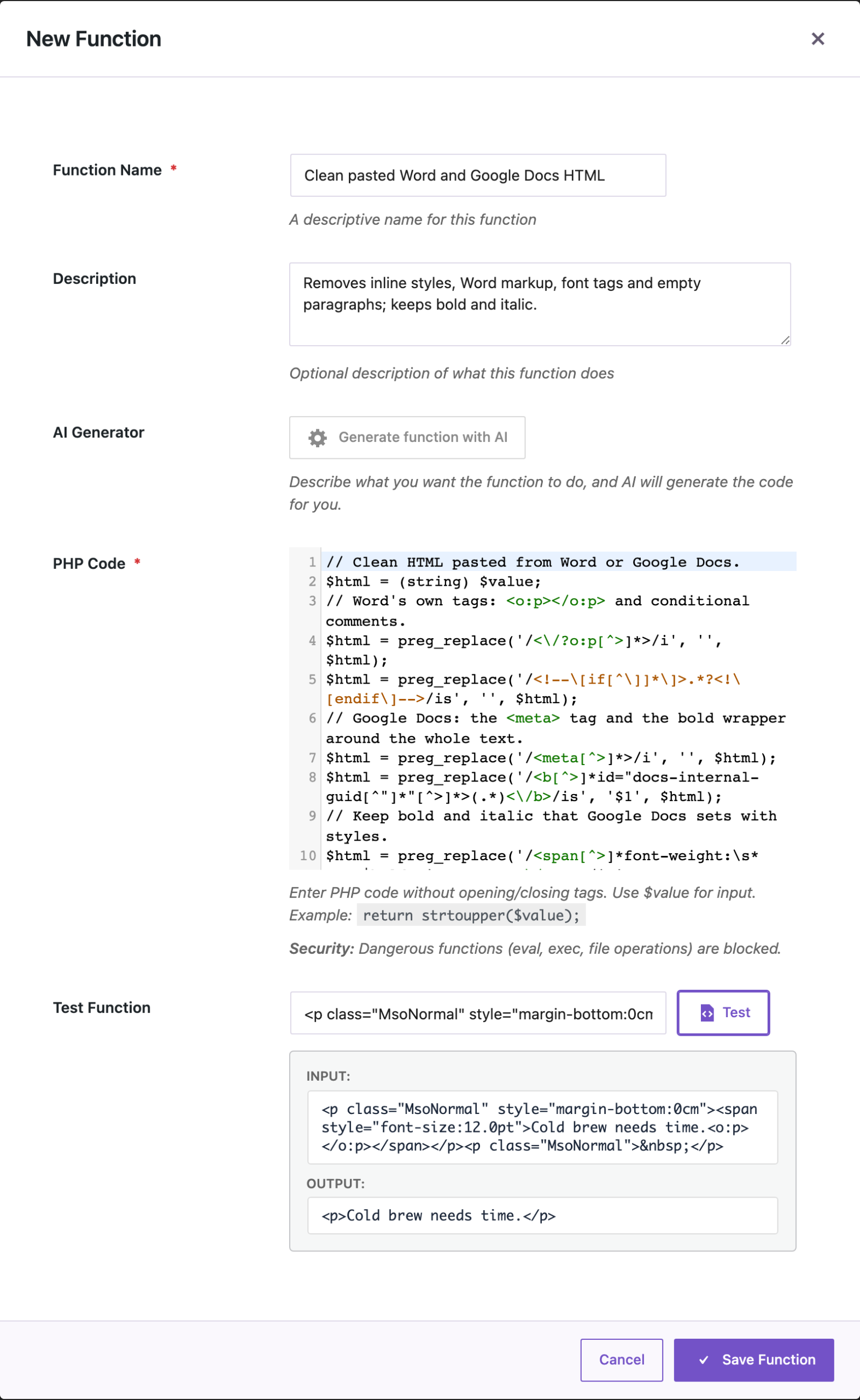
Click Save Function.
Step 2: Choose the posts
Open Import Export → Content Updater and choose Blog Posts. All our pasted posts came from one guest author, so we added the filter Author Name equals Maria Lopez. It found her 3 posts:
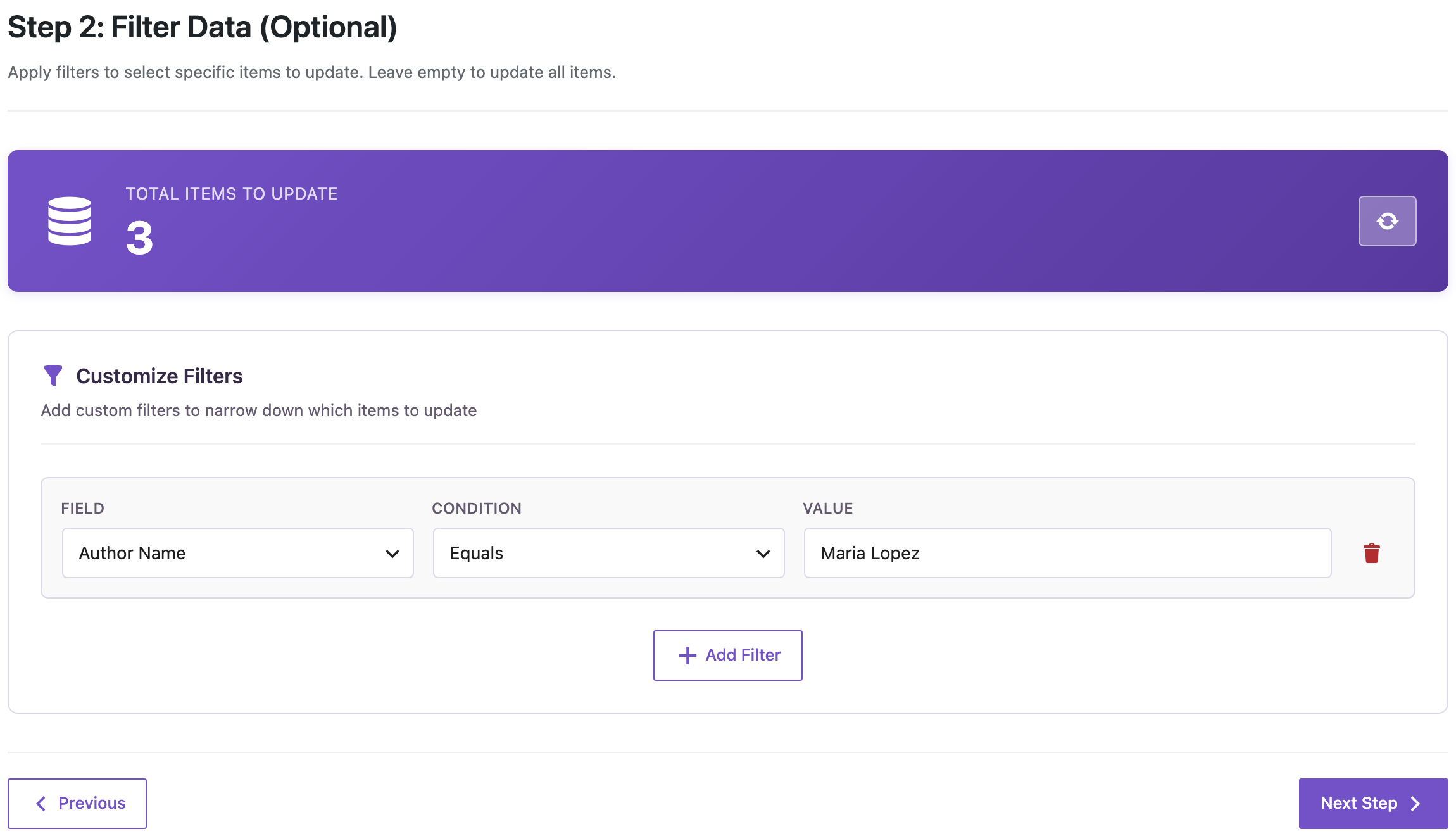
Other ways to find pasted posts: Content contains MsoNormal for Word, or docs-internal-guid for Google Docs.
Step 3: Clean the content
In Select Fields to Update, click Content. In Field Transformations, click Assign Transformations, find the function, click Add and check the result with Test Pipeline:
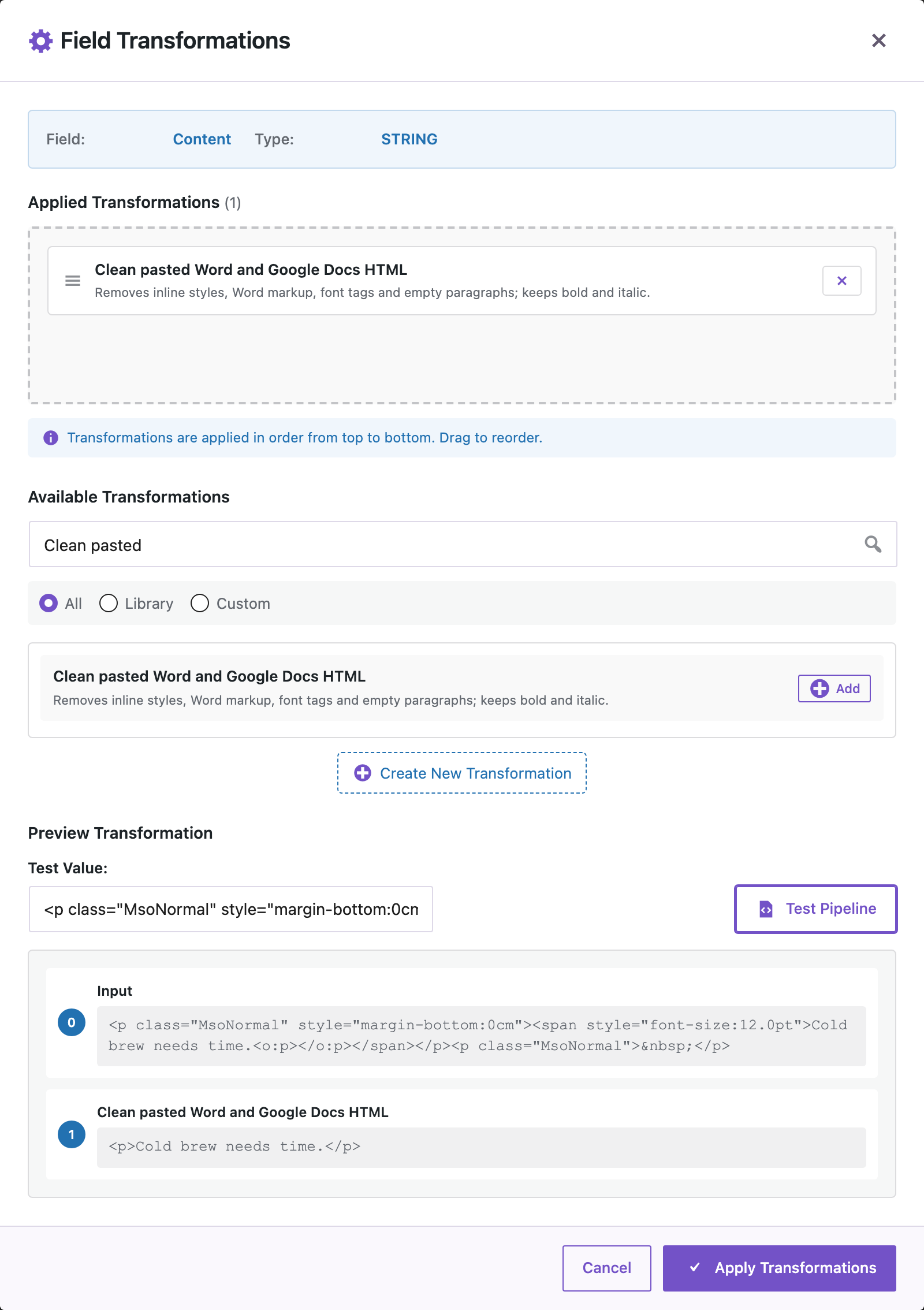
Click Apply Transformations, go to the last step and click Start Update:
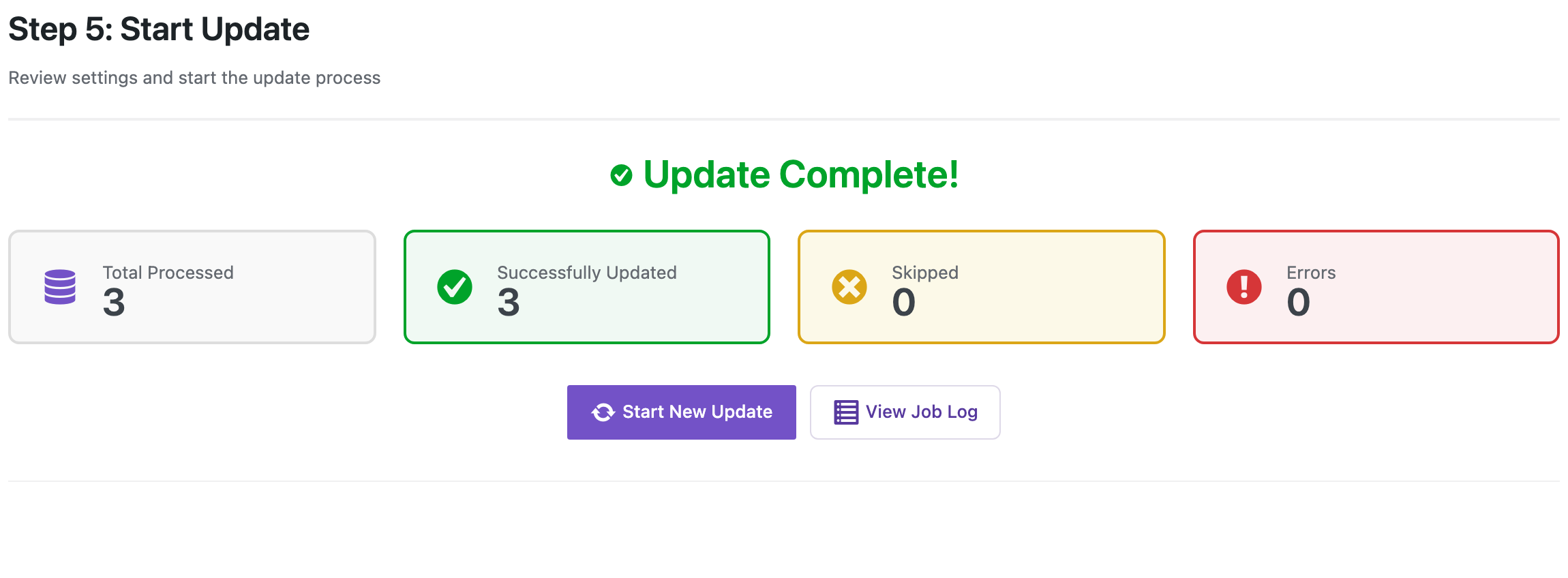
The result
The post pasted from Word, before:
<p class="MsoNormal" style="margin-bottom:0cm;line-height:normal"><span style="font-size:12.0pt;font-family:"Calibri",sans-serif">Cold brew needs time, not equipment. You need coarse coffee, cold water and a jar.<o:p></o:p></span></p>
<p class="MsoNormal" style="margin-bottom:0cm;line-height:normal"><span style="font-size:12.0pt"> <o:p></o:p></span></p>
<p class="MsoNormal" style="margin-bottom:0cm"><b><span style="font-size:14.0pt;color:#1F3864">Step 1: Grind</span></b><span style="font-size:12.0pt"><o:p></o:p></span></p>
<p class="MsoNormal"><span style="font-size:12.0pt">Use 100 g of coffee, ground coarse like sea salt.<o:p></o:p></span></p>
<!--[if gte mso 9]><xml><w:WordDocument><w:View>Normal</w:View></w:WordDocument></xml><![endif]-->After:
<p>Cold brew needs time, not equipment. You need coarse coffee, cold water and a jar.</p>

<p><b>Step 1: Grind</b></p>
<p>Use 100 g of coffee, ground coarse like sea salt.</p>
The post from Google Docs kept its bold “Tip:” as <strong>, and the post with <font> tags lost them and its two empty paragraphs.
Tips
- Test on one post first. Add a filter on the post ID, run the update and look at the post before you clean all of them.
- New posts. Run the update again after the next batch of guest posts. Clean posts don’t change.
- Find posts with old markup. Export the posts with Content contains
style=to see how many there are; see finding posts by their content.
With an AI agent
An AI agent connected to the site through the WordPress MCP Adapter (see connecting Claude Code to WordPress) can check that nothing was left behind:
Do any posts by Maria Lopez still have Word markup or inline styles?In our run, the agent counted Maria Lopez’s posts with rsl-ie/export-count (3), then called rsl-ie/export-preview with the filters Author Name equals Maria Lopez and Content contains style=. The list was empty: no inline styles were left.
FAQ
Does it work with block editor posts?
Yes. It changes the HTML inside the blocks and keeps the block comments. Pasted content usually sits in paragraph or Classic blocks.
Will my headings and links stay?
Yes. The function removes styles, Word and Google Docs markup and empty paragraphs, not tags such as headings, links or lists.
Can I undo it?
Restore the backup. WordPress revisions are not created by the Content Updater.
Is this in the free plugin?
No. The Content Updater and custom functions are PRO features.
Related Guides
- Add rel=”nofollow” to All External Links in Old Posts
- Bulk Update WordPress Content with Content Updater
- Find Every WordPress Post That Uses a Shortcode (Before You Remove a Plugin)
Get the free plugin on WordPress.org.

Comments 0
Have a question or a tip to share? Leave it below.