
Customers who ordered once and then went quiet are the cheapest ones to win back: they already know the store. WooCommerce lists customers, but it doesn’t filter them by the date of their last order. With Import Export by RockStarLab PRO, you export the customers whose last order is older than six months, with their names, emails and order history, ready for a win-back email.
PRO: the WooCommerce Customers export. Use PRO 2.1.19 or newer with the free plugin 2.2.0 or newer: they add the Last Order Date column and filter.
What you get
- One row per customer whose newest order is older than the date you choose.
- First name, last name and email.
- The number of orders, the total spent and the date of the last order.
Step 1: Filter by Last Order Date
Open Import Export → Export, choose WooCommerce Customers and click Next Step. Click Add Filter and set Last Order Date, Less Than, and the date six months ago. We ran this on 11 November 2026, so we picked 11 May 2026. Click the refresh button next to the total to update the count:
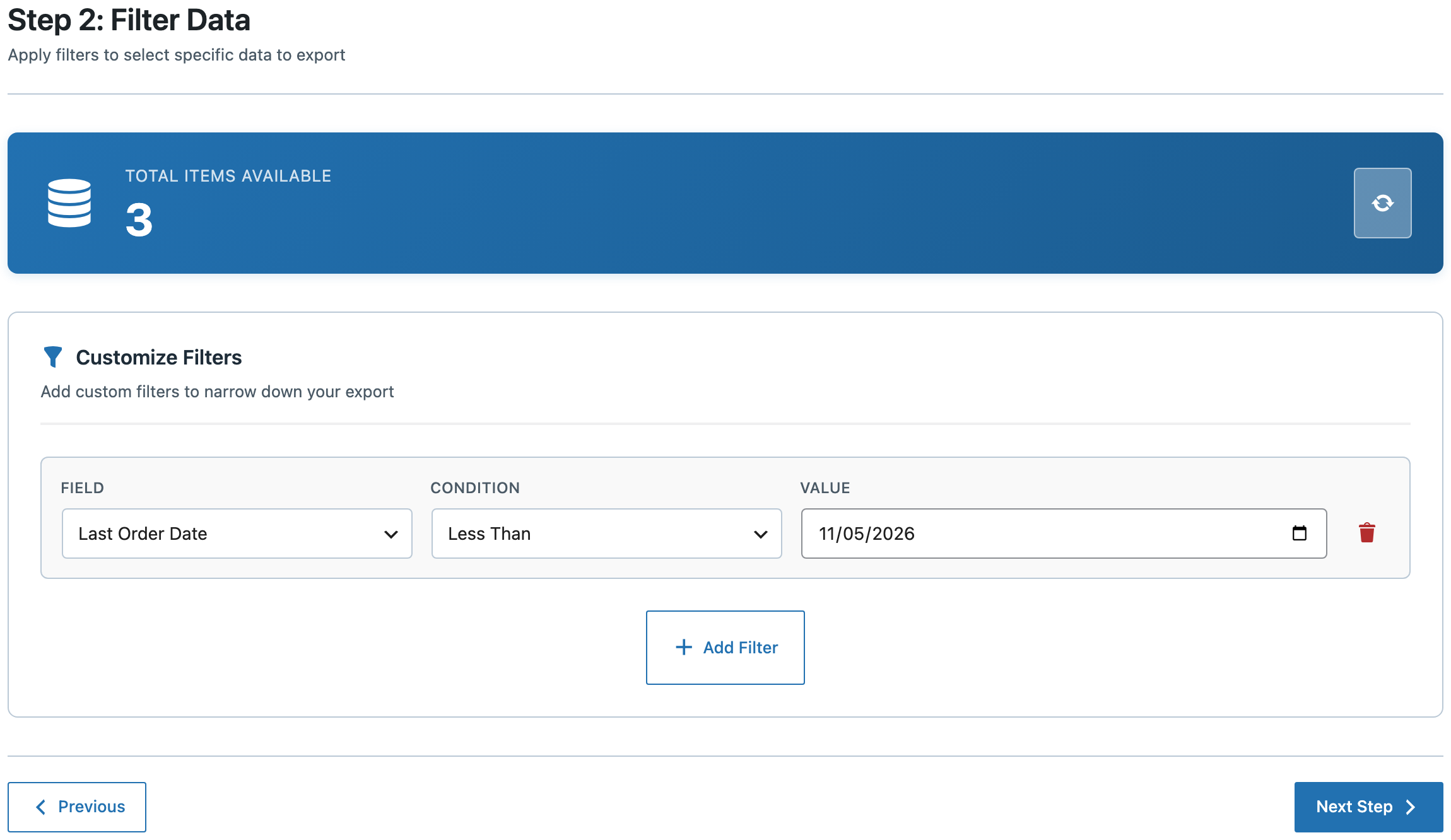
Our store has 8 customer accounts. The filter found the 3 customers whose last order was before 11 May 2026.
The Last Order Date is the date of the newest order that is not failed or cancelled. A customer whose only order was cancelled has no last order date, so this filter leaves them out.
Step 2: Choose the columns
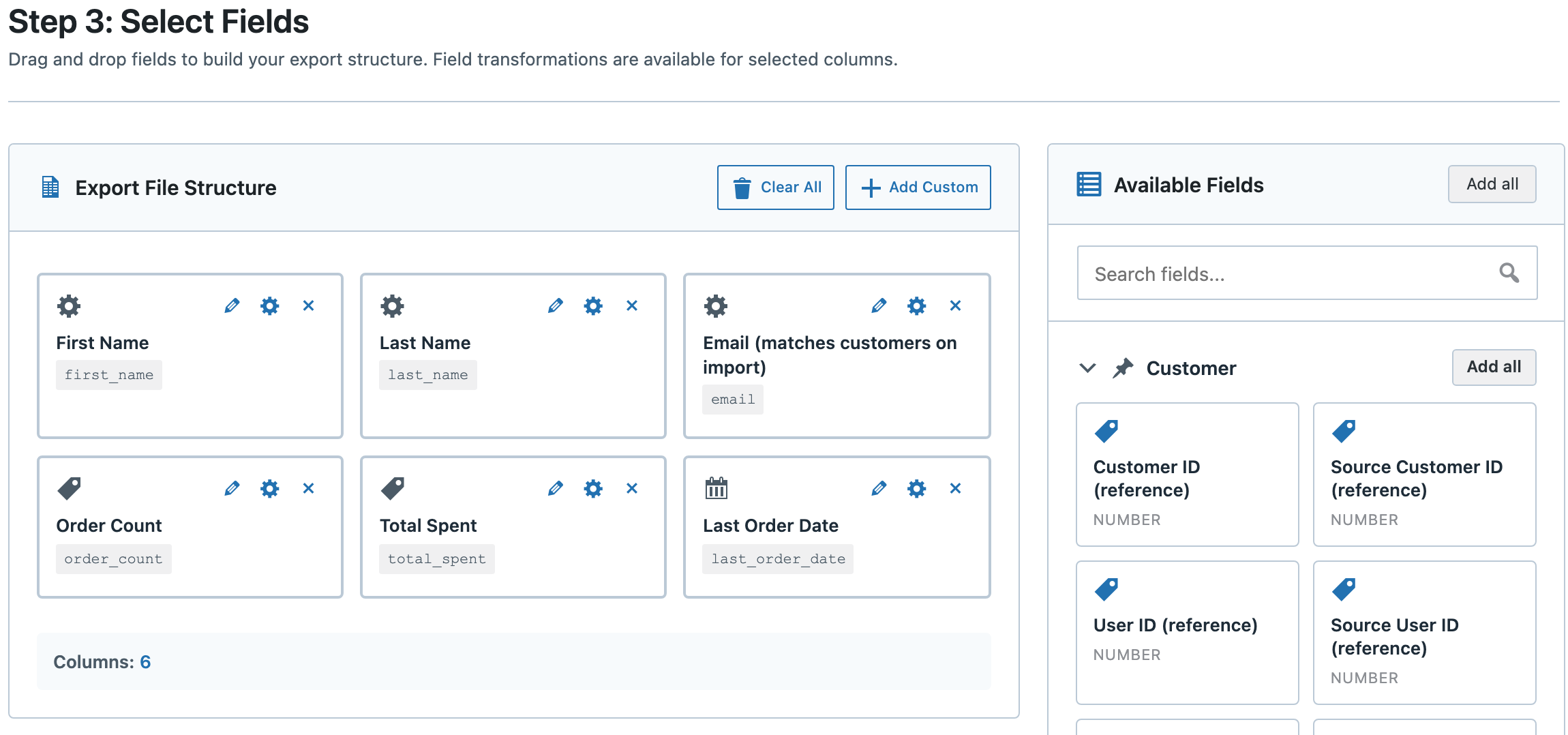
In Select Fields, click Clear All and drag First Name, Last Name, Email, Order Count, Total Spent and Last Order Date into the file structure:
Step 3: Export and download
Choose Excel or CSV, click Start Export and download the file. Our file:
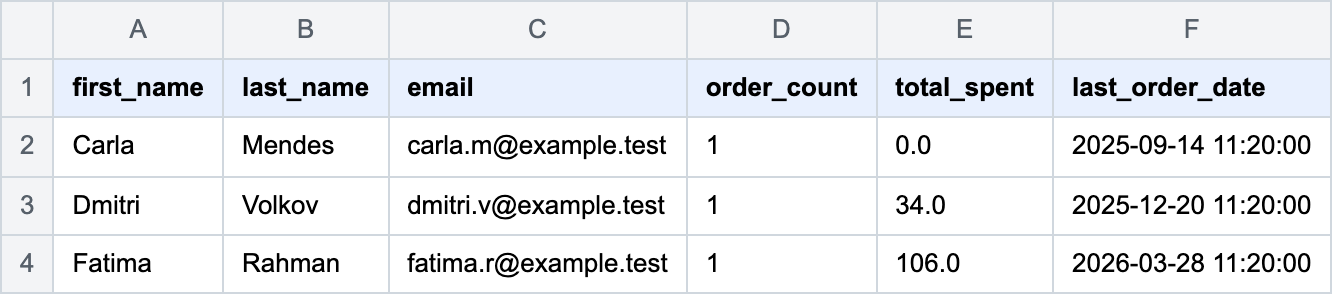
Carla’s total spent is 0 because her only order is on hold: WooCommerce counts only paid orders in Total Spent. Order Count includes it.
Tips
- Pick a window. Add a second filter, Last Order Date, Greater Than a date a year ago, to target customers who lapsed between 6 and 12 months ago.
- Customers worth the effort. Add Total Spent, Greater Than, for example 100, to start with the customers who spent the most.
- Accounts that never ordered. These have no Last Order Date, so the filter leaves them out. Use Order Count, Equals, 0 for them. This is a different message: a welcome offer, not a win-back.
- Consent. Send marketing emails only to customers who agreed to receive them.
- Repeat it. Run the export again next month with the new date: the list only depends on the date you enter.
The export doesn’t change any customer. If you later import changes back, for example tags from your email tool, back up the store first, or ask your AI agent to start the backup.
With an AI agent
An AI agent connected to the store through the WordPress MCP Adapter (see connecting Claude Code to WordPress) can build the same list:
Which customers have not ordered since 11 May 2026? Give me their emails and last order dates.In our run, the agent called rsl-ie-pro/export-preview with export_type woo_customer and the filter last_order_date less than 2026-05-11. It returned Carla (14 September 2025), Dmitri (20 December 2025) and Fatima (28 March 2026) with their emails. With the filter order_count equals 0 it listed the two accounts that never ordered. The preview only reads data.
FAQ
Are guest customers included?
No. The Customers export lists registered customer accounts. Guests appear only in the Orders export, which has the billing name, email and order date of each order.
Which orders count for the Last Order Date?
All orders except failed, cancelled and checkout drafts. Pending, on-hold, processing, completed and refunded orders count.
Can I filter by a number of days instead of a date?
The filter takes a date. Enter the date that many days ago, for example 180 days before today.
Does the export change my customers?
No. It only reads them.
Related Guides
- Export Customers Who Bought a Specific WooCommerce Product
- Export Your Top WooCommerce Customers by Total Spent
- Admin Colors, Row Filter and Day-First Dates (What’s New in 2.2.0)
Get the free plugin on WordPress.org.

Comments 0
Have a question or a tip to share? Leave it below.