
Import Export by RockStarLab 2.2.0 follows your WordPress admin color scheme, can import only the rows of a file that meet your conditions, and reads day-first dates such as 15/03/2024. PRO 2.1.19 adds a Last Order Date column for customers and fixes variable product pushes started by AI agents.
Free: admin colors, the row filter and the date option are in the free plugin. PRO: the WooCommerce Customers export and Content Sync of WooCommerce products are PRO features; use PRO 2.1.19.
Colors follow your admin color scheme
Every user can pick an admin color scheme in Users → Profile → Admin Color Scheme. The plugin’s screens now use the colors of that scheme: buttons, links, tabs, step numbers, badges, highlights and the plugin’s pop-up windows. The Default scheme uses WordPress blue, Midnight uses red, Coffee brown, and so on for all nine built-in schemes. A custom color scheme added by another plugin keeps the plugin’s own purple colors.

Import only some rows of a file
Step 5 of the import (Import Options) has a new Filter Rows option. Tick it and add one or more conditions: a column of the file, a condition and a value. Rows that do not match are not imported. The conditions are equals, does not equal, contains, does not contain, starts with, is one of, is none of, greater than, less than, is empty and is not empty. Text comparisons ignore letter case; greater than and less than compare numbers, and dates written as YYYY-MM-DD. With Rows must match you choose whether a row needs all conditions or any one of them.
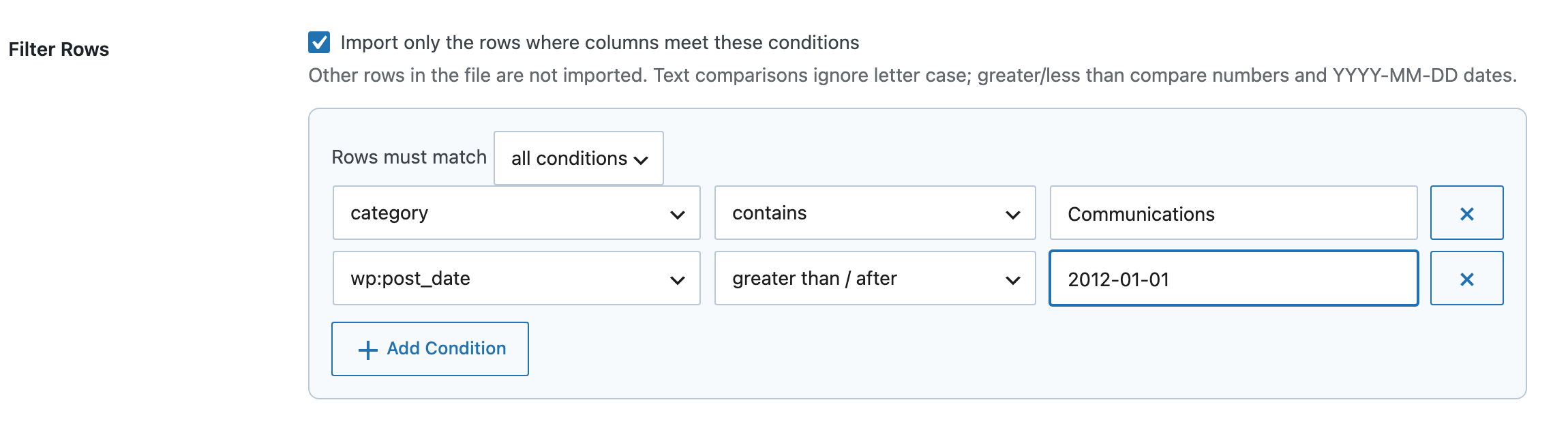
The filter works with CSV, Excel, JSON and XML files. In a WordPress export (WXR) file the columns are the item fields, for example category, wp:post_type, wp:status and wp:post_date, so you can import only the posts of one category or only the posts published after a date. The job log says how many rows were left out.
Day-first dates in import files
Before 2.2.0, a post date written as 15/03/2024 (day first) made the row fail, and 03/04/2024 was always read as 4 March. Step 5 now has Dates in the File:

- Detect automatically (default): 15/03/2024 is 15 March and 03/15/2024 is 15 March. When both numbers are 12 or less, a date with slashes is read month first and a date with dots or dashes day first.
- Day first (DD/MM/YYYY): for files from Europe and most other countries.
- Month first (MM/DD/YYYY): for files from the United States.
The option applies to the post date columns and to ACF date fields.
Last Order Date for WooCommerce customers (PRO)
The WooCommerce Customers export has a new Last Order Date column and filter. It is the date of the customer’s newest order that is not failed or cancelled. For example, Last Order Date less than a date six months ago lists the customers who have not ordered since then:

Other changes
- An ACF Relationship or Post Object cell whose post is not found leaves the field empty. Before, ACF saved it as post ID 0. When the post appears later in the same file, the field is still filled in.
- PRO 2.1.19: a Content Sync push of variable products started by an AI agent or as a background job no longer adds a second copy of every variation when the products already exist on the other site without having been synced before. Variations are matched by SKU or by their attributes, as in a push from the admin screen, and the job finishes. Before, the job stopped at the variations step and the variation prices and stock were not updated.
How to update
Update from Dashboard → Updates. Settings, jobs, mapping templates and schedules stay as they are. As before any update, back up the site first.
With an AI agent
An AI agent connected through the WordPress MCP Adapter (see connecting Claude Code to WordPress) can use the new options. Imports take options.row_filters (a list of field, operator, value), options.row_filters_match and options.date_order. For customers, we asked:
Which customers have not ordered since 11 May 2026?The agent called rsl-ie-pro/export-preview with export_type woo_customer and the filter last_order_date less than 2026-05-11, and returned three customers with their last order dates (14 September 2025, 20 December 2025 and 28 March 2026). The preview only reads data.
FAQ
Can I go back to the purple colors?
The plugin follows the scheme of each user. With a custom admin color scheme the plugin keeps its purple colors; there is no separate setting.
Does the row filter change the rows that are imported?
No. It only decides which rows are imported. Mapping, functions and the other options work as before on the remaining rows.
Is the row filter saved in mapping templates and schedules?
Yes. Save as Template keeps the conditions and the date option, and a scheduled import runs with the options of its source job.
Do I need to update PRO?
Only for the Last Order Date column and the variation fix. PRO 2.1.18 keeps working with 2.2.0.
Related Guides
- Category Spreadsheets and WXR Tags (What’s New in 2.2.1)
- Functions Keep HTML Entities (What’s New in PRO 2.1.18)
- Excel Leading Zeros, Dates and Scientific Notation in CSV Files
Get the free plugin on WordPress.org.

Comments 0
Have a question or a tip to share? Leave it below.