
Moving a blog often means moving its conversations too: questions from readers, your replies, the comments still waiting for approval. Import Export by RockStarLab imports comments from a CSV or Excel file, attaches each one to the right post by its slug, keeps replies under the comments they answer and keeps the original dates. In the example, six comments move from a coffee roastery’s old blog.
Free: everything in this guide works in the free plugin.
Short Answer
- Prepare a file with a comment ID, a parent ID for replies, the post slug, author, email, date, text and status.
- Go to Import Export by RockStarLab → Import, choose Comments and upload the file.
- Click Auto Map and check that Comment ID went to Source Comment ID, Parent ID to Source Parent Comment ID and Post Slug to Post Slug.
- Run the import. Replies are threaded after all rows are in.
The file
Comment ID,Parent ID,Post Slug,Author,Email,Date,Comment,Approved
101,,our-new-roastery-opens-in-march,Nina Petrova,nina@example.com,2025-02-14 09:12:00,Can't wait! Will there be a tasting bar?,1
102,101,our-new-roastery-opens-in-march,Roastery Team,hello@example-roastery.com,2025-02-14 11:40:00,"Yes, Nina: a six-seat cupping bar by the window.",1
103,,how-we-source-green-coffee,David Okafor,david@example.com,2025-03-02 18:05:00,Do you visit the farms yourselves?,1
104,103,how-we-source-green-coffee,Roastery Team,hello@example-roastery.com,2025-03-03 08:30:00,"Every harvest, for our main producers.",1
105,,how-we-source-green-coffee,Sam Lee,sam@example.com,2025-03-05 22:10:00,Is the Guji lot still available?,0
106,,winter-holiday-hours,Ola Berg,ola@example.com,2024-12-20 10:00:00,Are you open on the 26th?,1- Comment ID and Parent ID are the IDs from the old site. They aren’t used as WordPress IDs; the plugin uses them to put replies under the right comment and to recognise the same comment when you import the file again.
- Post Slug finds the post. If your posts kept their slugs, this is the most reliable link. Post Title and Post Permalink also work.
- Approved: 1 approved, 0 pending, or
spam. - Commas inside the text need quotes around the value, as in rows 102 and 104.
Our blog had the first two posts. The holiday-hours post wasn’t moved, which we’ll come back to.
Map the columns
For comments, Auto Map understands common headers such as Comment ID, Parent ID, Post Slug, Author, Email, Date, Comment and Approved:

If your file uses other names, drag the columns onto the fields on the right. Map the old IDs to Source Comment ID and Source Parent Comment ID, not to the plain Comment ID field. On the next step, Check for Existing Items by Field is set to Source Comment ID with Update, so a second run updates the same comments instead of adding copies.
Run the import
All six comments were imported. One note came with them:

No post had the slug winter-holiday-hours, so the plugin created a draft post called “Imported Comment Source” with that slug and attached Ola’s comment to it. Nothing is lost and nothing is public: either move the real post later and its comment is already waiting, or open the draft, check the comment and delete what you don’t need. The same note is in Jobs Log under the job’s details.
Check the result
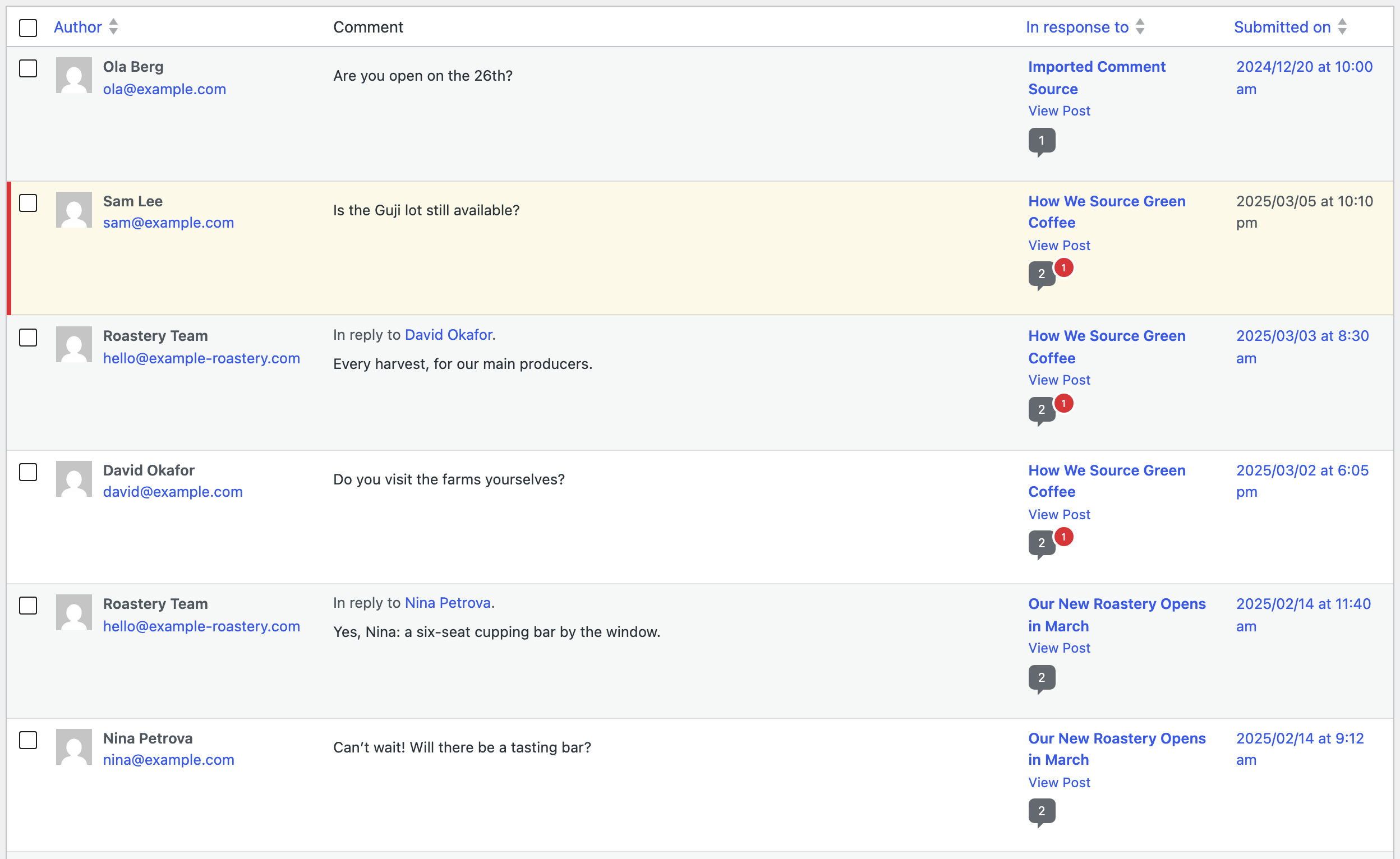
In Comments, the replies say “In reply to” the right reader, the dates are the original ones and Sam’s question is waiting for approval:
On the post, the replies appear nested under the questions, as on the old blog:

Comments whose email matches a user on the new site are linked to that user. The others stay guest comments with the name and email from the file.
Replies can also come in a later file. If a reply’s parent was imported earlier, the plugin finds it by its old ID and threads the reply under it.
Before you import
Comments are hard to clean up by hand once there are hundreds. Back up the site, import a few rows first and check them on the post.
With an AI agent
An AI agent connected through the WordPress MCP Adapter (see connecting Claude Code to WordPress) can check the import for you:
Did all the comments from the last import land on real posts?In our run, the agent called rsl-ie/job-list for the latest import (6 comments, 0 failed) and rsl-ie/job-get-logs with level warning. It reported that no post matched winter-holiday-hours and that the comment is on the new draft, with the draft’s ID.
FAQ
Can I import comments from Excel?
Yes. The importer reads CSV, Excel (.xlsx), JSON and XML files.
How are replies kept under the right comment?
Map the old comment ID to Source Comment ID and the old parent ID to Source Parent Comment ID. The plugin threads the replies after all rows are imported.
What happens if the post doesn’t exist?
The plugin creates a draft post with the slug from the file, attaches the comment to it and lists it in the import result and the Jobs Log.
Will importing the same file twice duplicate comments?
No, when Check for Existing Items is set to Source Comment ID. The second run updates the comments.
Are notification emails sent for imported comments?
No, the import doesn’t send comment notifications.
Related Guides
- Export WordPress Comments to CSV or Excel: Full Guide
- Sync WordPress Comments Between Sites with ACF Fields
- How to Import WordPress Posts from CSV or Excel
- WP-CLI Import and Export for WordPress: CSV, Excel and Cron Scripts
Get the free plugin on WordPress.org.

Comments 0
Have a question or a tip to share? Leave it below.