
Keyword cannibalization means several pages of your site compete for the same search: three posts about “sourdough bread”, and Google ranks a different one each week, or none of them well. If you use Yoast SEO, the focus keyphrase you set for each post is a quick way to find these groups, but Yoast shows it one post at a time. With Import Export by RockStarLab, every focus keyphrase goes into one file, and a spreadsheet finds the duplicates. We tested it on a bakery blog with nine posts, where two keyphrases were used more than once.
Free: export of posts and pages with Yoast SEO fields (focus keyphrase, SEO title, meta description) and Rank Math fields. PRO: the same for custom post types and WooCommerce products.
Short Answer
- Go to Import Export → Export, choose Blog Posts (and later Pages).
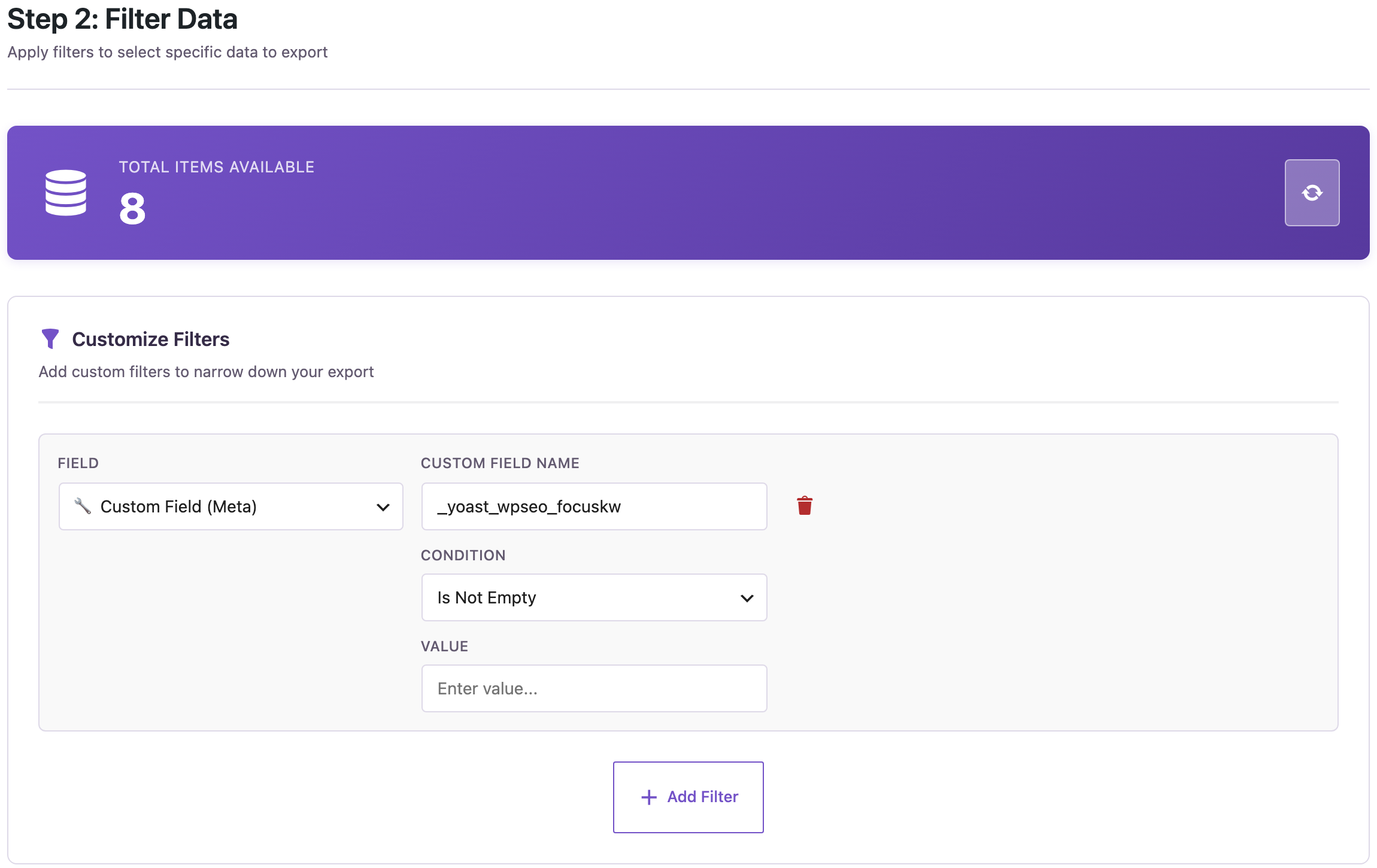
- Add a filter: Custom Field (Meta), name
_yoast_wpseo_focuskw, condition Is Not Empty. - Add the columns ID, Title, Focus Keyword, Permalink, Date and Word Count, and export to CSV or XLSX.
- In the spreadsheet, sort by the keyphrase and mark the ones that appear more than once.
Exports only read your content, so you don’t need a backup for them.
Step 1: Export the focus keyphrases
Yoast stores the focus keyphrase of each post in a custom field named _yoast_wpseo_focuskw. In step 2 of the export, click Add Filter, choose Custom Field (Meta), type that name and choose Is Not Empty. Posts without a keyphrase are left out; on our site, 8 of the 9 bakery posts had one.
In step 3, add the columns. With Yoast active, its fields appear among the available fields, and the focus keyphrase is called Focus Keyword:
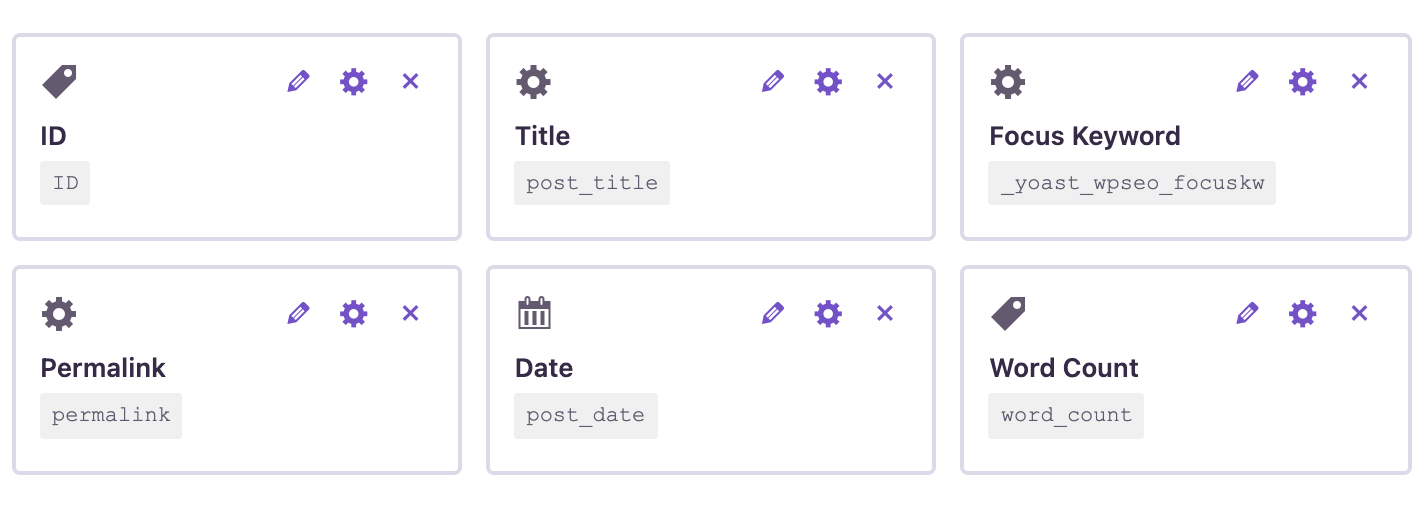
Permalink gives the full address of each post, Date shows which post is newer, and Word Count shows which one has more content. Add Yoast’s SEO title (_yoast_wpseo_title) if you want to compare titles too. In step 4, choose CSV or XLSX and click Start Export.
Step 2: Find the keyphrases used more than once
Our file, sorted by the keyphrase:
| ID | Title | Focus Keyword | Date | Words |
|---|---|---|---|---|
| 2024 | Butter Croissant Recipe | croissant recipe | 2025-05-08 | 8 |
| 2025 | Easy Croissant Recipe Without a Mixer | croissant recipe | 2026-01-17 | 11 |
| 2026 | Gluten-Free Bread Options | gluten-free bread | 2025-06-30 | 8 |
| 2028 | Rye Bread With Caraway | rye bread | 2025-10-05 | 9 |
| 2020 | How to Make Sourdough Bread at Home | sourdough bread | 2025-03-02 | 12 |
| 2021 | Sourdough Bread for Beginners | Sourdough Bread | 2025-09-14 | 9 |
| 2022 | Our Favourite Sourdough Bread Recipe | sourdough bread | 2026-02-20 | 10 |
| 2023 | Sourdough Starter: Feeding Schedule | sourdough starter | 2025-04-11 | 9 |
Editors don’t always type a keyphrase the same way: one post has “Sourdough Bread” with capitals. To group them reliably, add a helper column next to the keyphrase (column C here) and copy the formula down:
=LOWER(TRIM(C2))Then count how often each cleaned keyphrase appears, in the next column:
=COUNTIF(G:G, G2)Both formulas work in Excel and Google Sheets. Filter the count column for values greater than 1: here “sourdough bread” appears 3 times and “croissant recipe” twice. “sourdough starter” is a different topic and stays on its own.
Step 3: Decide what to do with each group
Look at each group and decide whether the posts really answer the same question:
- Same intent, similar content (the three sourdough bread posts): keep the strongest post, move anything useful from the others into it, and redirect the old addresses to it with 301 redirects. The Permalink column already gives you the old addresses; see exporting all site URLs.
- Different intent, same keyphrase (a classic croissant recipe and one without a mixer): keep both posts, but give each its own, more specific keyphrase, title and meta description, such as “croissant recipe without mixer”.
- Keyphrase only set by habit: sometimes the keyphrase is the only overlap. Change it in Yoast to what the post is actually about.
The focus keyphrase is your intention, not what Google decides. If you use Google Search Console, check which of the posts actually receives impressions for the query before you merge anything.
To change keyphrases, SEO titles or meta descriptions of many posts at once, edit them in the same file and import it back; see bulk updating Yoast meta descriptions from a CSV. That import changes your posts, so create a backup first.
Posts without a keyphrase
The opposite list is useful too: change the condition to Is Empty to export the posts that have no focus keyphrase at all. On our site, that included “How Long Does Bread Stay Fresh?”. Rank Math users can do the same with the field rank_math_focus_keyword.
With an AI agent
An AI agent connected through the WordPress MCP Adapter (see connecting Claude Code to WordPress) can do the export and the grouping:
Export all published posts that have a Yoast focus keyphrase, with title,
keyphrase, address and date. Then list the keyphrases used by more than
one post, ignoring case and extra spaces.
In our run, the agent started rsl-ie/export-start with the filter custom_fields: [{"name": "_yoast_wpseo_focuskw", "condition": "is_not_empty"}] and the fields ID, post_title, _yoast_wpseo_focuskw, permalink, post_date, read the CSV and reported two groups: “sourdough bread” (posts 2020, 2021, 2022) and “croissant recipe” (2024, 2025).
FAQ
Where does Yoast store the focus keyphrase?
In the custom field _yoast_wpseo_focuskw of each post. The export shows it as the Focus Keyword column.
Does the same focus keyphrase always mean cannibalization?
No. It shows where to look. Two posts with one keyphrase can serve different searches; check their content and, if you can, Search Console data.
Why are “Sourdough Bread” and “sourdough bread” counted separately?
Extra spaces make them different values in a spreadsheet, and some functions, such as EXACT, also treat capitals as different. Clean the column with =LOWER(TRIM()) before counting.
Can I include pages?
Yes. Run the same export for Pages and paste both files into one sheet before counting.
Does this work with Rank Math?
Yes. Use the field rank_math_focus_keyword in the filter and add the Rank Math focus keyword column.
Related Guides
- How to Export Yoast SEO Titles and Meta Descriptions to CSV for an SEO Audit
- Bulk Update Yoast Meta Descriptions from a CSV
- Export Rank Math SEO Titles and Meta Descriptions to CSV
- Export Posts from One Category, Tag or Author to CSV
Get the free plugin on WordPress.org.

Comments 0
Have a question or a tip to share? Leave it below.