
Import Export by RockStarLab PRO 2.1.14 and 2.1.15 fix how Content Sync pushes variable WooCommerce products to a site that already has the same product.
PRO: both fixes. Free: no change; Import Export by RockStarLab 2.1.52 works with PRO 2.1.15.
Existing variations are updated, not copied
When a store and its staging copy both have a variable product, the first push of that product from staging used to add a second set of variations on the live site, with the same SKUs. In PRO 2.1.14, Content Sync matches the variations that were never synced before: first by SKU, and by the same attribute values (for example Color Red and Logo No) when a variation has no SKU.
- A matched variation is updated with the price, sale price and stock from the site you push from.
- A variation that exists only on the site you push from is created.
- A variation that exists only on the receiving site is left as it is.
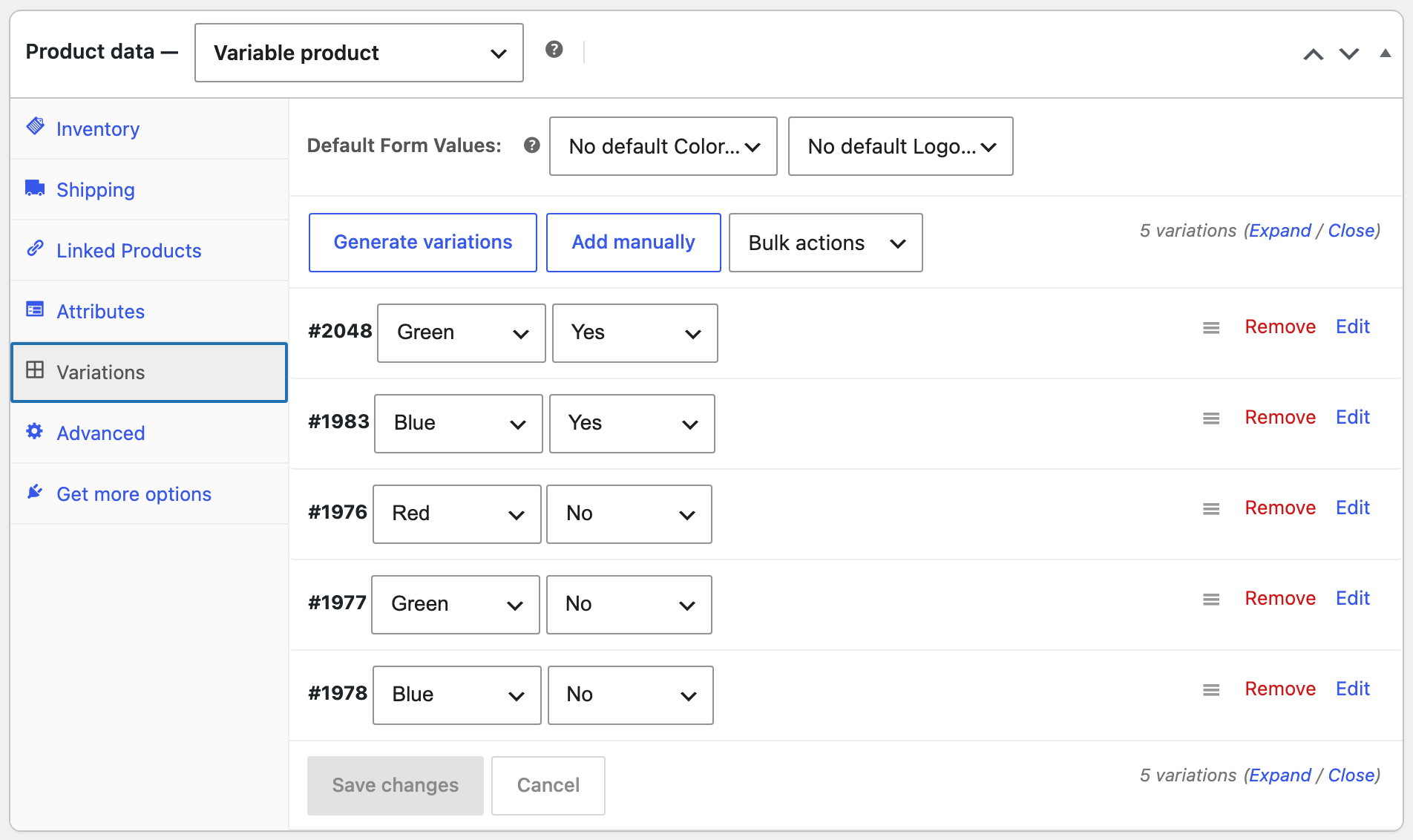
In our test, the Hoodie on the staging site had four variations from the live site and one new one (Green with logo, 49, 15 in stock). After one push, the live Hoodie had five variations: the four old ones with their old IDs and new prices, and the new Green one:
A sale that ended is removed
PRO 2.1.15 also clears the sale price on the receiving site when the variation is no longer on sale on the site you push from. In the same test, the Red Hoodie had a sale price of 42 on live and none on staging; after the push it sells for 48 on live as well, without a sale badge.
How to update
Update PRO from Dashboard → Updates or the Plugins screen on both sites that you sync. Connections, mappings and settings stay as they are. As before any update or push, back up the site first.
With an AI agent
An AI agent connected through the WordPress MCP Adapter (see connecting Claude Code to WordPress) can check the variations on the live site after a push:
List the SKU, price, sale price and stock of every Hoodie variation.On PRO 2.1.15, the agent called rsl-ie-pro/export-preview for the Hoodie with the option variation_rows. It returned five rows with five different SKUs, from woo-hoodie-red at 48 with no sale price to woo-hoodie-green-logo at 49 with 15 in stock.
FAQ
I already have duplicate variations from an earlier push. What should I do?
Remove the extra copies on the receiving site in Product data → Variations (they have the newer IDs), then push again. Restoring the backup made before the push also works.
Are variations deleted on the receiving site?
Only variations that came from a previous push and no longer exist on the site you push from. Variations that were created on the receiving site itself are kept.
Do I need to update the free plugin?
No. The free plugin stays at 2.1.52.
Related Guides
- Content Sync Keeps Your Store’s Stock (What’s New in 2.1.54)
- Import WordPress and WordPress.com Export Files (What’s New in 2.1.52)
- How to Sync WooCommerce Products Between Two Sites
Get the free plugin on WordPress.org.

Comments 0
Have a question or a tip to share? Leave it below.