
Import Export by RockStarLab 2.1.53 and 2.1.54 make Content Sync keep the stock that the receiving WooCommerce store tracks, also when the product you push has no stock settings saved.
Free: the fix is in the free plugin, which receives the pushed content. PRO: no change; WooCommerce products are synced with PRO, and PRO 2.1.15 works with 2.1.54.
Tracked stock stays on the receiving store
Content Sync already treats the stock of the receiving store as its own: when the live store tracks the quantity of a product, a push from staging does not replace it with the staging quantity. One case was missing. Products created by some importers or by code can have no stock settings saved at all. When such a product was pushed, the live store lost its stock management setting, and WooCommerce then cleared the quantity.
From 2.1.54, the live store keeps both: stock management stays on and the quantity stays as it was. Prices, descriptions and the other product fields are still updated from the site you push from.
In our test, the Beanie on live tracked 7 in stock. On staging, the Beanie had no stock settings saved and a new price of 21. After the push, the live Beanie costs 21, and stock management is still on with 7 in stock:
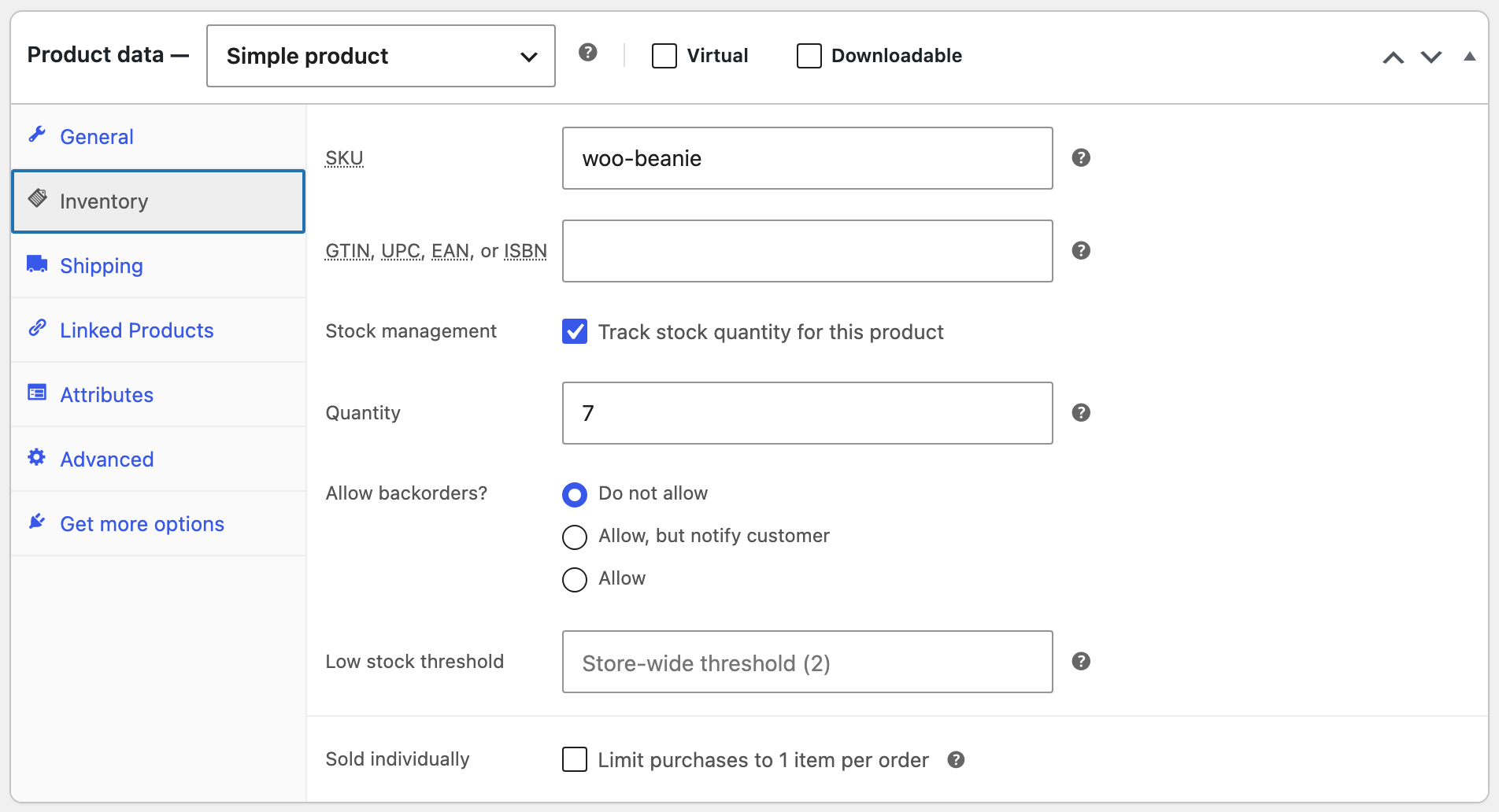
With 2.1.52, the same push turned stock management off on live and cleared the quantity.
How to update
Update the free plugin from Dashboard → Updates or the Plugins screen, on the sites that receive pushes. Connections and settings stay as they are. As before any update or push, back up the site first.
With an AI agent
An AI agent connected to the live store through the WordPress MCP Adapter (see connecting Claude Code to WordPress) can check the stock after a push:
Show the price, stock management and stock quantity of the Beanie.On 2.1.54, the agent called rsl-ie-pro/export-preview for the Beanie and returned the price 21, stock management yes, 7 in stock and the status In stock.
FAQ
Which stock wins in a push?
If the receiving store tracks the stock of the product, its own quantity is kept. If it does not track stock, the stock settings and quantity come from the site you push from.
Are sales counts and ratings changed by a push?
No. They come from the orders and reviews of the receiving store and are kept.
Do I need to update PRO?
No. PRO stays at 2.1.15.
Related Guides
- Reliable Pulls and Scheduled Page Pulls (What’s New in 2.1.55)
- Variable Products in Content Sync (What’s New in PRO 2.1.15)
- How to Sync WooCommerce Products Between Two Sites
Get the free plugin on WordPress.org.

Comments 0
Have a question or a tip to share? Leave it below.