
Import Export by RockStarLab 2.2.48 and PRO 2.1.44 add a language filter to the export screen and fix what we found while testing Polylang sites in every part of the plugin: Content Sync of pages, posts, products, categories, menus, users and media, file export and import in four formats, and the abilities that AI agents use. Polylang support itself arrived in 2.2.47 and PRO 2.1.43.
Free: the language filter and the fixes for ACF User fields, ACF Taxonomy fields, comment fields and busy connections. PRO: the Polylang fixes and the menu sync fixes. Update both plugins.
Export by Language
The export filters have a new field, Language (Polylang). Pick one or more languages from the list, or choose Not in these languages to leave one out. Before, the same filter needed a Taxonomy Filter with the taxonomy name language typed by hand.
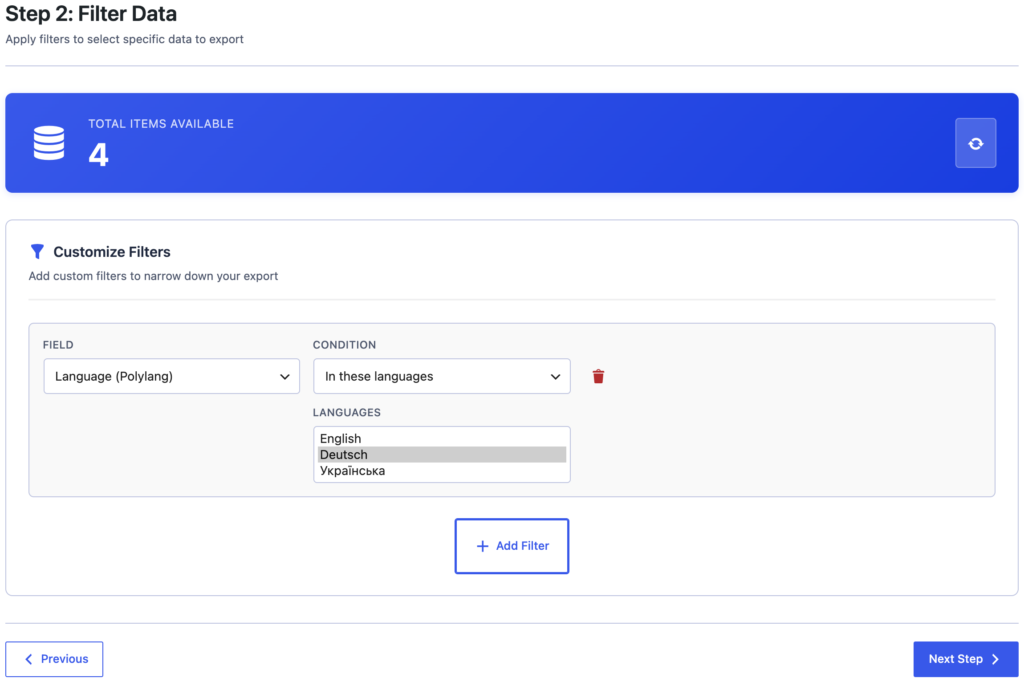
The filter is there for posts, pages, custom post types and WooCommerce products whenever Polylang is active. With PRO, combine it with the Language and Translation group columns to send one language to a translator and import the result back.
Polylang Fixes in Content Sync
- A page or post that shares its slug with a page of another language, such as an English and a German page both called
visit, could replace that page on the receiving site. Each one now updates only the page of its own language. - A category used in an ACF Taxonomy field could rename the category of another language that has the same slug. Fixed.
- Term sync now sends the translations of the selected categories and tags and links them; one English category gave 3 updated terms in our test.
- ACF image fields of categories and comments, and images inside ACF WYSIWYG fields, now point to the media translation of their language after a sync or a file import.
- When the sync creates a WooCommerce attribute on the receiving store, the terms of that attribute get their language and stay linked.
- Content Migration no longer lists Polylang’s own taxonomies as steps; languages and translation groups travel with each record.
Other Fixes
- ACF User fields now point to the matching user on the receiving site: a user synced earlier, or a user with the same login or email. Before, they kept the user ID of the other site.
- Comments imported from a file keep the link to their ACF fields, so ACF shows the values.
- Menu sync keeps the slug of a new menu and finds the menu again on the next push; before, the second push of such a menu failed. A menu named “Main menu” can now be created next to an existing “Main Menu”.
- Push current menu creates a new menu on the other site when no menu is selected; before, a menu with the same name had to exist there.
- A menu pull reports the items it skipped because no local page or category was chosen for them.
- Clicking Confirm & Sync while the list of remote posts was still loading could end with “This connection is already in use”. The sync now waits for the list.
- The message for a connection that works in one direction says how to make it work in both: click Edit for the site in Content Sync and save it.
How to Update
Update from Dashboard > Updates on all connected sites, the free plugin from WordPress.org and PRO from your account. Connections, jobs and schedules stay as they are. As before any update, back up the site first.
With an AI Agent
Agents get the same fixes through the abilities. Two things are new: the input with_translations in rsl-ie-pro/sync-terms-push (true by default, and the result counts the translations), and items_skipped in the result of rsl-ie-pro/sync-menus-pull. For example:
Push the category "Coffee guides" and its translations to the live site.In our run the agent called rsl-ie-pro/sync-terms-push with the English category ID and got “updated: 3”.
FAQ
Do I need PRO for the language filter?
No. The Language (Polylang) filter is in the free plugin and appears when Polylang is active. The Language and Translation group columns are PRO.
Do I have to sync my Polylang content again after the update?
Only content that was affected: pages with shared slugs, categories used in ACF Taxonomy fields, or menus whose second push failed. Push them again after updating both sites.
Which versions work together?
The free plugin 2.2.48 with PRO 2.1.44. Update both on every connected site.
Related Guides
- How Content Sync Works: API Keys, Push, Pull and What Gets Copied
- Export WordPress Content for Translators and Import the Translations Back
- ACF Relationship Fields Break After Import? How to Fix the IDs
Get the free plugin on WordPress.org.

Comments 0
Have a question or a tip to share? Leave it below.