
Import Export by RockStarLab 2.1.41 makes JSON imports work with the files APIs and other systems really produce: values inside nested objects get their own columns, and Auto Map knows where the common ones belong. Everything in this release is part of the Free plugin.
Nested JSON objects become columns
JSON from an API rarely looks like a flat spreadsheet. A recipe, a product or an article often carries its author or image as an object:
{
  "slug": "iced-oat-latte",
  "name": "Iced Oat Latte",
  "published": "2026-05-02 08:00:00",
  "tags": ["iced", "oat milk"],
  "author": { "name": "Lena Novak", "email": "lena@example-roastery.com" },
  "image": { "url": "https://old.example-roastery.com/img/iced-oat-latte.jpg", "alt": "Iced oat latte in a tall glass" }
}
Each value inside an object now gets its own column, named by its path: author.name, author.email, image.url, image.alt. Objects inside objects work too (author.profile.city). The original author and image columns stay, so existing mappings and re-imports of the plugin’s own JSON exports work as before. Lists such as tags stay one column and import as several terms.
Auto Map for JSON columns
On the mapping step, Auto Map now sends the usual nested columns to the right fields:
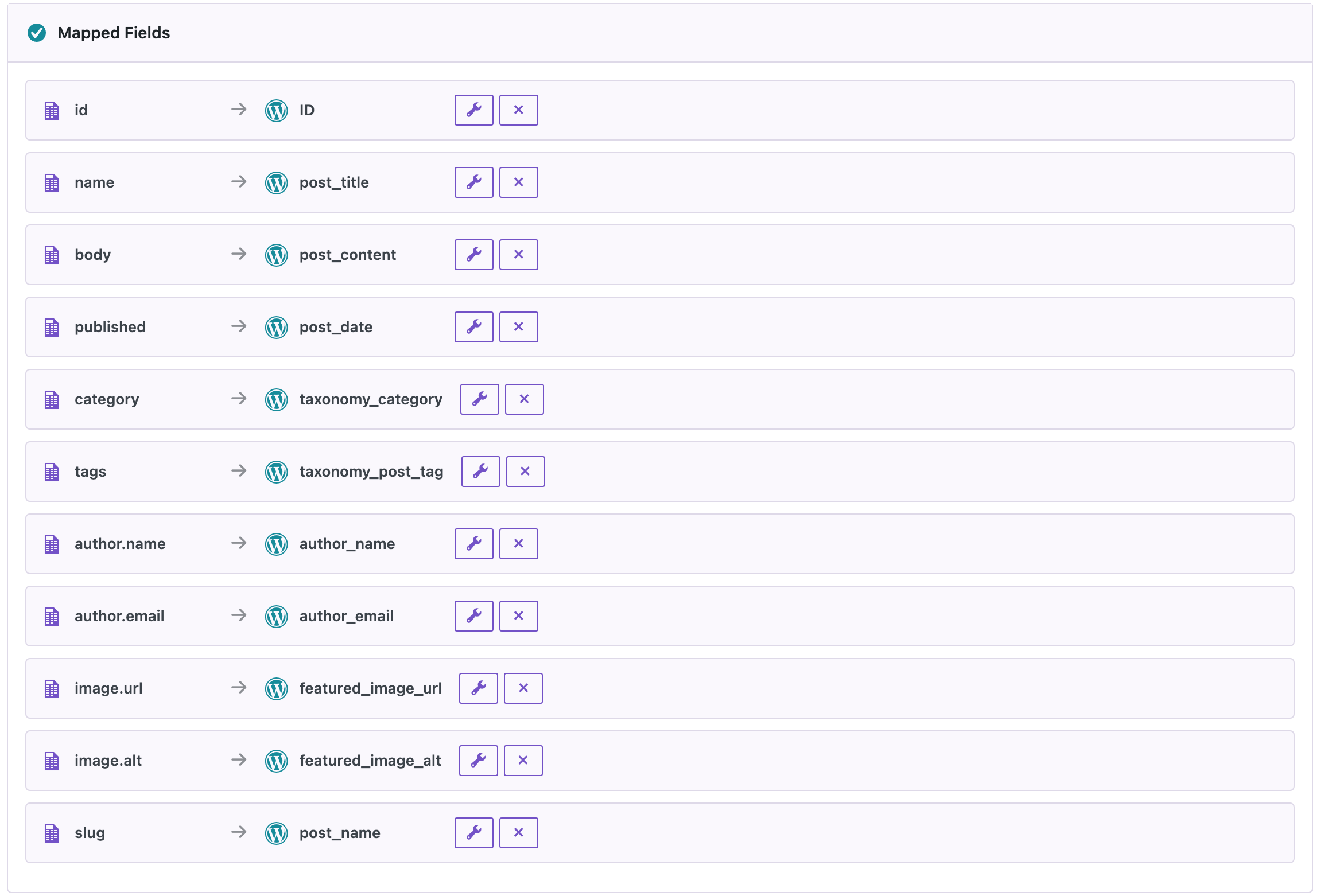
author.name,author.emailandauthor.logingo to the author fields, which find the user or create one from the email.image.urlandimage.altgo to the featured image URL and its alt text.- A column that holds a whole object is no longer matched to a single-value field such as Author ID.
- A
publishedcolumn with a date goes to Date. In shop exports where “Published” is a yes/no value, it still goes to Status.
In our test, three recipes from such a file were imported with their authors found or created from author.name and author.email, and their tags from the list.
WP-CLI and AI agents use the same columns: a mapping file for wp rsl-ie import --mapping or an agent’s import mapping can name author.name like any other column.
How to update
Update from Dashboard → Updates or the Plugins screen, or with wp plugin update import-export-by-rockstarlab. Your jobs, schedules, templates and settings stay as they are. On a busy site, make a backup first.
FAQ
Do I need to change my JSON files?
No. Files that worked before work the same way; nested objects just give you more columns to map.
Which JSON shapes can I import?
An array of objects, or an object whose members are objects. If an API wraps the list, such as {"count": 3, "recipes": [ … ]}, save the inner array as the file.
Are lists split into columns?
No. A list like tags stays one column and imports as several terms.
Does this update change PRO?
No. PRO stays at 2.1.9 and works with 2.1.41.
Related Guides
- Continue Stuck Jobs, Clear Upload Errors and Better Term Mapping (What’s New in 2.1.42)
- Import Warnings, Threaded Comment Imports and Clearer Media Messages (What’s New in 2.1.40)
- CSV, JSON, XML, XLSX and ODS: What Data Formats Are and When to Use Them
- How to Import WordPress Posts from CSV or Excel
- WP-CLI, Form Entries Export and Multisite Support (What’s New in 2.1.39)
Get the free plugin on WordPress.org.

Comments 0
Have a question or a tip to share? Leave it below.