
Data formats are the containers we use to move information between websites, apps, spreadsheets, APIs, and databases. Some formats are made for people, some are made for machines, and some try very hard to please both sides at once.
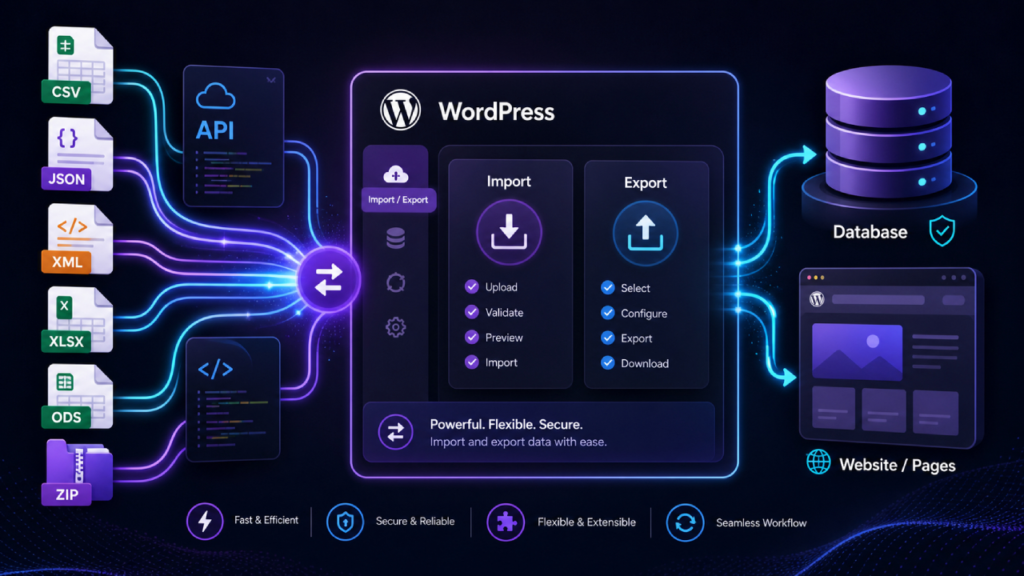
In WordPress work, choosing the right format can make an import, export, migration, SEO audit, or developer handoff much easier. WP Import Export by RockStarLab supports practical formats used in real projects, including CSV, JSON, XML, XLSX, ODS, and ZIP support where available.

The short version
| Format | Best for | Human-friendly? | Developer-friendly? |
|---|---|---|---|
| CSV | Simple tables, imports, exports, spreadsheets | Yes | Yes |
| JSON | APIs, developers, structured exports, automation | Somewhat | Yes |
| XML | Structured documents, integrations, legacy systems | Somewhat | Yes |
| XLSX | Excel workflows, clients, product sheets, business data | Yes | Somewhat |
| ODS | LibreOffice, OpenOffice, open spreadsheet workflows | Yes | Somewhat |
| ZIP | Packaging files, compressed exports, bundled data | No | Yes |
CSV: the simple classic
CSV stands for Comma-Separated Values. It is one of the simplest and oldest ways to store table-like data. Each row is a record, and each column is separated by a delimiter, usually a comma.
CSV became popular because it is easy to create, easy to read, and supported almost everywhere. Spreadsheet apps, databases, CRMs, ecommerce tools, analytics platforms, and WordPress plugins all understand CSV in some form.
Use CSV when your data fits into rows and columns. It is a great format for importing posts, products, users, media records, taxonomy terms, custom fields, and other structured WordPress data.
When CSV is a good choice
- You want to edit data in Excel, Google Sheets, Numbers, or LibreOffice.
- You are importing rows of content into WordPress.
- You need a lightweight export that can be opened almost anywhere.
- Your data is mostly flat, such as titles, slugs, prices, dates, SKUs, URLs, or categories.
JSON: the developer favorite
JSON stands for JavaScript Object Notation. It became popular with web applications and APIs because it is lightweight, structured, and easy for code to read.
JSON is newer than CSV and XML, but it became one of the default formats of the modern web. APIs often return JSON because it can represent nested data more naturally than CSV.
Use JSON when the exported data will be used by developers, scripts, integrations, static site generators, frontend apps, or automated QA tools.
When JSON is a good choice
- You are exporting WordPress data for developers.
- You need structured data with nested objects or arrays.
- You want to pass exported data into another app or script.
- You are building automation around exported WordPress content.
XML: the structured veteran
XML stands for Extensible Markup Language. It has been around for decades and is still used in many enterprise systems, feeds, publishing workflows, and data exchange processes.
XML is more verbose than JSON, but it is also very explicit. Tags describe what each piece of data means, which can be helpful when exchanging structured documents between systems.
Use XML when another system expects XML, when you are working with legacy integrations, or when a structured document format is more appropriate than a flat spreadsheet.
When XML is a good choice
- You need compatibility with older systems or enterprise workflows.
- You are exchanging structured content with another platform.
- Your workflow already uses XML feeds or XML-based integrations.
- You need a format with clear named elements.

XLSX: the spreadsheet everyone knows
XLSX is the modern Microsoft Excel spreadsheet format. It is widely used by businesses, agencies, ecommerce teams, clients, accountants, operations teams, and content managers.
Unlike CSV, XLSX can include multiple sheets, formatting, formulas, and richer spreadsheet features. For import and export workflows, it is especially useful when the people preparing the file already work in Excel.
Use XLSX when your team wants a familiar spreadsheet file and does not want to convert everything into CSV first.
When XLSX is a good choice
- A client sends product, content, or user data as an Excel file.
- Your team manages content plans in Excel.
- You want a spreadsheet format that feels familiar to business users.
- You need a format that can be reviewed easily before import.
ODS: the open spreadsheet option
ODS stands for OpenDocument Spreadsheet. It is commonly used by LibreOffice, OpenOffice, and other tools that support open document formats.
ODS is useful when a team prefers open standards or does not rely on Microsoft Excel. It plays a similar role to XLSX in many workflows, but it belongs to the OpenDocument format family.
Use ODS when your spreadsheet workflow is built around LibreOffice, OpenOffice, or open-format document exchange.
When ODS is a good choice
- Your team uses LibreOffice or OpenOffice.
- You prefer open document formats.
- You need a spreadsheet file that is not tied to Excel.
- You want to keep import and export workflows spreadsheet-friendly.
ZIP: the practical container
ZIP is not a data format in the same way CSV, JSON, XML, XLSX, or ODS are. It is a compressed archive format used to package one or more files together.
ZIP is useful when a workflow needs to move several files as one download or upload. It can also reduce file size, which helps when sharing large exports or bundled data packages.
Use ZIP when files need to travel together, especially in workflows that include compressed exports, bundled data, or supporting files where supported by the active import or export process.
Which format should you choose?
| Scenario | Recommended format |
|---|---|
| Importing simple WordPress content from a spreadsheet | CSV, XLSX, or ODS |
| Exporting data for an SEO manager | CSV or XLSX |
| Exporting data for a developer | JSON or XML |
| Working with Excel-based client files | XLSX |
| Working with LibreOffice or open-document workflows | ODS |
| Sending structured data to another system | JSON or XML |
| Packaging multiple files together | ZIP |
Formats supported by WP Import Export
WP Import Export by RockStarLab supports several practical formats for WordPress data workflows. The exact availability can depend on the workflow, active plugin edition, and installed addons.
Import formats
WP Import Export supports importing WordPress data from CSV, XML, XLSX, and ODS files where supported by the active setup. ZIP support can be used for compressed or bundled workflows where available.
These formats are useful when importing posts, pages, custom post types, users, media records, WooCommerce data, MySQL table data, custom fields, taxonomy terms, and ACF fields where supported.
Export formats
WP Import Export supports exporting WordPress data to CSV, JSON, XML, XLSX, and ODS where available. ZIP support helps with compressed exports or packaged files where supported.
For everyday review, CSV and XLSX are usually the easiest formats. For developers and automation, JSON and XML are often better choices. For open spreadsheet workflows, ODS is the natural option.
HowTo: Choose the right format for a WordPress import or export
- Decide who will use the file: a content manager, SEO specialist, client, developer, or another system.
- Choose CSV for simple rows and columns that need broad compatibility.
- Choose XLSX when the file will be reviewed or edited in Microsoft Excel.
- Choose ODS when the team uses LibreOffice, OpenOffice, or open-document tools.
- Choose JSON when the export is intended for developers, scripts, or automation.
- Choose XML when another system expects XML or the workflow needs structured document exchange.
- Use ZIP when supported and when multiple files or compressed packages are easier to move together.
- Test the workflow on a staging site before importing important production data.
Practical rule of thumb
If a human needs to open and edit the file, start with CSV, XLSX, or ODS. If code needs to read the file, start with JSON or XML. If several files need to move together, ZIP may be the neat little suitcase for the job.
The best format is not the fanciest one. It is the one that fits the next step in the workflow.
Recommended internal links
FAQ
What is the best format for importing WordPress data?
CSV is usually the best starting point for simple WordPress imports because it is easy to edit and widely supported. XLSX and ODS are useful when the source data is already managed in spreadsheet software.
What is the best format for exporting WordPress data?
CSV is best for spreadsheets and SEO workflows, while JSON and XML are better for developers, integrations, and automation. XLSX and ODS are useful when the exported data should remain spreadsheet-friendly.
When should I use JSON instead of CSV?
Use JSON when the exported data needs structure, nesting, or direct use in code. CSV is better when the data is mostly flat and needs to be reviewed in a spreadsheet.
Why is XML still used?
XML is still used in enterprise systems, feeds, publishing workflows, and legacy integrations. It is verbose, but it is structured and widely supported by older systems.
Does WP Import Export support XLSX and ODS?
Yes. WP Import Export supports XLSX and ODS where available, making it easier to work with Excel, LibreOffice, and OpenOffice spreadsheet workflows.
Does WP Import Export support ZIP files?
Yes. WP Import Export includes ZIP support where available for compressed or bundled import and export workflows.