
Old guides lose readers quietly: prices change, equipment changes, a better method appears. The first step of a content refresh is a list of the posts nobody has touched for a long time. With Import Export by RockStarLab you export exactly that list, with each post’s link, last edit date and length, to an Excel file you can sort and share with your writers. The example finds the brewing guides on a coffee roastery’s blog that haven’t been updated for a year.
Free: everything in this guide works in the free plugin.
Short Answer
- Go to Import Export by RockStarLab → Export and choose Posts.
- Add a filter: Modified Date, Less Than, and the cut-off date. Narrow it down with a Taxonomy Filter (category) and Status equals
publish. - Choose the columns Title, Permalink, Modified Date, Word Count and Category Names.
- Export to XLSX and sort the file by Modified Date.
Filter by last modified date
WordPress saves the date of the last edit separately from the publish date. A guide published in 2022 and corrected last month isn’t stale. One published last year and never opened again might be. That’s why the filter uses Modified Date, not Date.
Our blog has eight posts in the Brew Guides category. We wanted those last edited before 1 November 2025:
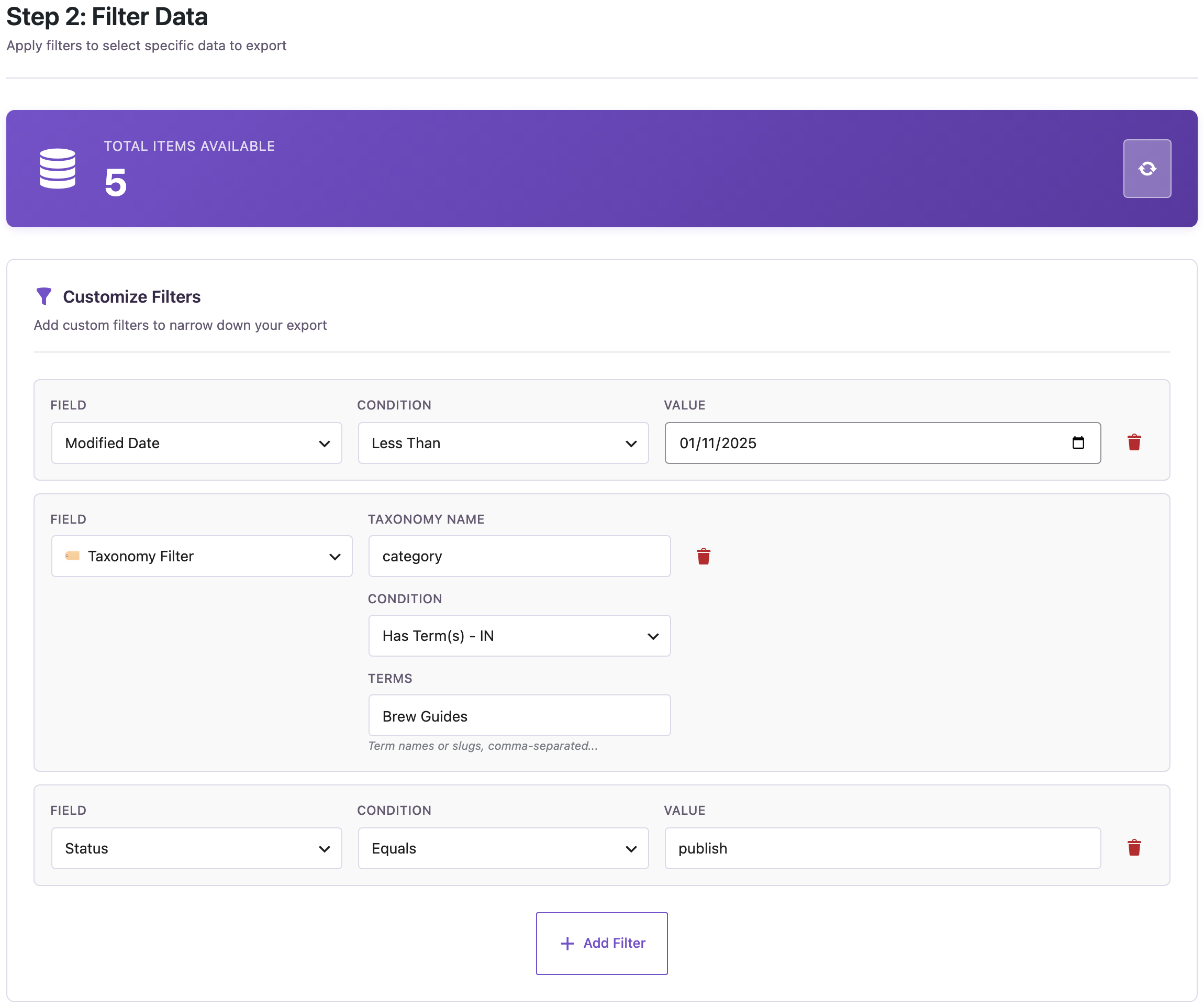
- Modified Date → Less Than → 1 November 2025: posts not edited since then.
- Taxonomy Filter: taxonomy
category, Has Term(s),Brew Guides. Leave it out to check the whole blog. - Status → Equals → publish: drafts and private posts stay out of the list.
The counter at the top updated to 5. The other three guides had been edited within the year.
Choose the columns
For a refresh list you need to know what the post is, where it is, how old it is and how much work it is:
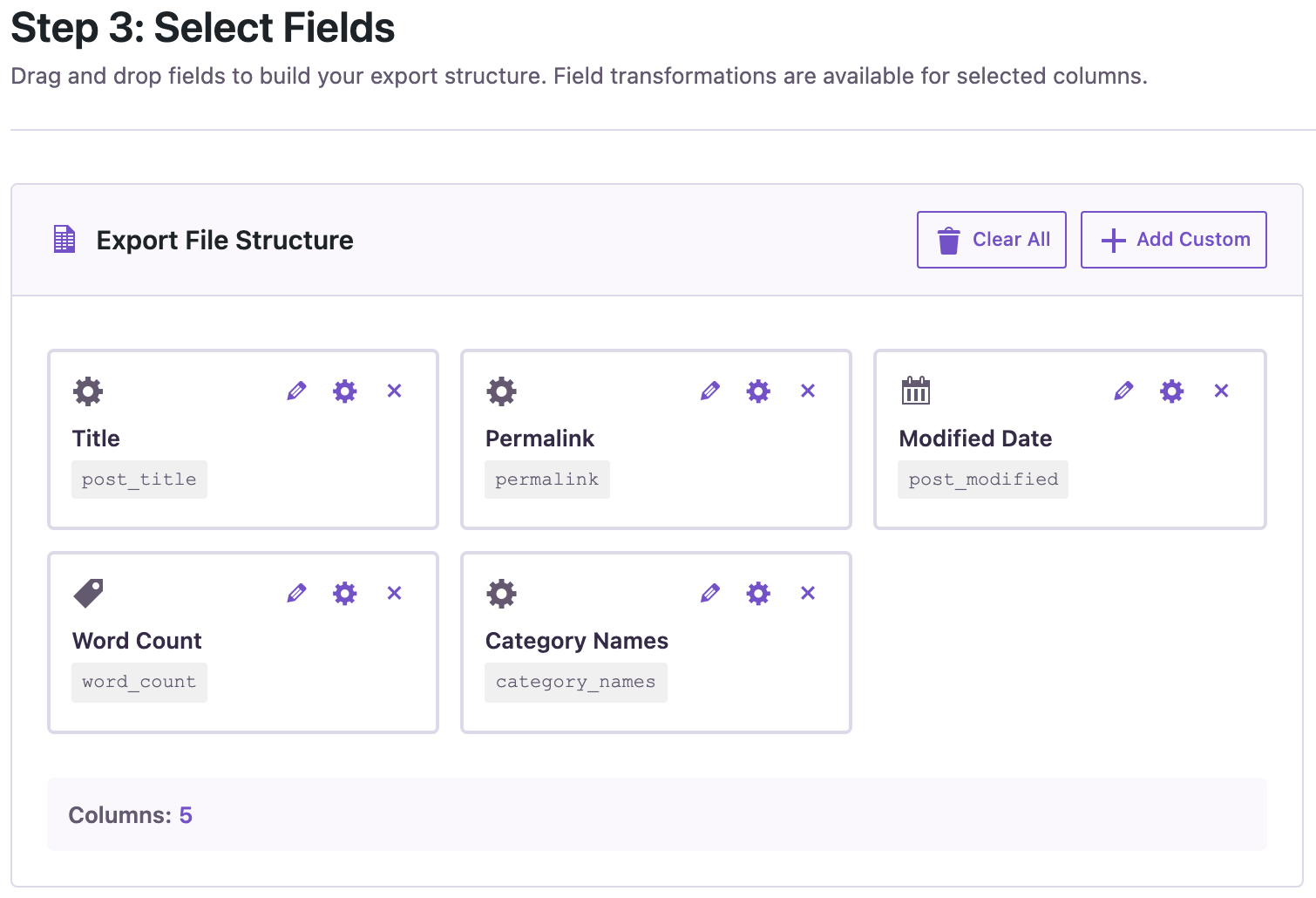
Permalink gives the public link, so a writer can open the post straight from the spreadsheet. Word Count helps you estimate the work: a 600-word post is an afternoon, a 2,000-word guide is a project. Modified Date is in the Other group of the field list.
The result
We exported to XLSX. The file had the five guides:
| post_title | permalink | post_modified | word_count | category_names |
|---|---|---|---|---|
| Cold Brew at Home | https://www.example-roastery.com/2023/07/15/cold-brew-at-home/ | 2023-07-15 09:00:00 | 820 | Brew Guides |
| French Press Basics | https://www.example-roastery.com/2022/05/04/french-press-basics/ | 2022-06-01 15:30:00 | 640 | Brew Guides |
| Choosing a Coffee Grinder | https://www.example-roastery.com/2022/01/20/choosing-a-coffee-grinder/ | 2024-02-02 12:00:00 | 2100 | Brew Guides |
| How to Brew a V60 | https://www.example-roastery.com/2021/03/10/how-to-brew-a-v60/ | 2021-03-10 09:00:00 | 980 | Brew Guides |
| Espresso Dial-In Guide | https://www.example-roastery.com/2020/11/11/espresso-dial-in/ | 2021-01-05 10:00:00 | 1450 | Brew Guides |
The wizard lists posts newest first by publish date. Sort the post_modified column in Excel to put the oldest edits on top. Add a column for the writer’s name and a status, and the file becomes your refresh plan.
Repeat it every quarter
Save the export as a schedule and the list is ready every three months without setting the filters again; see scheduling recurring exports. The cut-off date in the filter is fixed, so update it when you want a new one-year window.
From the command line, the same export can be sorted by the last edit, oldest first (the options are explained in the WP-CLI guide):
wp rsl-ie export --type=post --status=publish \
  --fields=post_title,permalink,post_modified,word_count \
  --options='{"taxonomy":[{"taxonomy":"category","terms":["brew-guides"],"condition":"in"}],"date_query":{"column":"post_modified","before":"2025-11-01"},"orderby":"modified","order":"ASC"}' \
  --format=csv --output=refresh.csv --user=admin
In our run this wrote the five guides from Espresso Dial-In Guide (last edited January 2021) to Choosing a Coffee Grinder (February 2024).
After the refresh
When writers update the posts in WordPress, the modified date changes and the posts drop off the next list. If you’d rather edit in the spreadsheet and import the changes back, use the post ID as the matching field (see bulk updates without duplicates) and back up the site first.
With an AI agent
An AI agent connected through the WordPress MCP Adapter (see connecting Claude Code to WordPress) can build the list from a sentence:
Which brew guides haven't been updated since November 2025? Put them in an Excel file, oldest first.In our run, the agent called rsl-ie/export-count with the category and a date_query on post_modified (count: 5), started the export with rsl-ie/export-start in XLSX sorted by modified date, and once the job finished, rsl-ie/file-get returned brew-guides-to-refresh.xlsx with its download link.
FAQ
What’s the difference between Date and Modified Date?
Date is when the post was published. Modified Date is the last time it was saved. A refresh list uses Modified Date.
Can I include pages or custom post types?
Yes. Choose Pages or the custom post type on the first step; the same Modified Date filter is there.
Can I see how long each post is?
Yes, add the Word Count column.
Can I sort the list by the last edit?
Sort the column in Excel, or use orderby “modified” from WP-CLI or an AI agent.
Does the export change my posts?
No. An export only reads the posts.
Related Guides
- Export WordPress Posts by Category, Tag or Author to CSV
- How to Schedule Recurring WordPress Exports to CSV
- Bulk Update WordPress Posts from CSV Without Duplicates
- WP-CLI Import and Export for WordPress: CSV, Excel and Cron Scripts
Get the free plugin on WordPress.org.

Comments 0
Have a question or a tip to share? Leave it below.