
Checkout field plugins let customers choose a delivery date, write a gift message or enter a VAT number. WooCommerce saves those answers with the order as custom fields (order meta), and they don’t show up in the standard order export. With Import Export by RockStarLab PRO they are listed as fields of their own, so you can export a delivery list with one column per checkout field. The example builds that list for a coffee roastery: orders still being processed that have a delivery date, with the gift message for the card.
PRO: WooCommerce Orders export (PRO 2.1.11 or later with the free plugin 2.1.46 or later for checkout fields). Free: the export wizard for posts, pages, media and comments.
Short Answer
- In Export, choose WooCommerce Orders. On the field step, checkout fields are listed under Custom Fields by their field name, for example
delivery_date. - To export only orders that have a value, add the filter Custom Field (Meta) with the field name and Is Not Empty.
- Rename the columns with the pencil icon, so the file has headers like “Delivery date” and “Gift message”.
Where checkout fields appear
In our test store, five orders had delivery_date and three had gift_message, saved with the order the way checkout field plugins save them. On the field step of the Orders export, both are in the Custom Fields group:
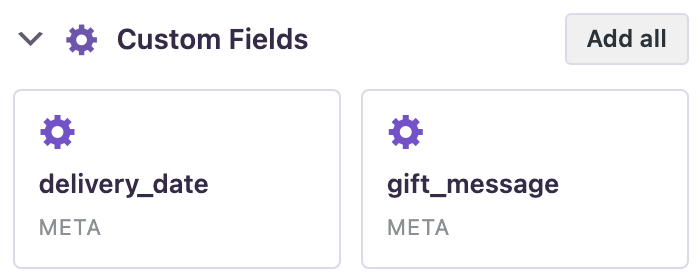
The group lists fields that have a value in at least one order. Fields whose names start with an underscore, which plugins use for hidden data, are not listed there.
Export the delivery list
- Go to Import Export → Export, choose WooCommerce Orders and click Next Step.
- Add two filters: Status equals
processing, and Custom Field (Meta) with the namedelivery_dateand the condition Is Not Empty. The counter showed 3 orders:

Processing orders that have a delivery date: 3. - On the next step, click Clear All and add Order Number, the shipping First Name, Last Name and City, and from Custom Fields
delivery_dateandgift_message. Rename each column with the pencil icon:

Each checkout field is its own column, renamed for the delivery team. - Choose CSV, enter a file name, click Start Export and download the file.
The file had the three processing orders with their delivery dates. The order without a gift message has an empty cell, and the two completed orders with a delivery date were left out by the Status filter:

Columns you don’t rename keep the field name as the header, for example delivery_date.
Before you export
An export only reads the orders; nothing in the store changes. The file contains customer names and cities, so keep it where only the people who need it can open it. If you plan to edit the orders and import them back, back up the site first.
With an AI agent
An AI agent connected through the WordPress MCP Adapter (see connecting Claude Code to WordPress) can read checkout fields as well:
Which orders in processing have a delivery date, and is there a gift message?In our run, the agent called rsl-ie-pro/export-preview with the export type woo_order and the fields order_number, order_status, shipping_city, delivery_date and gift_message. The preview returned eight orders, and the agent picked the three in processing: 2014 (Lyon, 12 November, no message), 2006 (Leeds, 13 November, “Merry Christmas from the team”) and 2005 (Berlin, 14 November, “Happy birthday, Anna!”).
FAQ
Why don’t I see my checkout field under Custom Fields?
The list shows fields that have a value in at least one order. Place a test order with the field filled in, or check the field name your checkout plugin uses. Fields whose names start with an underscore are not listed.
Can I filter orders by a checkout field?
Yes. Use the filter Custom Field (Meta), type the field name and choose a condition such as Equals, Contains or Is Not Empty.
What header does a checkout field column get?
The field name, such as delivery_date, unless you rename the column.
Related Guides
- Export WooCommerce Orders to CSV for a Shipping Tool
- Export WooCommerce Orders by Date Range for VAT and Tax Reports
- Export WooCommerce Orders for Accounting (QuickBooks and Xero-Friendly CSV)
- Safer Content Sync and Checkout Fields in Order Exports (What’s New in 2.1.46)
Get the free plugin on WordPress.org.

Comments 0
Have a question or a tip to share? Leave it below.