
Alt text describes an image for people who use screen readers and for search engines, and accessibility checks flag every image without it. In the WordPress Media Library you can only see it one image at a time. With Import Export by RockStarLab you export the alt text of all images to a spreadsheet, list the images that have none, and import the alt text you write back into the Media Library in one go. On our test site, 82 of 111 images had no alt text.
Free: Media Library export and import with alt text, title, caption and description. PRO: transformations of values during export and import.
Short Answer
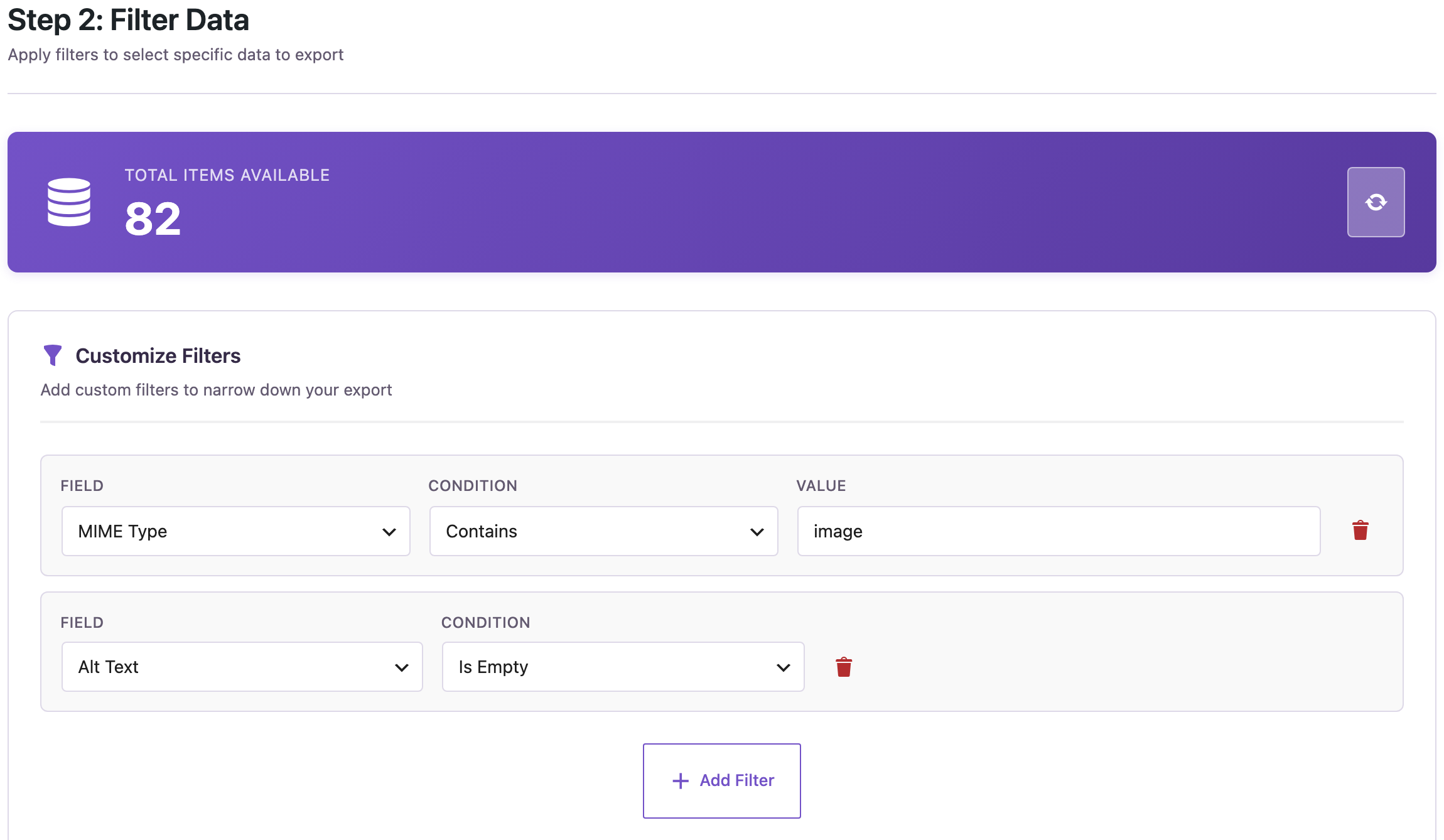
- Go to Import Export → Export, choose Media and add the filters MIME Type contains
imageand Alt Text Is Empty. - Export ID, File Name, Alt Text, Title, Attached Post Title and File URL to CSV or XLSX.
- Write the alt text in the Alt Text column.
- Import the file under Import → Media with Check for Existing Items by Field: ID, If Match Found: Update and If No Match Found: Skip.
Step 1: Export the images without alt text
Open Import Export → Export, choose Media and click Next Step. Add two filters: MIME Type Contains image, so PDFs and videos are left out, and Alt Text Is Empty.
In step 3, add the columns. File URL lets you open each image from the spreadsheet, and Attached Post Title tells you which post it was uploaded for, which helps to describe it.

In step 4, choose CSV or XLSX and click Start Export. To review all alt text instead, leave out the Alt Text filter; the exported column then shows the existing descriptions too.
Step 2: Write the alt text
Open the file and fill in the Alt Text column. Our rows:
| ID | File Name | Alt Text |
|---|---|---|
| 2020 | bakery-front-original-scaled.jpg | Bakery shop front with bread in the window |
| 2021 | summer-banner-scaled.png | Summer offers banner |
| 2022 | team-photo-1.jpg | Bakery team in the kitchen |
| 2023 | favicon-orange.png | (left empty: decorative) |
Describe what the image shows and why it’s on the page, in a short sentence. Don’t start with “Image of”, and don’t stuff keywords. Purely decorative images, such as a background shape or an icon next to a text that says the same thing, should have an empty alt text, so leave those cells empty.
Keep the ID column unchanged: the import uses it to find each image. You can delete the other columns or rows you don’t change.
Step 3: Import the alt text back
Go to Import Export → Import, choose Media and upload the file. The file doesn’t need the image files or their addresses; the import only changes the details of images that already exist.
- In the field mapping, click Auto Map: ID goes to ID and alt_text to Alt Text.
- In the import options, set Check for Existing Items by Field to ID, If Match Found to Update and If No Match Found to Skip, so a wrong ID can’t create a new item.
- Click Start Import.

All four rows were updated; the three images now had alt text in the Media Library, and the decorative icon kept its empty alt text, because empty cells don’t change existing values.

An import changes your Media Library, so create a backup before you run it on a live site.
Alt text in posts that already use the image
The Media Library alt text is used whenever you insert the image from now on, and by themes and plugins that read it, such as featured images and WooCommerce product images. An Image block that was inserted earlier keeps the alt text it had at that moment, because the block stores its own copy. To find such images in old posts, search the content for alt="", for example with an export filter Content contains alt="", and fix those posts in the editor; see bulk find and replace in posts for changes across many posts.
With an AI agent
An AI agent with vision, connected through the WordPress MCP Adapter (see connecting Claude Code to WordPress), can look at the images and write the descriptions for you to review:
List images without alt text, look at the first two, propose an alt text for
each, and after I approve, save them to the Media Library.
In our run, the agent exported the list with rsl-ie/export-start (filter alt_text is_empty), opened two gallery photos and proposed “Rocky headland with green trees above a blue sea and white surf” and “Forested coast at sunset with a headland and calm sea”. After approval it uploaded a two-row CSV with rsl-ie/upload-create, upload-chunk and upload-complete, and ran rsl-ie/import-start with import_type: media, the mapping ID and alt_text, and duplicate_mode: update, duplicate_check: ID, if_not_exists: skip. The job updated 2 images and failed none. Review descriptions written by an AI before saving them: it can’t know the context of your page.
FAQ
How do I find images without alt text in WordPress?
Export the Media Library with the filter Alt Text Is Empty, together with MIME Type contains image. The file lists every image that has no alt text.
Can I add alt text to many images at once?
Yes. Fill in the Alt Text column of the export and import the file under Import → Media, matching by ID and set to Update.
Does the import need the image files?
No. When the import updates existing items, the ID and the columns you change are enough.
Will new alt text appear in posts that already use the image?
Featured images and places that read the Media Library show it. Image blocks inserted earlier keep their own copy and need to be edited in the post.
Should every image have alt text?
Every meaningful image should. Decorative images should have an empty alt text so screen readers skip them.
Related Guides
- Export the Media Library with File Sizes to Find Large Images
- Export the WordPress Media Library to CSV or Excel
- Import WordPress Media Library Files
- Bulk Find and Replace in WordPress Posts
Get the free plugin on WordPress.org.

Comments 0
Have a question or a tip to share? Leave it below.