
Import Export by RockStarLab 2.1.43 makes the first step of an import clearer: the wizard shows which delimiter your CSV file uses, a broken JSON file gets a message that says what’s wrong with it, and the message for an unsupported file type is the same everywhere. The export filter step also sends fewer requests while you set up filters. Everything in this release is part of the Free plugin.
The Delimiter dropdown follows your CSV file
CSV files from Excel in many European languages use a semicolon instead of a comma, and some systems export tab-separated files. After you upload such a file, the Delimiter dropdown in the import wizard now switches to the semicolon, tab or pipe the file uses:
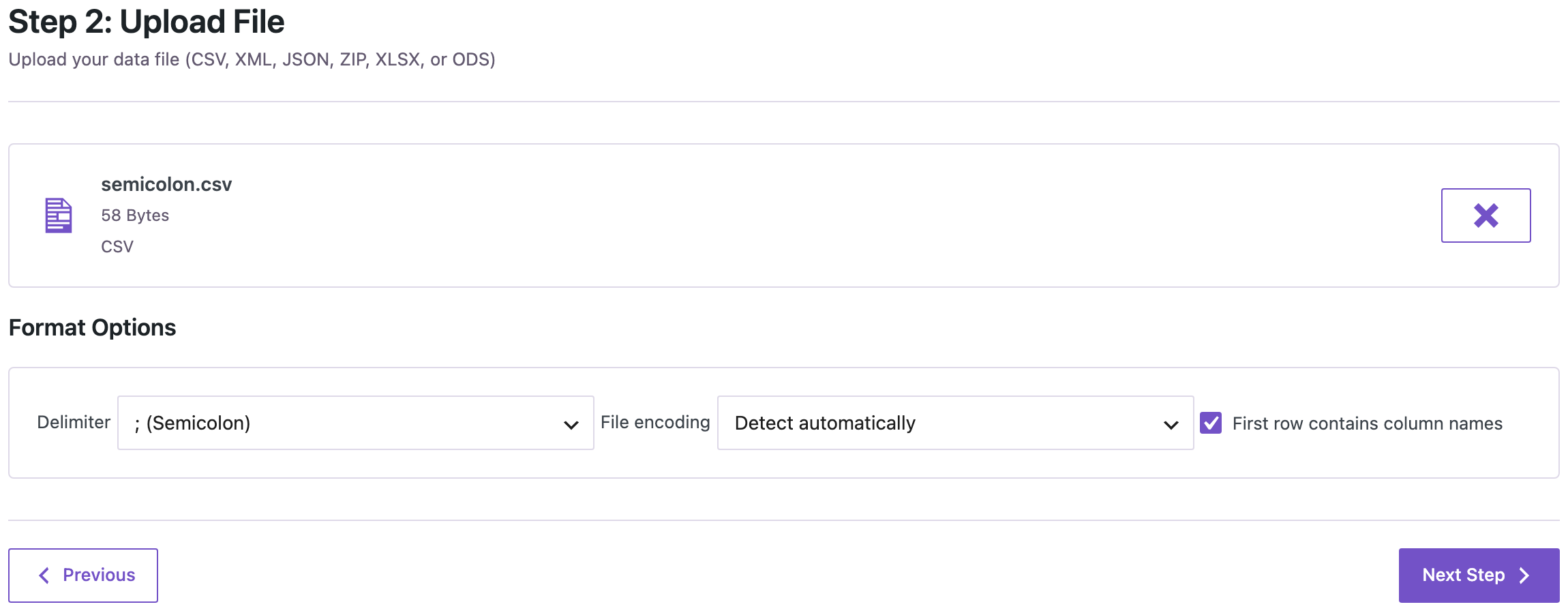
You can still pick another delimiter if the file needs it. If you have already picked a different delimiter, the wizard keeps your choice. WP-CLI and AI agents get the detected delimiter in the upload response as detected_delimiter.
For files that open in one column in Excel, see delimiter fixes for exported CSV files.
Broken JSON files say what’s wrong
When a JSON file can’t be read, the message names the problem:
![Notice: Upload failed: Invalid JSON file: The file ends before the JSON is complete: a closing ] or } is missing. Download or export it again.](https://wpimportexport.com/wp-content/uploads/2026/11/02-json-error.webp)
- The file ends before the JSON is complete: a closing
]or}is missing, usually because a download or export was cut off. Download or export it again. - A record is not valid JSON: for example, a missing comma or quotation mark. Check the file in a JSON validator.
- There is text after the end of the JSON: remove it, or save only the JSON array.
- The JSON is nested too deeply to import.
WP-CLI and AI agents get the same messages. More on JSON imports: nested JSON imports in 2.1.41.
One message for unsupported file types
When you upload a file type the importer can’t read, the wizard lists the types it does read (CSV, XLSX, ODS, JSON, XML or ZIP) and says that a tab-separated .txt file can be renamed to .csv, the same message WP-CLI and AI agents get. The other upload messages are listed in the 2.1.42 release notes.
Fewer count requests on the export filter step
“Total items available” on the export filter step is updated after you stop changing filters. If you change several filters in a row, the plugin asks the server for the count once instead of once per change, which helps on large sites.
How to update
Update from Dashboard → Updates or the Plugins screen, or with wp plugin update import-export-by-rockstarlab. Your jobs, schedules, templates and settings stay as they are. On a busy site, make a backup first.
With an AI agent
An AI agent connected through the WordPress MCP Adapter (see connecting Claude Code to WordPress) uploads files with rsl-ie/upload-create, rsl-ie/upload-chunk and rsl-ie/upload-complete. On 2.1.43, we uploaded a two-line CSV separated by semicolons. rsl-ie/upload-complete returned "detected_delimiter": ";" and a preview with three columns, Title, Content and Status, so the agent can tell at once how the file was read.
FAQ
Do I need to change my files or mappings?
No. Everything that worked before works the same way.
Which delimiters are detected?
Comma, semicolon, tab and pipe. For any other character, choose Custom in the Delimiter dropdown.
What does “The file ends before the JSON is complete” mean?
The file was cut off, usually during a download or an export. Get a fresh copy of the file and upload it again.
Does this update change PRO?
No. PRO stays at 2.1.9 and works with 2.1.43.
Related Guides
- Menu Imports Keep External Links (What’s New in PRO 2.1.10)
- Continue Stuck Jobs, Clear Upload Errors and Better Term Mapping (What’s New in 2.1.42)
- How to Import CSV Files into WordPress with Field Mapping
- Exported CSV Opens in One Column in Excel: Delimiter Fixes
- Nested JSON Imports and Smarter Auto Map (What’s New in 2.1.41)
Get the free plugin on WordPress.org.

Comments 0
Have a question or a tip to share? Leave it below.