
Import Export by RockStarLab PRO 2.1.10 improves menu imports: when you move a navigation menu to another site, custom links to other websites stay exactly as they were, and only the links to the site the menu came from move to the new site. Menu export and import are part of PRO. The free plugin stays at 2.1.43.
External links stay external
A header menu often has a custom link to a different website: an online shop on its own domain, a booking system or a partner. When you import such a menu on another site, PRO 2.1.10 keeps the address of every link that points to another website, including links to a site’s home page such as https://shop.example-roastery.com/.
Links to the site the menu was exported from are still moved to the new site. The plugin recognises that site from the page, post and category items in the same file, so a custom link like https://old-site.example/contact-us/ becomes https://new-site.example/contact-us/.
We exported a header menu with six items from one site and imported it on another:
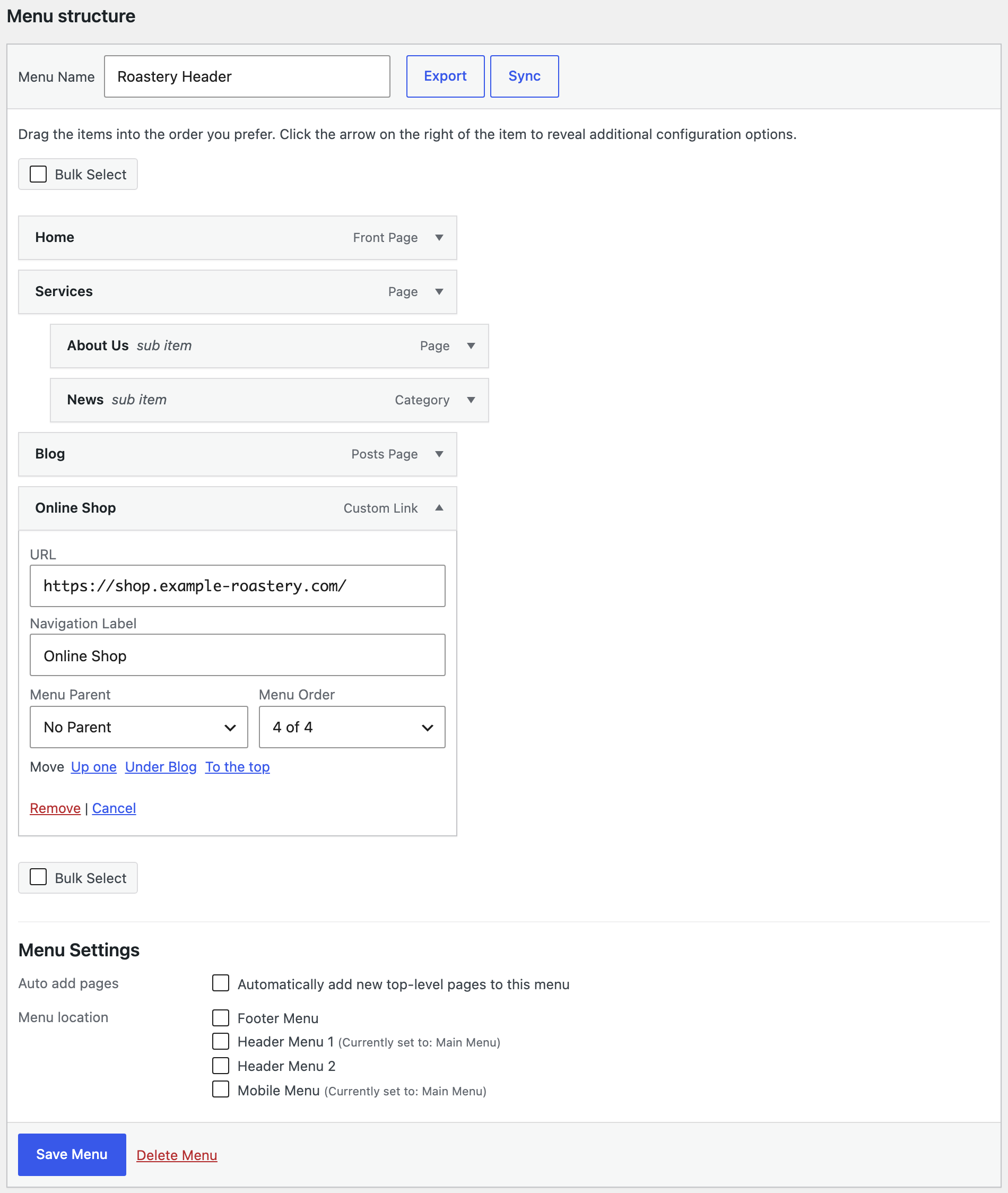
- Home, Services and Blog point to the pages on the new site.
- About Us has a different page ID on the new site; the import found the page by its slug and kept it under Services.
- News, a category link, points to the new site’s category.
- Online Shop kept
https://shop.example-roastery.com/and still opens in a new tab.
How to update
PRO updates appear in Dashboard → Updates and on the Plugins screen, like any other plugin. Your menus, jobs, schedules and settings stay as they are. On a busy site, make a backup first.
With an AI agent
An AI agent connected through the WordPress MCP Adapter (see connecting Claude Code to WordPress) can check a menu after an import. On the new site, the agent called rsl-ie-pro/export-preview for the menu “Roastery Header”. It returned six items: five with URLs on the new site, and Online Shop with https://shop.example-roastery.com/ and the target _blank.
FAQ
Do I need to export my menus again?
No. Files you exported earlier import the same way with 2.1.10.
Which links are moved to the new site?
Links that point to the site the menu was exported from. Links to any other website keep their address.
Does this change menu sync between connected sites?
No. This release changes importing menus from a file. To keep menus in step between two connected sites, see syncing menus between sites.
Does the free plugin change?
No. The free plugin stays at 2.1.43 and works with PRO 2.1.10.
Related Guides
- Accurate Stock Filters for Products and Variations (What’s New in 2.1.44)
- Detected CSV Delimiter and Clearer JSON Errors (What’s New in 2.1.43)
- How to Sync WordPress Menus Between Sites with ACF Fields
- Continue Stuck Jobs, Clear Upload Errors and Better Term Mapping (What’s New in 2.1.42)
Get the free plugin on WordPress.org.

Comments 0
Have a question or a tip to share? Leave it below.