
Messy import and export data often needs one last cleanup step before it is safe to save or share. Transformation functions handle that step by changing field values while data is being imported, exported, or bulk updated.
In WP Import Export by RockStarLab, transformation functions receive the current field value and row context, then return a cleaned, reformatted, or enriched value. They can format titles, clean HTML, convert dates, normalize prices, replace domains, set default values, and prepare ACF fields. Note – this feature comes with PRO Add-on.
What Are Transformation Functions?
Transformation functions are reusable PHP functions that modify field values during Import, Export, and Content Updater workflows. Each function receives an incoming or outgoing value, applies custom logic, and returns the final value that WordPress should save or export.
During import, these functions clean CSV values before WordPress saves them. During export, they format WordPress data before it appears in a CSV or JSON file. Content Updater uses the same concept to modify selected fields in existing WordPress records.
Content Updater changes database records directly and cannot undo those changes from within the plugin. Create a database backup before running a bulk update.
When to Use Transformation Functions
Use a transformation function when field mapping alone is not enough. Field mapping connects a CSV column or WordPress field to the correct destination. The assigned function changes the value while that mapping is processed.
Common use cases include:
- Converting product titles to title case.
- Removing unwanted HTML from imported content.
- Replacing an old domain in image URLs and internal links.
- Formatting phone numbers before saving them to custom fields.
- Replacing empty CSV values with default values.
- Converting dates into the format expected by WordPress.
- Normalizing prices before a WooCommerce import.
- Preparing values for ACF fields such as
acf_subtitle,acf_gallery, oracf_specs. - Formatting exported values for a spreadsheet or external system.
Transformation functions are especially useful when the same rule must be applied to many records. Instead of editing hundreds of CSV rows manually, you can define the rule once, test it, and reuse it.
Where Transformation Functions Are Supported
| Workflow | Supported? | How the function is used |
|---|---|---|
| CSV import | Yes | The function modifies a mapped CSV value before it is saved in WordPress. |
| CSV export | Yes | The function formats a WordPress value before it is written to the exported CSV. |
| JSON export | Yes | The function cleans or reformats a field before it appears in the JSON output. |
| Content Updater | Yes | The function changes selected fields in existing WordPress records. |
How Transformation Functions Work
A transformation function receives the current field value and can also use data from the current row or processing context. It applies the required logic and returns the transformed value.
These are user-defined PHP functions that accept input through parameters and return a processed value. Developers who want to review the underlying syntax can use the official PHP documentation for user-defined functions.
Some functions change only one string. More advanced functions can check whether a value is empty, read another CSV column, validate a format, or prepare a value for a specific WordPress field.
Here is a simple example:
function clean_imported_title( $value, $row ) {
    $value = trim( wp_strip_all_tags( (string) $value ) );

    return ucwords( strtolower( $value ) );
}
This function removes HTML, trims extra spaces, converts the title to lowercase, and then applies title case.
How to Create a Transformation Function
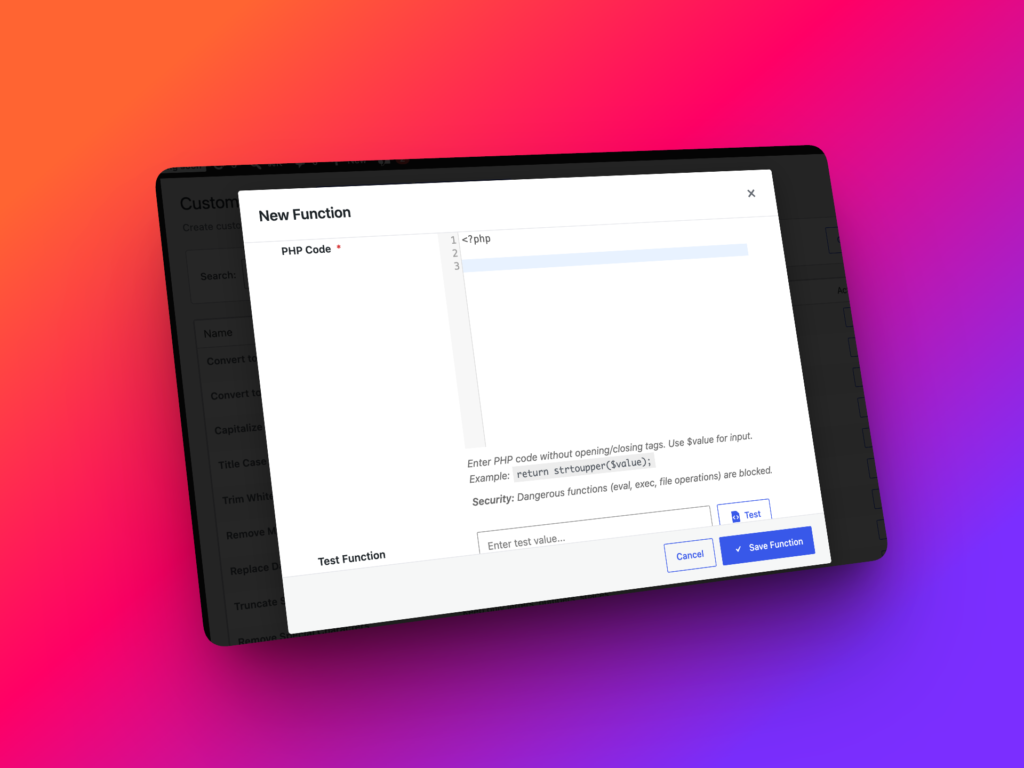
Go to Import Export -> Functions. Create a function, enter the PHP logic, and test it with a sample value before assigning it to a real workflow.
The Functions Library includes:
- A PHP code editor with syntax highlighting.
- Testing controls for sample input values.
- Reusable saved functions.
- An AI Function Generator.
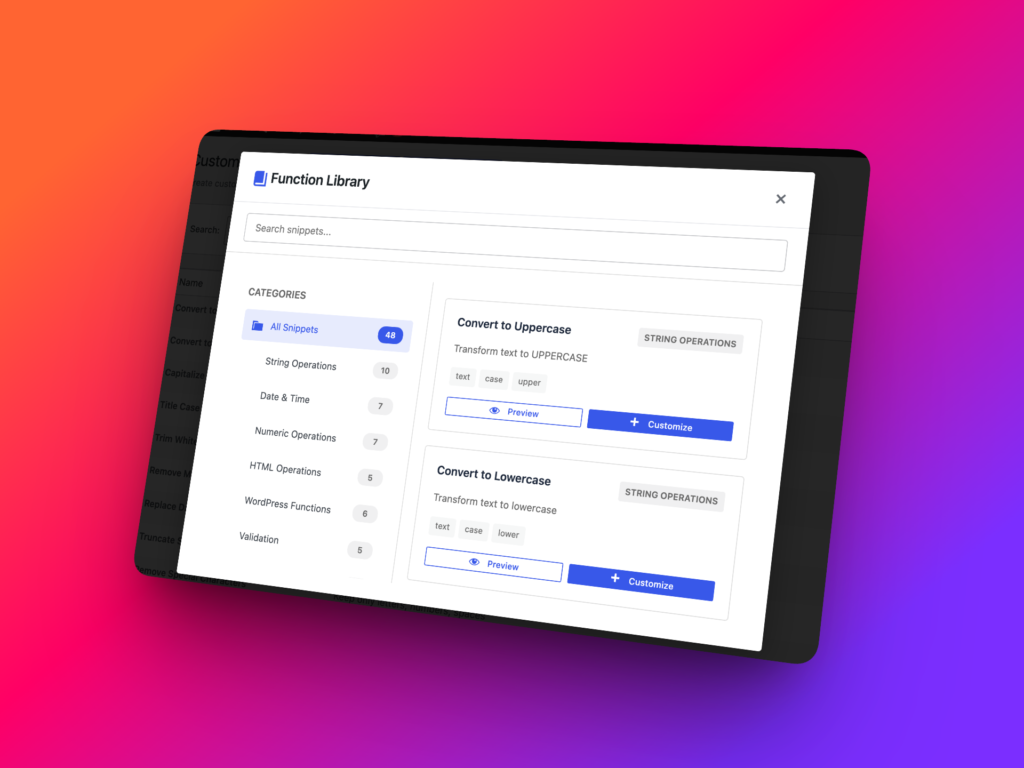
- A snippets library with common transformation examples.
A good transformation function should be:
- Focused on one specific task.
- Easy to read and understand later.
- Safe when the source value is empty.
- Tested with realistic and unexpected input.
- Reused only when the same rule applies.
How to Use Transformation Functions During CSV Import
Use transformation functions during CSV import when source values need to be cleaned or reformatted before they become WordPress data.
- Go to
Import Export -> Import. - Select the required WordPress content type.
- Upload the CSV file.
- Choose the delimiter and review the data preview.
- Map CSV columns to WordPress fields.
- Assign functions to mapped fields that need transformation.
- Configure duplicate handling and other import options.
- Run a small test import.
- Check the imported data before processing the complete file.
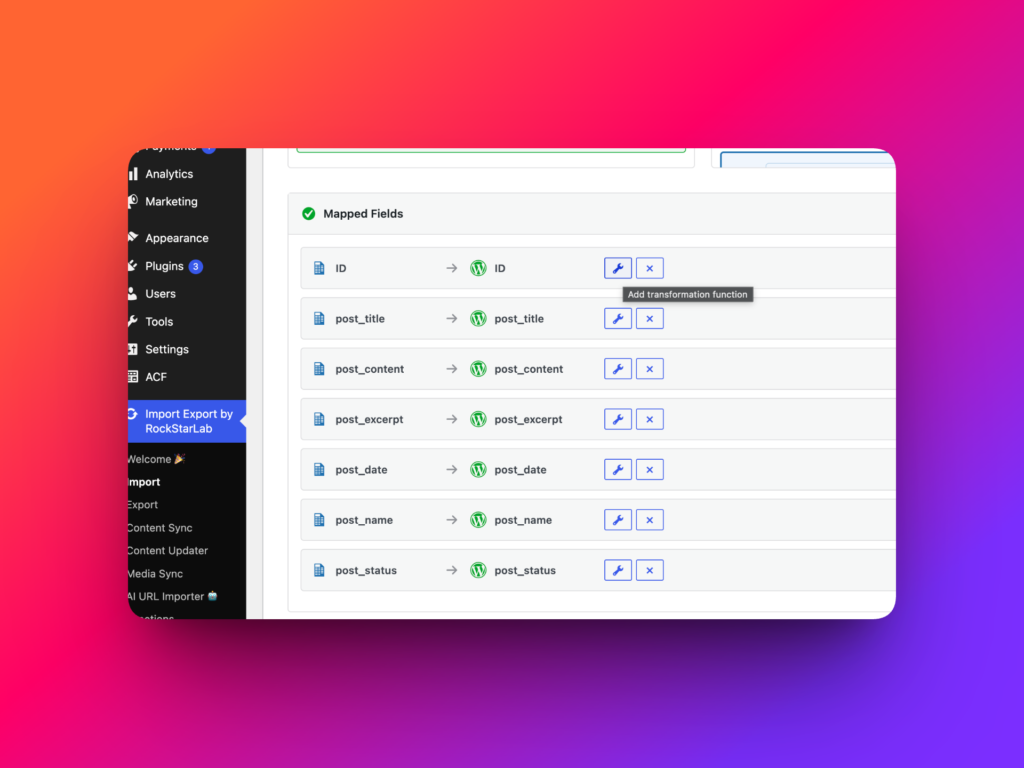
For example, a CSV might contain these headers:
post_title,post_content,old_image_url,acf_subtitle,price,publish_dateOne function could clean post_title, while others replace the domain in old_image_url, normalize price, clean acf_subtitle, or convert publish_date into the required format.
How to Use the AI Function Generator
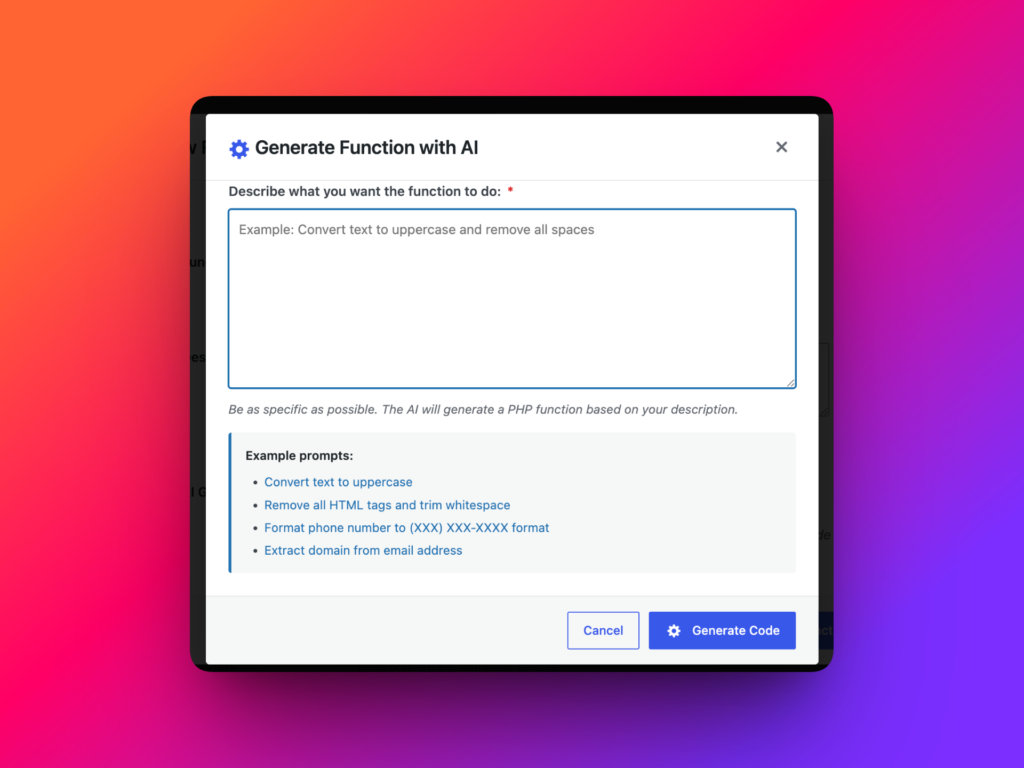
WP Import Export includes an AI Function Generator that creates PHP transformation functions from plain-English instructions. It is useful when you know how a value should change but do not want to write the initial PHP function manually.
The generator can help draft functions for tasks such as:
- Trimming extra spaces.
- Converting text to title case.
- Replacing obsolete URLs.
- Normalizing phone numbers.
- Formatting dates and prices.
- Cleaning HTML.
- Setting fallback values.
- Preparing data for custom fields and ACF fields.
Step 1: Open the AI Function Generator
Go to Import Export -> Functions and choose the AI function generation option. Describe the required transformation in clear, specific language.
Step 2: Write a Clear Prompt
A useful prompt should describe:
- The type of source value.
- The required output format.
- How empty values should be handled.
- What should happen when the value is invalid.
- Any characters or formatting that should be removed.
- The CSV column or WordPress field where the function will be used.
For export workflows, also describe the format expected by the receiving spreadsheet, API, or external system.
Example prompt:
Create a PHP transformation function for WP Import Export. The function should take a product price value from a CSV file, remove dollar signs, commas, and extra spaces, return an empty string if the value is empty, and format valid numeric values with two decimal places.Step 3: Review the Generated Code
Always review generated PHP before using it. AI-generated code can provide a useful starting point, but it may not account for every value in your actual dataset.
Check whether the function handles:
- Empty values
- Unexpected input
- Special characters
- Invalid dates or numbers
- Inconsistent CSV formatting
- Values that are already in the correct format
Step 4: Test the Generated Function
Test the function with several realistic values. For a price formatter, try values such as $1,299.5, 1299, an empty value, and a value containing extra spaces.
A date function should be tested with every date format found in the source file. A URL replacement function should be tested with the old domain, the new domain, empty input, and URLs from unrelated domains.
Step 5: Save and Reuse the Function
After the function returns the expected output, save it in the Functions Library with a descriptive name.
Good names include:
normalize_product_pricereplace_old_domain_in_urlformat_export_dateclean_acf_subtitle
Clear names make it easier to choose the correct function later. They also reduce the risk of applying migration-specific logic to an unrelated field.
Test AI-generated functions on a staging site before using them with complex ACF PRO fields, WooCommerce data, custom post types, media references, or large production datasets.
AI Function Generator Prompt Examples
| Task | Example prompt | Where to use it |
|---|---|---|
| Clean imported titles | Create a PHP function that strips HTML, trims extra spaces, converts the value to lowercase, and returns it in title case. | Post titles, product names, or custom post type titles. |
| Replace an old domain | Create a PHP function that replaces https://old-example.com with https://new-example.com in the current field value. | CSV import, export cleanup, or Content Updater. |
| Format dates | Create a PHP function that converts a date into YYYY-MM-DD format and returns the original value when it cannot be parsed. | Import date fields or spreadsheet exports. |
| Set fallback text | Create a PHP function that returns “More details coming soon” when the value is empty and otherwise returns the trimmed original value. | Custom fields, ACF text fields, or excerpts. |
| Prepare plain-text exports | Create a PHP function that removes HTML, collapses repeated whitespace, trims the result, and returns plain text. | CSV or JSON exports for external systems. |
The best AI-generated transformation functions begin with precise instructions and end with human testing. Treat the generator as a drafting tool, then verify the code before it processes production data.
Import Transformation Functions: Practical Examples
Set a Default Value When a CSV Field Is Empty
Use this function when a CSV column sometimes contains blank values:
function default_subtitle_if_empty( $value, $row ) {
    $value = trim( (string) $value );

    if ( $value === '' ) {
        return 'More details coming soon';
    }

    return $value;
}
This is useful for custom fields or ACF fields where an empty value would make a template look incomplete.
Replace an Old Domain in Image URLs
Use this function when imported content references an old website domain:
function replace_old_domain( $value, $row ) {
    return str_replace(
        'https://old-example.com',
        'https://new-example.com',
        (string) $value
    );
}
This can update image URLs, internal links, downloads, or file paths before WordPress saves the imported value.
Normalize a WooCommerce Price
WooCommerce workflows require WooCommerce to be installed and may depend on the PRO Addon. When product import is available, a transformation function can clean price values before import.
function normalize_price_value( $value, $row ) {
    $value = str_replace( [ '$', ',', ' ' ], '', (string) $value );

    if ( $value === '' ) {
        return '';
    }

    return number_format( (float) $value, 2, '.', '' );
}
This converts a value such as $1,299.5 into 1299.50.
Prepare an ACF Text Field
WP Import Export supports field mapping for Advanced Custom Fields, including ACF PRO fields such as Flexible Content where supported by the active setup. Test complex ACF structures on a staging site before importing production data.
function clean_acf_text_value( $value, $row ) {
    $value = wp_strip_all_tags( (string) $value );
    $value = preg_replace( '/\s+/', ' ', $value );

    return trim( $value );
}
This function is useful for fields such as acf_subtitle, acf_specs, and short description fields.
How to Use Transformation Functions During Export
Use transformation functions during export when WordPress stores the correct source value but the resulting CSV or JSON file requires a different format.
- Go to
Import Export -> Export. - Select the content type.
- Add optional filters.
- Choose the fields to export.
- Assign functions to fields that need formatting.
- Choose CSV or JSON as the output format.
- Configure the export options.
- Start the export.
- Download the completed file.
Export transformations are useful for reporting, integrations, translation, editorial review, agency handoff, and developer workflows.
Format a Date for a Spreadsheet
function export_date_for_spreadsheet( $value, $row ) {
    if ( empty( $value ) ) {
        return '';
    }

    $timestamp = strtotime( (string) $value );

    if ( ! $timestamp ) {
        return $value;
    }

    return date( 'Y-m-d', $timestamp );
}
This function converts recognized dates into a consistent format that is easier to sort in spreadsheet applications.
Strip HTML from Exported Content
function export_plain_text_content( $value, $row ) {
    $value = wp_strip_all_tags( (string) $value );
    $value = preg_replace( '/\s+/', ' ', $value );

    return trim( $value );
}
This is useful when exported content will be used for editorial review, translation, audits, or external systems that do not accept HTML.
Add a Prefix to Exported SKUs or IDs
function export_prefixed_sku( $value, $row ) {
    $value = trim( (string) $value );

    if ( $value === '' ) {
        return '';
    }

    return 'STORE-' . $value;
}
This can prepare identifiers for an external system that expects a specific prefix.
Using Transformation Functions with Content Updater
Content Updater applies transformation functions to fields in existing WordPress records. It can update many records without requiring a new CSV import.
Suitable Content Updater tasks include:
- Replacing old domains in post content.
- Standardizing post titles.
- Removing unwanted HTML.
- Formatting phone numbers.
- Setting default values.
- Cleaning selected custom fields.
Content Updater modifies database records directly and cannot undo those changes from within WP Import Export.
Before starting a bulk update:
- Back up the WordPress database.
- Test the function on staging.
- Filter the target records carefully.
- Run a small update first.
- Review the changed content before applying the function broadly.
Common Transformation Function Mistakes
Testing with Only One Value
A function that works for one clean sample may fail when it receives an empty value, special characters, old formatting, or an inconsistent CSV row. Test both normal and unexpected input.
Ignoring Empty Values
CSV files often contain empty cells. Decide whether the function should return an empty string, a default value, or the original value when no usable input is available.
Using Content Updater without a Backup
A small logic error can affect many existing records. Create a database backup and test the update on a limited set of records first.
Using Vague Function Names
A name such as clean_value does not explain where the function belongs. A descriptive name such as normalize_product_price or replace_old_domain_in_url makes reuse safer.
Applying One Function to Unrelated Fields
A function written for a product price should not be reused for every numeric field. Keep each function focused on the format and destination it was designed to handle.
Trusting AI-Generated Code without Review
The AI Function Generator can accelerate development, but the resulting PHP must still be reviewed and tested against real source data.
Best Practices for Transformation Functions
- Keep each function small and focused on one task.
- Handle empty and invalid values explicitly.
- Return the original value when transformation is unsafe.
- Use descriptive function names.
- Test with realistic source values.
- Run a limited import, export, or update before processing the entire dataset.
- Use staging for complex ACF, WooCommerce, custom post type, and media workflows.
- Create a backup before using Content Updater.
- Review AI-generated functions before saving them.
Recommended Links
FAQ
What are transformation functions in WP Import Export?
Transformation functions are reusable PHP functions that change field values during import, export, or Content Updater workflows. They receive a value, apply custom logic, and return the final value.
Can I use transformation functions during CSV import?
Yes. WP Import Export lets you assign functions to mapped fields during CSV import so values can be cleaned or reformatted before WordPress saves them.
Can I use transformation functions during export?
Yes. Functions can be assigned to exported fields so their values are formatted before they appear in CSV or JSON output.
Can transformation functions be used with ACF fields?
Yes. CSV columns can be mapped to ACF fields where supported by the active setup. Complex ACF structures, including ACF PRO fields such as Flexible Content, should be tested on staging first.
Can transformation functions update existing WordPress content?
Yes. Content Updater can apply them to selected fields in existing records. Back up the database first because these bulk changes cannot be undone from within the plugin.
Do I need to know PHP to create transformation functions?
Basic PHP knowledge is helpful. WP Import Export also includes an AI Function Generator, testing controls, and a snippets library that can help create common functions.
Should I test AI-generated transformation functions?
Yes. Review the generated PHP and test it with empty, valid, invalid, and unexpected source values before using it with production data.