---
title: "How to Fill a WordPress Test Site with 1,000 Realistic Posts"
url: "https://wpimportexport.com/seed-wordpress-test-site-realistic-posts/"
description: "Generate a CSV of realistic test posts with authors, categories, tags, dates and images, import it in about a minute, and remove it again cleanly."
type: post
published: 2026-11-14T05:00:00+00:00
modified: 2026-11-14T10:44:33+00:00
categories: ["Import Guides", "Tutorials"]
tags: ["CSV import", "Import Export by RockStarLab"]
docs_topics: ["Import guides"]
---

# How to Fill a WordPress Test Site with 1,000 Realistic Posts

A theme, a search plugin or a caching setup looks fine with five posts and falls apart with a thousand. Lorem ipsum generators fill the database, but their posts all have the same author, no categories and today’s date, so archives, author pages and related-post widgets never get a real test. Below, 1,000 realistic posts for a coffee blog are generated as a CSV file, imported with [Import Export by RockStarLab](https://wordpress.org/plugins/import-export-by-rockstarlab/) and removed again afterwards.

**Free:** everything in this guide works in the free plugin. **PRO:** the same approach works for WooCommerce products, orders and custom post types.

## Short Answer

1. Generate a CSV with one row per post and columns named after the WordPress fields (`post_title`, `post_date`, `author_email`, `taxonomy_category`…). Add a tag such as `seed-data` to every row.
2. Import it in the wizard. Auto Map matches every column by name.
3. When you are done, delete everything with the `seed-data` tag.

Only do this on a test or staging site, never on a live site.

## What makes test posts realistic

| Column | Why it matters |
| --- | --- |
| `post_date` | Dates spread over two years fill date archives and pagination. |
| `post_status` | A few drafts and scheduled posts test the admin and the “future” logic. |
| `author_name`, `author_email` | Several authors test author archives and bylines. Missing authors are created. |
| `taxonomy_category`, `taxonomy_post_tag` | Category and tag archives, filters and related-post widgets. |
| `post_excerpt`, `post_content` | HTML with headings and lists, so styles and search snippets get tested. |
| `featured_image_url` | Thumbnails in lists, cards and social previews. |
| `meta_origin` | A custom field, for themes or plugins that read post meta. |

## Generate the CSV

This Python script writes 1,000 posts: 950 published, 40 drafts and 10 scheduled, by four authors, in four categories, with two topic tags plus `seed-data` on each post:

```
"""Generate seed-posts.csv: 1,000 realistic test posts for a coffee blog."""
import csv, random
from datetime import datetime, timedelta

random.seed(98)
IMAGES = "https://www.example-roastery.com/sample-photos/seed-{:02d}.jpg"
AUTHORS = [("Lena Novak", "lena@example-roastery.com"), ("Tomás Rivera", "tomas@example-roastery.com"),
           ("Aiko Tanaka", "aiko@example-roastery.com"), ("Sam Okafor", "sam@example-roastery.com")]
CATEGORIES = ["Brewing", "Origins", "Equipment", "News"]
TAGS = ["espresso", "filter", "cold brew", "single origin", "decaf", "milk", "grinders", "water"]
ORIGINS = ["Ethiopia", "Colombia", "Kenya", "Brazil", "Guatemala", "Peru", "Rwanda", "Honduras"]
TITLES = ["How to Brew {o} Coffee at Home", "{o} Harvest Report", "Five Things We Learned About {o} Beans",
          "Dialing In a {o} Espresso", "Why {o} Tastes Different Every Year", "A Beginner's Guide to {o} Coffee"]

start = datetime(2025, 1, 1, 8, 0)
with open("seed-posts.csv", "w", newline="", encoding="utf-8") as f:
    w = csv.writer(f)
    w.writerow(["post_title", "post_name", "post_status", "post_date", "post_excerpt", "post_content",
                "author_name", "author_email", "taxonomy_category", "taxonomy_post_tag", "featured_image_url", "meta_origin"])
    for i in range(1, 1001):
        o = random.choice(ORIGINS)
        title = random.choice(TITLES).format(o=o) + f" ({i})"
        status = "draft" if i % 25 == 0 else ("future" if i % 100 == 1 else "publish")
        date = start + timedelta(days=random.randint(0, 660), minutes=random.randint(0, 600))
        if status == "future":
            date = datetime(2026, 12, 1, 9, 0) + timedelta(days=i % 30)
        name, email = random.choice(AUTHORS)
        content = (f"<h2>About this {o} lot</h2><p>We cupped this {o} lot on our roastery table and wrote down what stood out.</p>"
                   f"<ul><li>Dose: 15 g</li><li>Water: 250 g at 94 °C</li><li>Time: 3 minutes</li></ul>"
                   f"<p>Try it as {random.choice(['filter', 'espresso', 'cold brew'])} first.</p>")
        w.writerow([title, f"seed-post-{i}", status, date.strftime("%Y-%m-%d %H:%M:%S"),
                    f"Tasting notes and brew settings for a {o} coffee.", content, name, email,
                    random.choice(CATEGORIES), ", ".join(random.sample(TAGS, 2)) + ", seed-data",
                    IMAGES.format(random.randint(1, 10)), o])
```

Run it with `python3 make_seed.py`. Point `IMAGES` at a few images you host; we used 10 photos for all 1,000 posts. If you don’t use Python, build the same columns in a spreadsheet and fill them with formulas.

## Import the posts

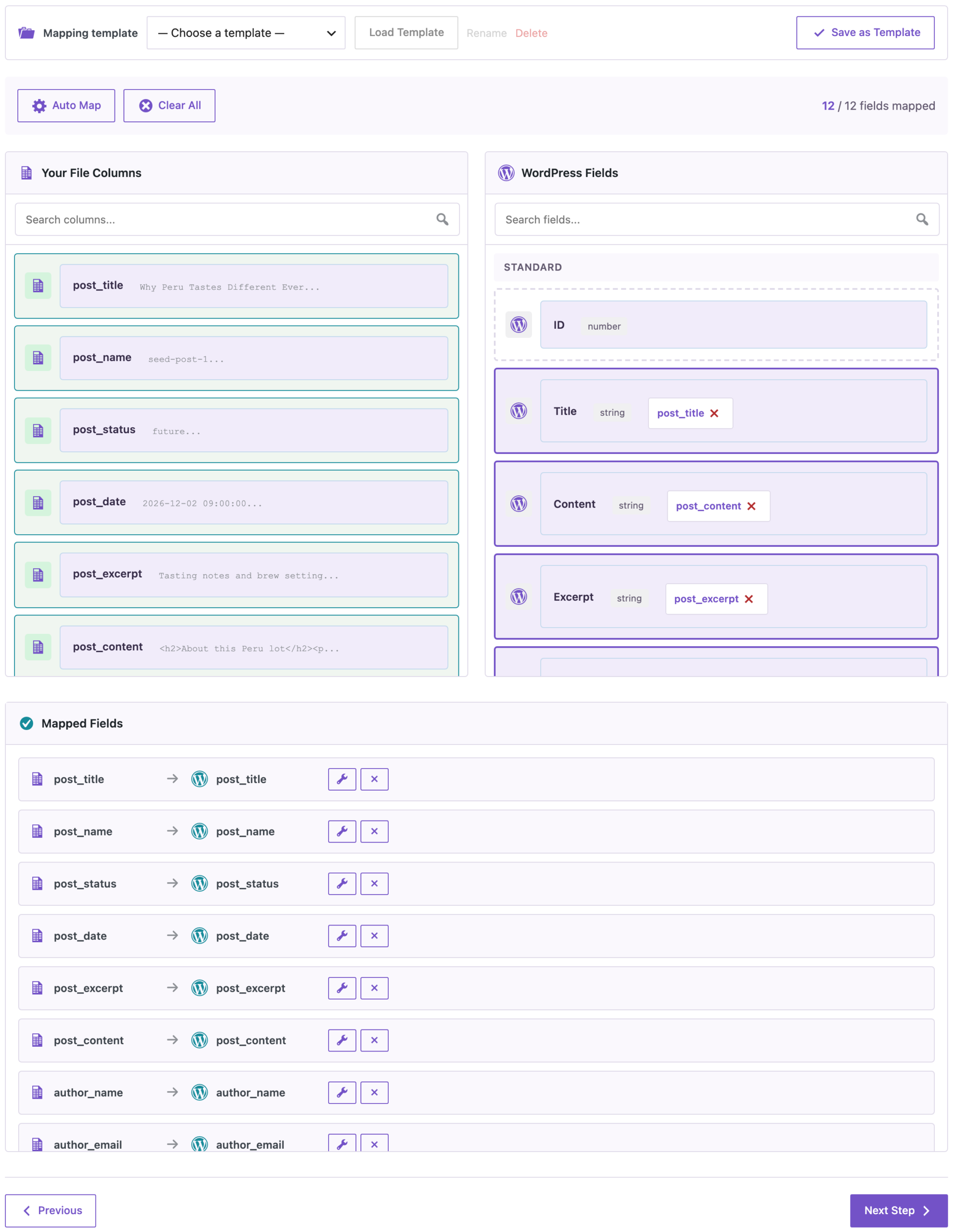
In **Import**, choose Posts, upload `seed-posts.csv` and click **Auto Map**. Because the columns are named after the fields, all 12 are matched:
![Import mapping after Auto Map: 12 of 12 fields mapped, including post_title, post_name, post_status, post_date, author_name and author_email](https://wpimportexport.com/wp-content/uploads/2026/11/01-mapping-3-scaled.webp)

_Name the columns after the fields, and Auto Map matches all of them._

On the options step, set **Check for Existing Items by Field** to Slug and **If Match Found** to Update. Then you can change the script and import the file again without creating duplicates. Leave **If Media File Already Exists** at Skip, so each image is downloaded only once.

![Import Completed Successfully: 1000 successful, 1000 created, 0 failed, duration 1m 3s](https://wpimportexport.com/wp-content/uploads/2026/11/02-result-1.webp)

_1,000 posts in about a minute on our test site._

What we got on our test site:

- 1,000 posts created in 1 minute 3 seconds: 950 published, 40 drafts and 10 scheduled for December.
- Four new users (aiko, lena, sam and tomas) with the Author role, created from the emails.
- Categories and tags assigned by name. Those that didn’t exist yet were created.
- **10 media files** for 1,000 featured images. The same photo is reused instead of downloaded 100 times.
- The `origin` custom field on every post.
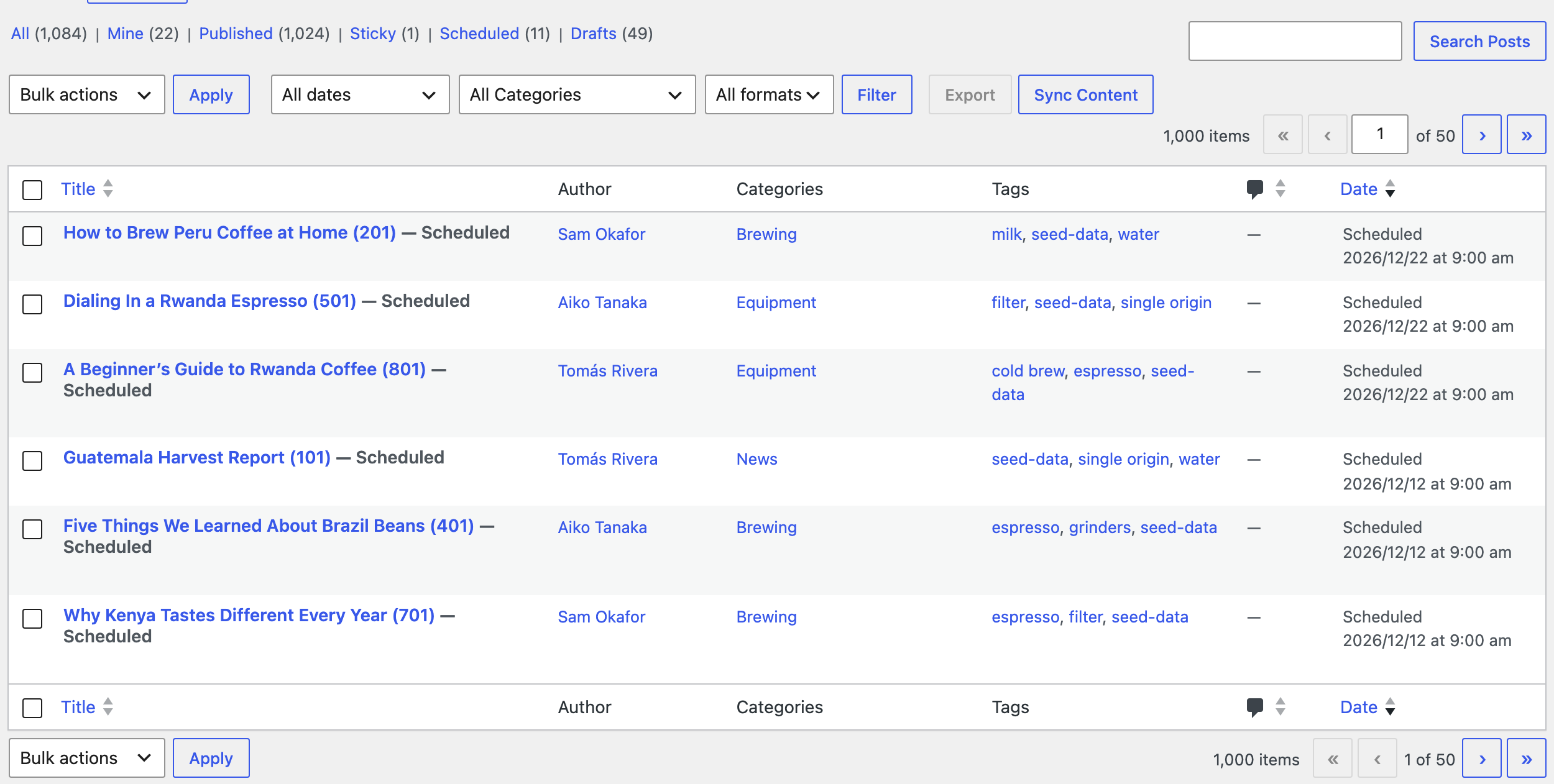
![Posts filtered by the seed-data tag: 1,000 items with different authors, categories and tags, including scheduled posts](https://wpimportexport.com/wp-content/uploads/2026/11/03-posts-list.webp)

_The test posts have real authors, categories, tags and dates, and all of them carry the seed-data tag._

## Remove the test data

Everything you imported has the `seed-data` tag, so it’s easy to find. With WP-CLI, delete the posts, the images and the users:

```
wp post delete $(wp post list --tag=seed-data --post_status=any --format=ids) --force
wp post delete $(wp post list --post_type=attachment --s=seed- --format=ids) --force
wp user delete aiko lena sam tomas --yes
```

On our site, the first command removed all 1,000 posts (drafts and scheduled ones too, thanks to `--post_status=any`), the second the 10 images, and the third the four users. Without WP-CLI, open **Posts**, click the `seed-data` tag to filter the list, and move the posts to the trash with **Bulk actions**. Use Screen Options to show more posts per page.

If you don’t need the data back later, it’s often quicker to [back up the test site](https://wpimportexport.com/how-to-create-a-wordpress-website-backup-and-restore-it/) before the import and restore that backup afterwards.

## Before you import

Import test data only into a test or staging site. A backup taken just before the import is the cleanest way back, and it also brings back the categories and tags that were created.

## With an AI agent

An AI agent connected through the WordPress MCP Adapter (see [connecting Claude Code to WordPress](https://wpimportexport.com/connect-claude-code-to-wordpress-mcp/)) can confirm the test data is complete before you start testing:

```
How many posts with the seed-data tag are there, including drafts and scheduled posts?
```

In our run, the agent called `rsl-ie/export-count` for posts with the statuses publish, draft and future and the tag `seed-data`. It returned 1,000.

## FAQ

### Is this better than a lorem ipsum generator?

It gives you control over what the posts look like: real-looking titles, several authors, categories, tags, custom fields and dates over a period you choose.

### Do I need Python?

No. Any tool that writes a CSV with these columns works, including Excel or Google Sheets.

### Will 1,000 images fill my media library?

No, if you reuse a few image URLs. With If Media File Already Exists set to Skip, each image is downloaded once; we got 10 files for 1,000 posts.

### Can I import more than 1,000 posts?

Yes. The import runs in batches. For very large files, keep the progress page open; see [what to do if an import stops at a percentage](https://wpimportexport.com/wordpress-import-stuck-how-to-finish/).

### Why do the tag counts show 950, not 1,000?

WordPress counts only published posts in term counts. Drafts and scheduled posts are tagged too.

### How do I remove everything again?

Delete the posts with the `seed-data` tag, the sample images and the test users, or restore a backup taken before the import.

## Related Guides

- [How to Import CSV Files into WordPress with Field Mapping](https://wpimportexport.com/how-to-import-csv-files-into-wordpress-with-field-mapping/)
- [Import WordPress Posts and Assign Authors from a CSV](https://wpimportexport.com/import-wordpress-posts-assign-author-csv/)
- [Bulk Import Images from URLs into the Media Library](https://wpimportexport.com/bulk-import-images-from-urls-wordpress-media-library/)
- [Import and Export WordPress Content with WP-CLI](https://wpimportexport.com/wp-cli-import-export-wordpress/)

Get the free plugin on [WordPress.org](https://wordpress.org/plugins/import-export-by-rockstarlab/).
